

XML technologies / CSS / CSS Cookbook / Links and navigation / Keyboard-controlled navigation menus
(Excerpt from “CSS Kochbuch” by Christopher Schmitt)
Problem
Navigation menu links should be activated through keyboard shortcuts.
Solution
Create an unordered list of links and use the elements a with the attribute accesskey to assign shortcuts to the links:
<div id="navsite">
  <ul>
    <li><a href="/" accesskey="s">Startseite</a></li>
    <li><a href="/about/" accesskey="u">Über uns</a></li>
    <li><a href="/archives/" accesskey="a">Archive</a></li>
    <li><a href="/writing/" accesskey="c">Schreiben</a></li>
    <li><a href="/speaking/" accesskey="p">Sprechen</a></li>
    <li><a href="/contact/" accesskey="k">Kontakt</a></li>
  </ul>
</div>
To highlight shortcut letters in links, enclose each in an element span:
<div id="navsite">
  <ul>
    <li><a href="/" accesskey="h"><span class="akey">S</span>tartseite</a></li>
    <li><a href="/about/" accesskey="u">Über <span class="akey">u</span>ns</a></li>
    <li><a href="/archives/" accesskey="a"><span class="akey">A</span>rchive</a></li>
    <li><a href="/writing/" accesskey="c">S<span class="akey">c</span>hreiben</a></li>
    <li><a href="/speaking/" accesskey="p">S<span class="akey">p</span>rechen</a></li>
    <li><a href="/contact/" accesskey="k"><span class="akey">K</span>ontakt</a></li>
  </ul>
</div>
Then style the access-key letters with a class selector (see the next figure):
.akey {
 text-decoration: underline;
}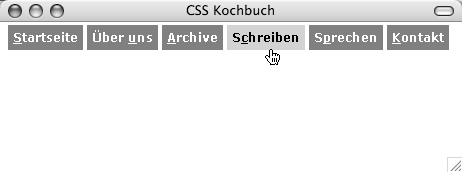
Figure: Access-key letters are highlighted with custom styles.
Discussion
Keyboard shortcuts make websites easier to use without a mouse. This solution assigns access keys to navigation links. Pressing ALT on Windows or CTRL on Mac together with the specified key follows the link and displays the new page.
Consistent shortcuts across pages can give users a sense of continuity.
Keyboard navigation should work in Internet Explorer 4+ for Windows, Mozilla, Firefox, Netscape Navigator 6+, Safari and Opera 7+.
One obstacle is the lack of standard shortcuts for particular links. Decide yourself whether the home page should use “s,” as in our example, or “h” for “Homepage.”
See also
the article “Accesskeys: Unlocking Hidden Navigation” by Stuart Robertson, and
the recipe Highlighting keyboard shortcuts in web forms on keyboard shortcuts for form elements.
Copyright of the German edition © 2007 by O’Reilly Verlag GmbH & Co. KG
You may print the online version for your private use.
Otherwise, this chapter from “CSS Kochbuch” is subject to the same conditions as the bound edition: the work, including all its parts, is protected by copyright. All rights reserved, including reproduction, translation, microfilming, and storage and processing in electronic systems.
O’Reilly Verlag GmbH & Co. KG, Balthasarstr. 81, 50670 Köln