

XML technologies / CSS / CSS Cookbook / Lists / Defining hanging indents for lists
(Excerpt from “CSS Kochbuch” by Christopher Schmitt)
Problem
The first line of a list item should start further left than the rest, creating a so-called hanging indent (see the following figure).
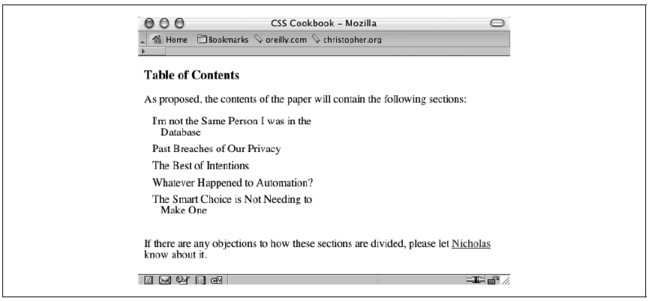
Figure: Hanging indents in a list.
Solution
Use the property text-indent with a negative value:
ul {
 width: 30%;
 padding: 0 0 0.75em 0;
 margin: 0;
 list-style: none;
}
li {
 text-indent: -1.75em;
 margin: 0.33em 0.5em 0.5em 1.5em;
}
Discussion
List markers—whether numbers, images or text—help draw attention to a list, but sometimes you want to omit these design elements and use hanging indents instead.
This solution indents the list by 3/4 em, producing a visible but unobtrusive hanging indent. Increasing the value text-indent or the list item’s font size makes the effect more prominent.
See also
The recipe Indenting entire paragraphs on defining paragraph indents, and the CSS 2.1 specification for the property text-indent.
Copyright of the German edition © 2007 by O’Reilly Verlag GmbH & Co. KG
You may print the online version for your private use.
Otherwise, this chapter from “CSS Kochbuch” is subject to the same conditions as the bound edition: the work, including all its parts, is protected by copyright. All rights reserved, including reproduction, translation, microfilming, and storage and processing in electronic systems.
O’Reilly Verlag GmbH & Co. KG, Balthasarstr. 81, 50670 Köln