

XML technologies / CSS / CSS Cookbook / Lists / Changing a list’s formatting
(Excerpt from “CSS Kochbuch” by Christopher Schmitt)
Problem
Change a list’s default presentation to use a different bullet or special numbering, for example, as shown in the following figure.
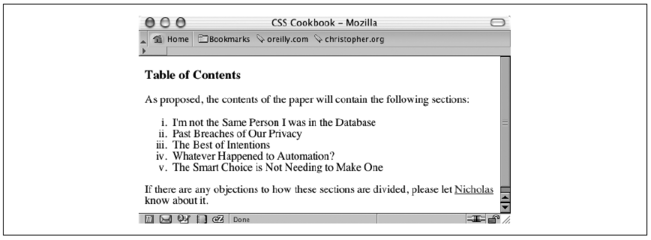
Figure: This list uses lowercase Roman numerals as markers.
Solution
Use the property list-style-type to customize list bullets or counters:
li {
 list-style-type: lower-roman;
}
Discussion
The CSS 2.1 specification defines several marker styles (see the following table). Browsers generally use different markers for different nesting levels. Instead, you can use list-style-type to define your own markers for nested lists.
Table: Different marker styles.
Style/value | Description | Browser support |
|---|---|---|
| Usually a filled square; the exact appearance is not further defined. | All major browsers |
| Usually a filled circle; the exact appearance is not further defined. | All major browsers |
| Usually an unfilled circle; the exact appearance is not further defined. | All major browsers |
| Sequential numbers starting at 1, followed by 2, 3, 4 and so on. | All major browsers |
| Sequential numbers with one or more leading zeros, starting at 01, followed by 02, 03, 04 and so on. The number of leading zeros may correspond to the number of digits used in the list. In a list of 5876 items, the first number would then be 0001. | All major browsers |
| Starts with a sequence of lowercase Roman numerals. | All major browsers |
| Starts with a sequence of uppercase Roman numerals. | All major browsers |
| Starts with a sequence of lowercase ASCII letters. | All major browsers |
| Starts with a sequence of uppercase ASCII letters. | All major browsers |
| Starts with a sequence of lowercase ASCII letters. | All major browsers |
| Starts with a sequence of uppercase ASCII letters. | All major browsers |
| Starts with classical Greek letters: alpha, then beta, gamma and so on. | Safari, Mozilla, Netscape 6+ |
| Starts numbering with traditional Hebrew letters. | Safari, Mozilla, Netscape 6+ |
| Starts numbering with the classical Japanese Hiragana system. | Mozilla, Netscape 6+ |
| Starts numbering with the classical Japanese Katakana system. | Mozilla, Netscape 6+ |
| Starts numbering with the classical Japanese Hiragana-Iroha system. | Mozilla, Netscape 6+ |
| Starts numbering with the classical Japanese Katakana-Iroha system. | Mozilla, Netscape 6+ |
| No marker is displayed. | All major browsers |
See also
The recipe Using large images as list bullets on using custom images as bullets, and chapter 12 of CSS – Das umfassende Handbuch by Eric A. Meyer (O’Reilly).
Copyright of the German edition © 2007 by O’Reilly Verlag GmbH & Co. KG
You may print the online version for your private use.
Otherwise, this chapter from “CSS Kochbuch” is subject to the same conditions as the bound edition: the work, including all its parts, is protected by copyright. All rights reserved, including reproduction, translation, microfilming, and storage and processing in electronic systems.
O’Reilly Verlag GmbH & Co. KG, Balthasarstr. 81, 50670 Köln