

XML technologies / CSS / CSS Cookbook / Lists / Displaying list items as inline elements
(Excerpt from “CSS Kochbuch” by Christopher Schmitt)
Problem
List items should appear as though part of a paragraph, as in the next figure. The bold, comma-separated list appearance was achieved with a simple element ul.
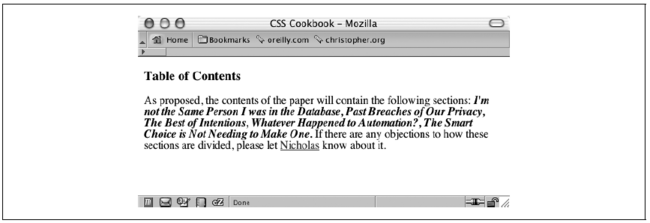
Figure: List items displayed inline within a paragraph.
Solution
Format the paragraphs before and, if applicable, after the list:
<h3>Table of Contents</h3>
<p>As proposed, the contents of the paper will contain the following sections:</p>
<ul>
  <li>I'm not the Same Person I was in the Database</li>
  <li>Past Breaches of Our Privacy</li>
  <li>The Best of Intentions</li>
  <li>Whatever Happened to Automation?</li>
  <li class="last">The Smart Choice is Not Needing to Make One</li>
</ul>
<p>If there are any objections to how these sections are divided, please let <a href="nick@heatvision.com">Nicholas</a> know about it.</p>
The CSS rules display paragraphs as inline elements. Commas between items and the final period are inserted as generated content:
ul, li {
 display: inline;
 margin: 0;
 padding: 0;
 font-weight: bold;
 font-style: italic;
}
li:after {
 content: ", ";
}
li.last:after {
 content: ".";
}
p {
 display: inline;
}
Discussion
This method preserves the structure of lists and paragraphs. CSS nevertheless lets lists appear to be part of a paragraph, changing their default display so that their items appear within the paragraph.
The key to this solution is setting the property display for list items to the value inline. Instead of stacking items with the usual space above and below, they appear one after another on the same line.
Warning: Unfortunately, this method does not work in Internet Explorer up to version 6, which supports neither the pseudo-element :after nor the property content. Internet Explorer therefore omits commas between items and the period at the end of the list.
See also
The CSS 2.1 specification on the property display.
Copyright of the German edition © 2007 by O’Reilly Verlag GmbH & Co. KG
You may print the online version for your private use.
Otherwise, this chapter from “CSS Kochbuch” is subject to the same conditions as the bound edition: the work, including all its parts, is protected by copyright. All rights reserved, including reproduction, translation, microfilming, and storage and processing in electronic systems.
O’Reilly Verlag GmbH & Co. KG, Balthasarstr. 81, 50670 Köln