

XML technologies / CSS / CSS Cookbook / Lists / Custom text markers for list items
(Excerpt from “CSS Kochbuch” by Christopher Schmitt)
Problem
Use your own text-based markers for list items.
Solution
Give the first line of list items a negative indent. Then use the pseudo-element :before and the property content to insert the desired text marker before each item, two angle brackets in our example (see the next figure):
ul {
 list-style: none;
 margin: 0;
 padding: 0 0 0 1em;
 text-indent: -1em;
}
li {
 width: 33%;
 padding: 0;
 margin: 0 0 0.25em 0;
}
li:before {
 content: "\00BB \0020";
}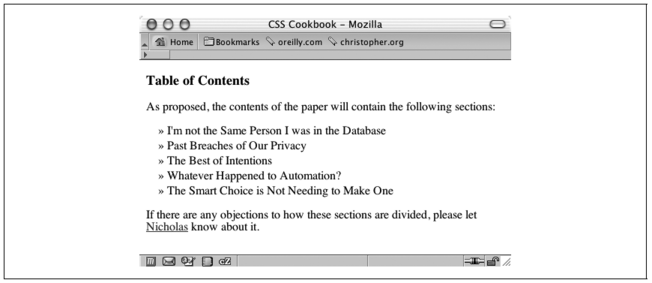
Figure: A text-based list marker.
Discussion
Setting the property list-style to none disables the marker normally displayed to the left of each list item.
Instead of appearing before the list item, the custom marker appears as an inline element together with the item’s other content. To move it outside the item again, shift the first line to the left using a negative value for the property text-indent. A positive value would instead move the marker farther to the right.
ul {
 list-style: none;
 margin: 0;
 padding: 0 0 0 1em;
 text-indent: -1em;
}
Here the pseudo-element :before creates the marker. This makes it easy to insert ordinary keyboard characters:
li:before {
 content: ">> ";
}
Under the CSS 2.1 specification, however, special characters must be specified as Unicode values (ISO 10646). Instead of common HTML4 entities, such as », use the hexadecimal equivalent of the Unicode character for these characters.
Hexadecimal values are escaped with a backslash in CSS:
li:before {
 content: "\00BB \0020";
}
At the time this book went to press, this solution worked in Mozilla, Firefox, Netscape 6+, Safari and Opera, which support generated content. Unfortunately, Internet Explorer for Windows and Macintosh, and thus about 45% of web users, are excluded because they do not support generated content.
For a browser-independent solution, avoid generated content and insert the marker manually before each list item instead:
<ul>
<li>» I'm not the Same Person I was in the Database</li>
<li>» Past Breaches of Our Privacy</li>
<li>» The Best of Intentions</li>
<li>» Whatever Happened to Automation?</li>
<li>» The Smart Choice is Not Needing to Make One</li>
</ul>The main drawback is that disabling CSS and viewing the raw content without styles displays two markers per item: the browser’s marker and the manually inserted character. This is not life-threatening, but adds an unwanted design element to the page.
See also
The CSS 2.1 specification on using escape characters,
information on hexadecimal values for ASCII and Unicode characters and
the recipe Using custom images as list markers.
Copyright of the German edition © 2007 by O’Reilly Verlag GmbH & Co. KG
You may print the online version for your private use.
Otherwise, this chapter from “CSS Kochbuch” is subject to the same conditions as the bound edition: the work, including all its parts, is protected by copyright. All rights reserved, including reproduction, translation, microfilming, and storage and processing in electronic systems.
O’Reilly Verlag GmbH & Co. KG, Balthasarstr. 81, 50670 Köln