

XML technologies / ePUB / ePub für (In)Designer / Audio in ePub / Adding audio directly in HTML
(Excerpt from “ePub für (In)Designer — Mit InDesign Schritt für Schritt zum E-Book” by Sascha Heck & Yves Apel)
With an older InDesign version (< CS5.5), add audio manually in source code. First unpack the ePub if needed, as explained under Unpacking an ePub.
In OEBPS, create an images subfolder if absent and copy the audio files there.
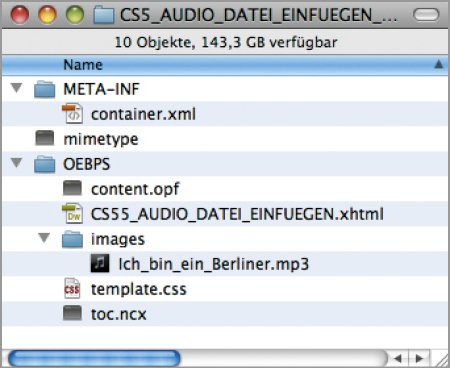
Figure: Copying audio to images.
Information
The folder need not be called images: choose any name, adjusting source-code paths accordingly. InDesign CS5.5 places audio and video in images, a convention we follow for manual edits.
Open the target HTML in an editor, here Adobe Dreamweaver, and insert this line at the desired text position:
<audio src="images/[Name der Audio-Datei]" controls="controls"></audio>Replace [Name der Audio-Datei] with the complete filename including extension. The result should look like this:

Figure: Including audio in HTML.
Now open the file content.opf in your HTML editor or a plain-text editor such as TextEdit (Mac) or Notepad (Windows). Find the line:
</manifest>
Put the cursor just before it and add this line for each audio file:
<item id="audio1" href="images/Ich_bin_ein_Berliner.mp3" media-type="audio/mpeg"/>The entry audio1 is a unique identifier. Choose it freely, but use it only once. Under images/Ich_bin_ein_Berliner.mp3 specify the audio path; set the media type to audio/mpeg or alternatively audio/mp3.
<?xml version="1.0" encoding="UTF-8" standalone="yes"?>
<package xmlns="http://www.idpf.org/2007/opf" xmlns:dc="http://purl.org/dc/elements/1.1/" unique-identifier="bookid" version="2.0">
   <metadata>
      <meta name="generator" content="Adobe InDesign"/>
      <dc:title></dc:title>
      <dc:creator></dc:creator>
      <dc:subject></dc:subject>
      <dc:description></dc:description>
      <dc:publisher></dc:publisher>
      <dc:date></dc:date>
      <dc:source></dc:source>
      <dc:relation></dc:relation>
      <dc:coverage></dc:coverage>
      <dc:rights></dc:rights>
      <dc:language>de-DE</dc:language>
      <dc:identifier id="bookid"></dc:identifier>
   </metadata>
   <manifest>
      <item id="ncx" href="toc.ncx" media-type="application/x-dtbncx+xml"/>
      <item id="css" href="template.css" media-type="text/css"/>
      <item id="AUDIO_DATEI_EINFUEGEN_FERTIG" href="AUDIO_DATEI_EINFUEGEN_FERTIG.html" media-type="application/xhtml+xml"/>
      <item id="Ich_bin_ein_Berliner.mp3" href="images/Ich_bin_ein_Berliner.mp3" media-type="audio/mpeg"/>
   </manifest>
   <spine toc="ncx">
      <itemref idref="AUDIO_DATEI_EINFUEGEN_FERTIG"/>
   </spine>
</package>
Repackage the files into an ePub and the audio is embedded in your book.
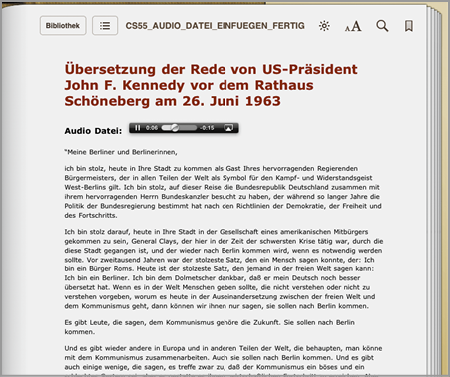
Figure: Embedded audio in iBooks.
Copyright © dpunkt.verlag GmbH 2012
You may print the online version for your private use.
Otherwise, this chapter from “ePub für (In)Designer” is subject to the same terms as the printed edition: the work and all its parts are protected by copyright. All rights reserved, including reproduction, translation, microfilming, and storage and processing in electronic systems.
dpunkt.verlag GmbH, Wieblinger Weg 17, 69123 Heidelberg, fon 06221-14830, fax 06221-148399, hallo(at)dpunkt.de
back to top