

XML technologies / ePUB / ePub für (In)Designer / Audio in ePub / Including the audio file in the InDesign document
(Excerpt from “ePub für (In)Designer — Mit InDesign Schritt für Schritt zum E-Book” by Sascha Heck & Yves Apel)
Switch to your InDesign document. Choose File → Place or use Command + D (Mac) or Ctrl + D (Windows) to place the file in the document.
Place the file anywhere.
CS5.5
To position the file as desired, create a text anchor from it (inline object). Hold the left mouse button on the small blue square at the top right. Move the pointer to the desired text position while also holding Shift, so the object itself moves there rather than merely creating an anchor.
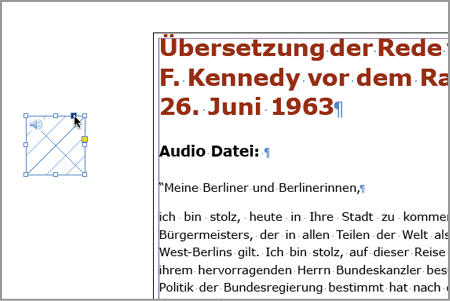
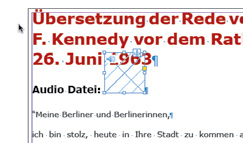
Figure: Positioning audio in InDesign.
CS5
In InDesign CS5, insert the audio into text by cutting the placed audio object with Command + X (Mac) or Ctrl + X (Windows), positioning the text cursor, and pasting with Command + V (Mac) or Ctrl + V (Windows).
The audio is now included. You can adjust the object size, but this does not affect ePub: the audio control bar has a predefined size and shape that cannot yet be changed, nor can you assign your own image.
Copyright © dpunkt.verlag GmbH 2012
You may print the online version for your private use.
Otherwise, this chapter from “ePub für (In)Designer” is subject to the same terms as the printed edition: the work and all its parts are protected by copyright. All rights reserved, including reproduction, translation, microfilming, and storage and processing in electronic systems.
dpunkt.verlag GmbH, Wieblinger Weg 17, 69123 Heidelberg, fon 06221-14830, fax 06221-148399, hallo(at)dpunkt.de