

XML technologies / ePUB / ePub für (In)Designer / Finishing tasks / Adding or editing a cover afterward
(Excerpt from “ePub für (In)Designer — Mit InDesign Schritt für Schritt zum E-Book” by Sascha Heck & Yves Apel)
Refining a cover exported from InDesign CS5
InDesign CS5 has some cover-export errors: its identifier (Cover ID) is not recognized and required code is missing, so editing is needed.
In the unpacked ePub, unnecessary with Sigil, open the cover’s XHTML file, for example cover.html. Its code should resemble:
<body>
   <div id="x01">
      <div class="generated-style">
         <img src="images/01_fmt.jpeg" alt="01.jpg"/>
      </div>
   </div>
</body>
Change the line <div id="x01"> to <div id="cover-image">.
Then open the content.opf file. After <meta name="generator" content="Adobe InDesign"/> insert <meta name="cover" content="cover-image"/>.
After <manifest> find the cover XHTML entry (href="Name des Covers"). Here it is <item id="x01" href="01.xhtml" media-type="application/xhtml+xml"/>; change id="x01" to id="cover".
Find also the cover image file entry, here <item id="x01-fmt-jpeg" href="images/01_fmt.jpeg" media-type="image/jpeg"/>, identified by href="images/01_fmt.jpeg" with its path. Change id="x01-fmt-jpeg" to id="cover-image".
Finally find <itemref idref="x01"/> in the same content.opf file; x01 is the value found and changed above. Replace the code with itemref idref="cover"/>.
Your cover should now display correctly in iBooks and others.
Creating a cover manually
CS5.5 simplifies covers, but manual creation or editing may be needed. Skip this if yours is correct; otherwise:
Unpack the ePub.
Create an HTML file in your preferred editor.
Paste this code:
<!DOCTYPE html PUBLIC "-//W3C//DTD XHTML 1.1//EN" "http://www.w3.org/TR/xhtml11/DTD/xhtml11.dtd">
<html xmlns="http://www.w3.org/1999/xhtml">
   <head>
      <title>Cover</title>
      <style type="text/css">img {max-width: 100%; }</style>
   </head>
   <body>
      <div id="cover-image">
         <img src="images/cover.png" alt=""/>
      </div>
   </body>
</html>
Save as Cover.html in OEBPS.
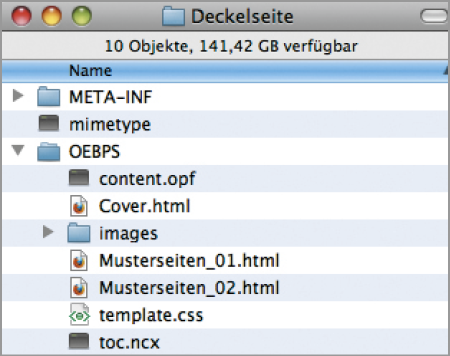
Figure: Save Cover.html in OEBPS.
Copy your cover image into images as cover.png, matching the code above.
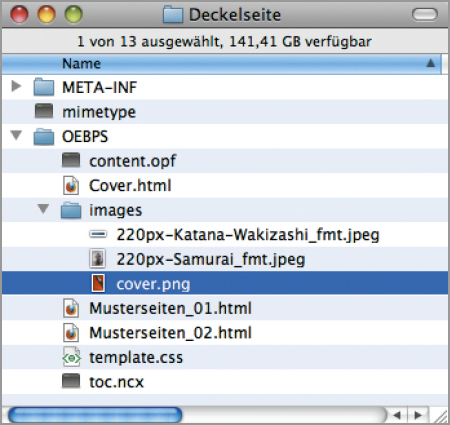
Figure: Save cover.png in images.
For valid ePub, open content.opf and find
<manifest>.Add these two lines:
<item id="cover" href="Cover.html" media-type="application/xhtml+xml"/>
<item id="cover-image" href="images/cover.png" media-type="image/png"/>
Near the bottom of content.opf, find
<spine toc="ncx">and add this line, indicating cover location to Adobe Digital Editions and e-readers.
<itemref idref="cover" linear="yes"/>For metadata, under
<metadata>add this line:
<meta name="cover" content="cover-image"/><guide>
<reference href="cover.html" type="cover" title="Cover"/>
</guide>Complete content.opf code may look like this:
<?xml version="1.0" encoding="UTF-8" standalone="yes"?>
<package xmlns="http://www.idpf.org/2007/opf" xmlns:dc="http://purl.org/dc/elements/1.1/" unique-identifier="bookid" version="2.0">
<metadata>
<meta name="generator" content="Adobe InDesign"/>
<meta name="cover" content="cover-image"/>
<dc:title></dc:title>
<dc:creator></dc:creator>
<dc:subject></dc:subject>
<dc:description></dc:description>
<dc:publisher></dc:publisher>
<dc:date>2011-08-29</dc:date>
<dc:source></dc:source>
<dc:relation></dc:relation>
<dc:coverage></dc:coverage>
<dc:rights></dc:rights>
<dc:language>de-DE</dc:language>
<dc:language>en-GB</dc:language>
<dc:identifier id="bookid"></dc:identifier>
</metadata>
<manifest>
<item id="ncx" href="toc.ncx" media-type="application/x-dtbncx+xml"/>
<item id="css" href="template.css" media-type="text/css"/>
<item id="cover" href="Cover.html" media-type="application/xhtml+xml"/>
<item id="Musterseiten_01" href="Musterseiten_01.html" media-type="application/xhtml+xml"/>
<item id="Musterseiten_02" href="Musterseiten_02.html" media-type="application/xhtml+xml"/>
<item id="cover-image" href="images/cover.png" media-type="image/png"/>
<item id="x220px-Katana-Wakizashi_fmt.jpeg" href="images/220px-Katana-Wakizashi_fmt.jpeg" media-type="image/jpeg"/>
<item id="x220px-Samurai_fmt.jpeg" href="images/220px-Samurai_fmt.jpeg" media-type="image/jpeg"/>
</manifest>
<spine toc="ncx">
<itemref idref="cover" linear="yes"/>
<itemref idref="Musterseiten_01"/>
<itemref idref="Musterseiten_02"/>
</spine>
<guide>
   <reference href="cover.html" type="cover" title="Cover"/>
</guide>
</package>This was admittedly complicated and not for everyone, but knowing the procedure prepares you for any case.
Copyright © dpunkt.verlag GmbH 2012
You may print the online version for your private use.
Otherwise, this chapter from “ePub für (In)Designer” is subject to the same terms as the printed edition: the work and all its parts are protected by copyright. All rights reserved, including reproduction, translation, microfilming, and storage and processing in electronic systems.
dpunkt.verlag GmbH, Wieblinger Weg 17, 69123 Heidelberg, fon 06221-14830, fax 06221-148399, hallo(at)dpunkt.de