

XML technologies / SVG / Filters, transformations and gradients / Using and combining filters and lighting effectively / Filters and masks / The feDisplacementMap filter element
(Excerpt from “Das Einsteigerseminar SVG — Webgrafiken mit XML” by Helma Spona)
This filter element manipulates two images by moving pixels from the first into the second, according to this formula:
P'(x,y) <- P(x + scale * ((XC(x,y) - .5), y + scale * (YC(x,y) - .5))
Here, P'(x,y) represents the calculated pixel at x/y; P(x,y) is the pixel of the image specified with in. Set the values XC and YC using the attributes xChannelSelector and yChannelSelector. In addition to the universal attributes, the filter element has these attributes:
scalesets the displacement scale factor. The default value is 0.xChannelSelectorsets the color channel of the image specified within2. Pixels are shifted on the x axis of the image specified within. Available values are"R","G","B"and"A". This attribute also determines the value of the expressionXC(x,y)in the formula.yChannelSelectorsets the color channel of the image specified within2. Pixels are shifted on the y axis of the image specified within. Available values are"R","G","B"and"A". This attribute also determines the value of the expressionYC(x,y)in the formula.in2specifies the second image, just like the universal attributein.
<filter id="scale10Rot">
  <feOffset dx="0" dy="0" in="SourceGraphic" result="rText"/>
  <feDisplacementMap in="SourceGraphic" in2="rText" scale="10" xChannelSelector="R" yChannelSelector="R"/>
</filter>
<filter id="scale10Alpha">
  <feOffset dx="0" dy="0" in="SourceAlpha" result="rText"/>
  <feDisplacementMap in="SourceGraphic" in2="rText" scale="10" xChannelSelector="A" yChannelSelector="A"/>
</filter>
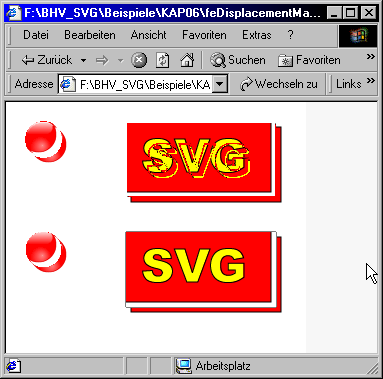
Figure: Results of the defined feDisplacementMap filters.
Copyright © verlag moderne industrie GmbH 2001
You may print the online version for your private use.
Otherwise, this chapter from “Das Einsteigerseminar SVG — Webgrafiken mit XML” is subject to the same conditions as the bound edition. The work, including all its parts, is protected by copyright. All rights reserved, including reproduction, translation, microfilming, and storage and processing in electronic systems.
verlag moderne industrie GmbH, Justus-von-Liebig-Straße 1, D-86899 Landsberg/Lech, fon ++49 (0) 81 91 / 125 – 0, leserservice(at)mi-verlag.de
back to top