

XML technologies / CSS / CSS Cookbook / Forms / Styling buttons
(Excerpt from “CSS Kochbuch” by Christopher Schmitt)
Problem
You want to define colors, padding, borders and rollover effects for a form’s submit and reset buttons. The next figure shows unstyled buttons; the figure after that shows styled buttons.
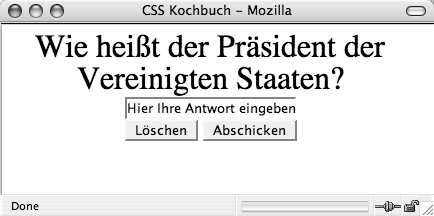
Figure: Buttons without styles.
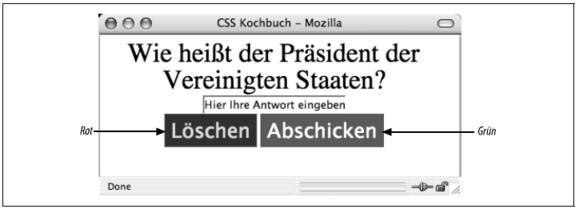
Figure: Buttons with styles.
Solution
Mark the buttons with an attribute class so the stylesheet can select them:
<form action="simplequiz.php" method="post">
  <label for="question">Wie heißt der Präsident der Vereinigten Staaten?</label>
  <input type="text" name="question" id="textfield" value="Hier Ihre Antwort eingeben" />
  <br />
  <input type="reset" name="reset" id="reset" value="Löschen" class="buttonReset" />
  <input type="submit" name="submit" value="Abschicken" class="buttonSubmit" />
</form>
Then define the button styles with CSS:
.buttonReset {
 color: #fcc;
 background-color: #900;
 font-size: 1.5em;
 border: 1px solid #660;
 padding: 4px;
}
.buttonSubmit {
 color: white;
 background-color: #660;
 font-size: 1.5em;
 border: 1px solid #660;
 padding: 4px;
}
Discussion
Add JavaScript rollover effects to the buttons:
<script language="JavaScript" type="text/javascript">function classChange(styleChange,item) { item.className = styleChange; }</script>Define two additional CSS rules for the buttons’ rollover styles:
.buttonResetRoll {
 color: white;
 background-color: #c00;
 font-size: 1.5em;
 border: 1px solid #660;
 padding: 4px;
}
.buttonSubmitRoll {
 color: white;
 background-color: #cc0;
 font-size: 1.5em;
 border: 1px solid #660;
 padding: 4px;
}
With the function and extra rules in place, add function calls to the buttons’ markup so that their appearance changes as needed (see the following figure):
<form action="simplequiz.php" method="post">
  <label for="question">Wie heißt der Präsident der Vereinigten Staaten?</label>
  <input type="text" name="question" id="textfield" value="Hier Ihre Antwort eingeben" />
  <br />
  <input type="reset" name="reset" id="reset" value="Löschen" class="buttonReset" onMouseOver="classChange('buttonResetRoll',this)" onMouseOut="classChange('buttonReset',this)" />
  <input type="submit" name="submit" value="Abschicken" class="buttonSubmit" onMouseOver="classChange('buttonSubmitRoll',this)" onMouseOut="classChange('buttonSubmit',this)" />
</form>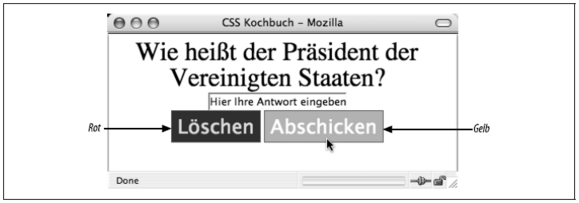
Figure: A rollover effect created with CSS and JavaScript.
As noted earlier, use class selectors for a consistent design while Internet Explorer lacks attribute selector support. Attribute selectors, however, avoid extra HTML markup identifying class membership. For example, styles using attribute selectors would look like this:
input[type="reset"] {
 color: #fcc;
 background-color: #900;
 font-size: 1.5em;
 border: 1px solid #660;
 padding: 4px;
}
input[type="submit"] {
 color: white;
 background-color: #660;
 font-size: 1.5em;
 border: 1px solid #660;
 padding: 4px;
}
The property width also sets button width, although Internet Explorer 4.x for Windows does not support it in forms.
See also
The recipe Graphical rollover effects on CSS-based graphical rollovers, and the CSS 2.1 specification on attribute selectors.
Copyright of the German edition © 2007 by O’Reilly Verlag GmbH & Co. KG
You may print the online version for your private use.
Otherwise, this chapter from “CSS Kochbuch” is subject to the same conditions as the bound edition: the work, including all its parts, is protected by copyright. All rights reserved, including reproduction, translation, microfilming, and storage and processing in electronic systems.
O’Reilly Verlag GmbH & Co. KG, Balthasarstr. 81, 50670 Köln