

XML technologies / CSS / CSS Cookbook / Forms / Styling textarea elements
(Excerpt from “CSS Kochbuch” by Christopher Schmitt)
Problem
You want to use styles to change the text colour, size, weight and other properties of a textarea element (see the following figure).
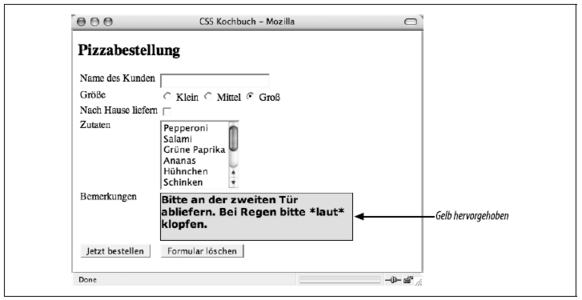
Figure: A textarea element with custom styles.
Solution
Assign styles to the textarea element using an element selector:
textarea {
 width: 300px;
 height: 100px;
 background-color: yellow;
 font-size: 1em;
 font-weight: bold;
 font-family: Verdana, Arial, Helvetica, sans-serif;
 border: 1px solid black;
}
Discussion
Element selectors make it easy to assign styles to a textarea element:
textarea {
 background-color: blue;
}
If you also add the pseudo-class :focus, you can define a separate style for the active textarea field:
textarea:focus {
 background-color: green;
}
This rule changes the background colour of the textarea field as soon as the user starts typing in it. Currently, :focus is supported only by Safari, Netscape Navigator 6+, Firefox and Opera 7+. Unfortunately, the many Internet Explorer users therefore cannot see the effect described in this recipe.
See also
The CSS 2.1 specification on element selectors.
Copyright of the German edition © 2007 by O’Reilly Verlag GmbH & Co. KG
You may print the online version for your private use.
Otherwise, this chapter from “CSS Kochbuch” is subject to the same conditions as the bound edition: the work, including all its parts, is protected by copyright. All rights reserved, including reproduction, translation, microfilming, and storage and processing in electronic systems.
O’Reilly Verlag GmbH & Co. KG, Balthasarstr. 81, 50670 Köln