

XML technologies / CSS / CSS Cookbook / Forms / Styling input elements
(Excerpt from “CSS Kochbuch” by Christopher Schmitt)
Problem
You want to customize input elements’ background color.
Solution
Give the desired input elements an attribute class and select them in CSS with a class selector to apply styles:
<h2>Einfaches Quiz</h2>
<form action="simplequiz.php" method="post">
<p>Sind Sie <input type="radio" value="male" name="sex" class="radioinput"> männlich oder <input type="radio" value="female" name="sex" class="radioinput"> weiblich?</p>
<p>Welche Zutaten sollen auf Ihre Pizza? <input type="checkbox" name="" value="l" class="checkbxinput"> Pepperoni <input type="checkbox" name="" value="mushrooms" class="checkbxinput"> Pilze <input type="checkbox" name="" value="pineapple" class="checkbxinput"> Ananas</p>
<label for="question1">Wer ist in Grants Grabmal beerdigt?</label>
<input type="text" name="question1" id="question1" class="textinput" value="Geben Sie hier Ihre Antwort ein" /><br />
<label for="question2">In welchem Land befindet sich die chinesische Mauer?</label>
<input type="text" name="question2" id="question2" class="textinput" value="Geben Sie hier Ihre Antwort ein" /><br />
<label for="password">Wie lautet Ihr Passwort?</label>
<input type="password" name="password" id="password" class="pwordinput" value="" />
<br />
<input name="reset" type="reset" id="reset" value="Eingaben löschen" />
<input type="submit" name="Submit" value="Abschicken" class="buttonSubmit" />
</form>Then use these CSS rules to customize the input elements’ presentation:
.textinput {
 margin-bottom: 1.5em;
 width: 50%;
 color: #666;
 background-color: #ccc;
}
.pwordinput {
 color: white;
 background-color: white;
}
.radioinput {
 color: green;
 background-color: #ccc;
}
.checkbxinput {
 color: green;
 background-color: green;
}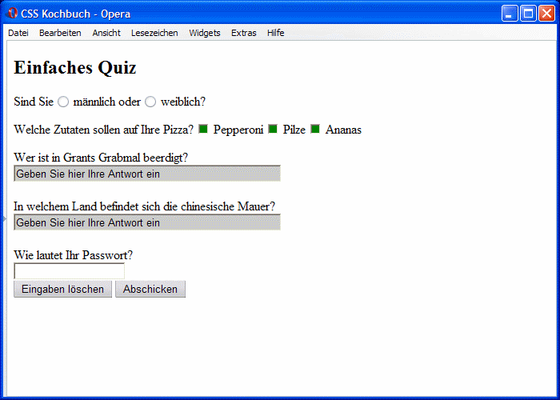
Figure: Input fields with styles.
Discussion
Opera is currently the only browser that also allows radio buttons and checkboxes to be colored. Mozilla offers no color support for these elements, while Internet Explorer for Windows ignores the foreground color and applies the background color around them (see the following figure).
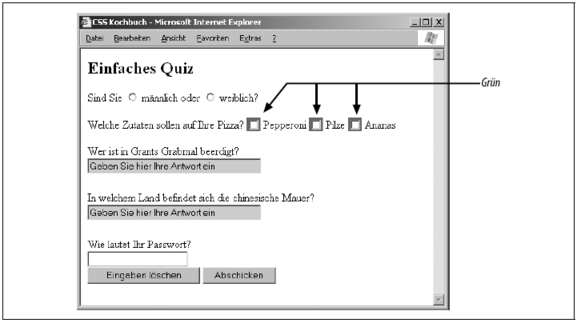
Figure: Internet Explorer uses the background color around checkboxes.
Attribute selectors can select different input field types instead of class selectors.
Attribute selectors let you omit the attributes class from HTML. Use these definitions instead:
input[type="text"] {
 margin-bottom: 1.5em;
 width: 50%;
 color: #666;
 background-color: #ccc;
}
input[type="password"] {
 color: white;
 background-color: white;
}
Although this works well in most browsers, Internet Explorer for Windows lacks attribute selector support entirely. Netscape Navigator 6+, Firefox, Safari and Opera 5+ currently support them. For a cross-browser solution to styling different form elements, therefore, use class selectors.
See also
Styling form elements and the CSS 2.1 specification on attribute selectors.
Copyright of the German edition © 2007 by O’Reilly Verlag GmbH & Co. KG
You may print the online version for your private use.
Otherwise, this chapter from “CSS Kochbuch” is subject to the same conditions as the bound edition: the work, including all its parts, is protected by copyright. All rights reserved, including reproduction, translation, microfilming, and storage and processing in electronic systems.
O’Reilly Verlag GmbH & Co. KG, Balthasarstr. 81, 50670 Köln