

XML technologies / SVG / Filters, transformations and gradients / Using and combining filters and lighting effectively / Filters and masks / The feTurbulence effect
(Excerpt from “Das Einsteigerseminar SVG — Webgrafiken mit XML” by Helma Spona)
This effect creates fractal or random patterns, calculated as individual tiles and assembled. In addition to the universal attributes, these attributes are available:
baseFrequencysets pattern regularity, the repetition frequency within a rectangle. Give one or two numbers separated by spaces or commas. The first controls x frequency, the optional second y frequency; a single value applies to both. Omission defaults to 0, hiding the effect. Values must be between 0 and 1; lower values make the pattern more irregular. Negative values are forbidden.numOctavessets pattern density. The default is 1; higher values tile the pattern more densely.seedsets the random generator’s initial number, defaulting to 0.stitchTilescontrols whether tile-edge frequencies are adjusted for seamless assembly. Specifystitch. The other value isnoStitch, which makes no adjustments.typeselects the function used to calculate the graphic. Values arefractalNoiseandturbulence, illustrated in the following example.
Note:
Pattern colors cannot be controlled directly, but another filter can process the result to adjust them.
<filter id="Turb01">
  <feTurbulence in="SourceGraphic" baseFrequency="0.02" numOctaves="1" seed="2" type="turbulence"/>
</filter>
<filter id="Turb02">
  <feTurbulence in="SourceGraphic" baseFrequency="0.02" numOctaves="6" seed="2" type="turbulence"/>
</filter>
<filter id="Turb03">
  <feTurbulence in="SourceGraphic" baseFrequency="0.02" numOctaves="6" seed="2" type="fractalNoise"/>
</filter>
<filter id="Turb04">
  <feTurbulence stitchTiles="stitch" in="SourceGraphic" baseFrequency="0.06" numOctaves="17" seed="2" type="fractalNoise"/>
</filter>
<filter id="Turb05">
  <feTurbulence stitchTiles="noStitch" in="SourceGraphic" baseFrequency="0.06" numOctaves="17" seed="2" type="fractalNoise"/>
</filter>
<filter id="Turb06">
  <feTurbulence stitchTiles="stitch" in="SourceGraphic" baseFrequency="0.01 0.1" numOctaves="0.1" seed="0.3" type="fractalNoise"/>
</filter>
Filters Turb01 through Turb03 create the left-hand pattern column in the next figure. The right column is produced by filters Turb04 through Turb06.
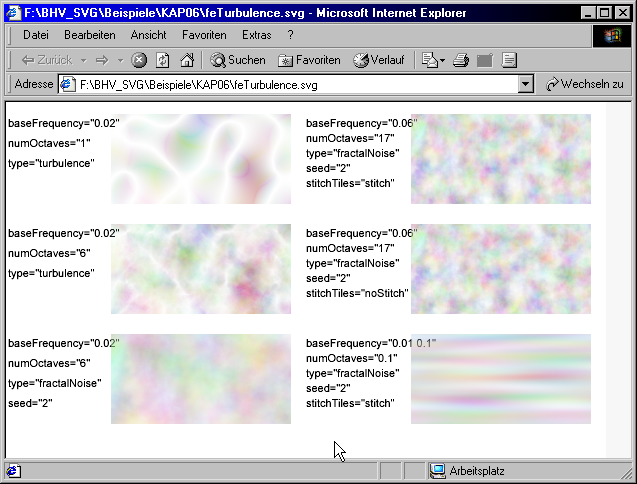
Figure: Examples of the feTurbulence element.
Copyright © verlag moderne industrie GmbH 2001
You may print the online version for your private use.
Otherwise, this chapter from “Das Einsteigerseminar SVG — Webgrafiken mit XML” is subject to the same conditions as the bound edition. The work, including all its parts, is protected by copyright. All rights reserved, including reproduction, translation, microfilming, and storage and processing in electronic systems.
verlag moderne industrie GmbH, Justus-von-Liebig-Straße 1, D-86899 Landsberg/Lech, fon ++49 (0) 81 91 / 125 – 0, leserservice(at)mi-verlag.de
back to top