

XML technologies / CSS / CSS Cookbook / Typography for the web / Pull quotes with images
(Excerpt from “CSS Kochbuch” by Christopher Schmitt)
Problem
A pull quote should have images, such as curly braces, on both sides, as shown in the following figure.
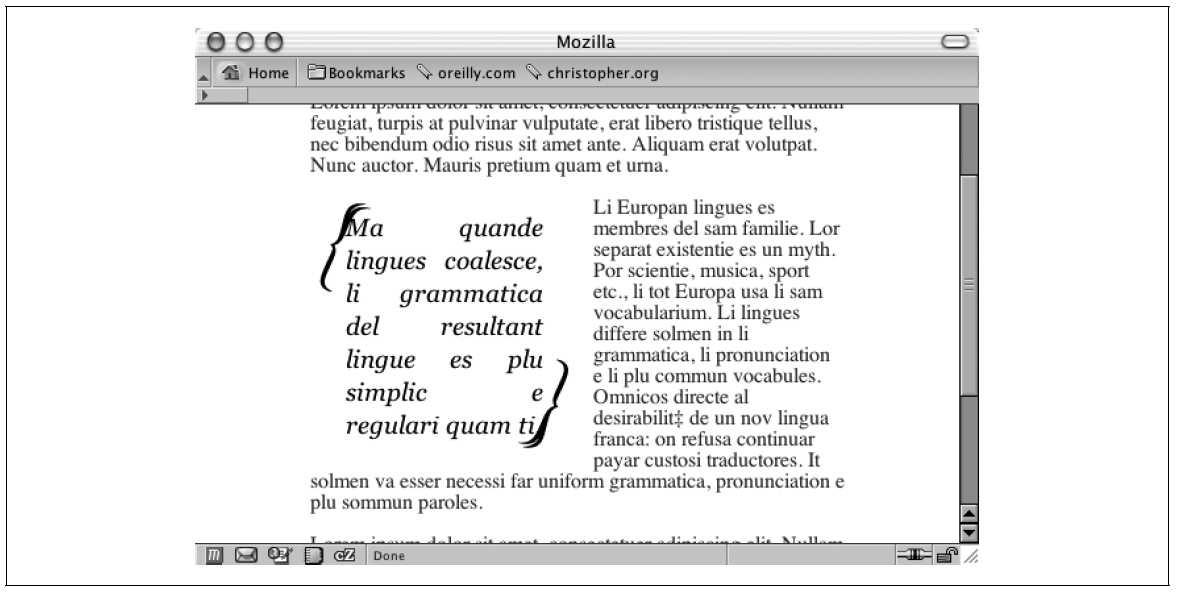
Figure: A pull quote with images.
Solution
Use the element blockquote to mark up the pull quote’s content:
<blockquote>
  <p>Ma quande lingues coalesce, li grammatica del resultant lingue es plu simplic e regulari quam ti.</p>
</blockquote>
Then define the pull quote’s styles, placing one image in the background of the element blockquote and the other in the background of the element p:
blockquote {
 background-image: url(bracket_left.gif);
 background-repeat: no-repeat;
 float: left;
 width: 175px;
 margin: 0 0.7em 0 0;
 padding: 10px 0 0 27px;
 font-family: Georgia, Times, "Times New Roman", serif;
 font-size: 1.2em;
 font-style: italic;
 color: black;
}
blockquote p {
 margin: 0;
 padding: 0 22px 10px 0;
 width:150px;
 text-align: justify;
 line-height: 1.3em;
 background-image: url(bracket_right.gif);
 background-repeat: no-repeat;
 background-position: bottom right;
}
Discussion
This example has two images of curly braces, one for the top-left corner and the other for the bottom-right corner. However, CSS allows only one background image per block-level element.
You can work around this limitation by assigning the images as backgrounds of different elements. (Note: Internet Explorer for Windows through version 6 unfortunately has problems positioning background images on elements other than body. See meyerweb: complexspiral.) In our case, these are the element blockquote itself and its child element p:
blockquote {
 background-image: url(bracket_left.gif);
 background-repeat: no-repeat;
 float: left;
 width: 175px;
}
blockquote p {
 background-image: url(bracket_right.gif);
 background-repeat: no-repeat;
 background-position: bottom right;
}
Adjust the widths, padding and margins of the elements blockquote and p appropriately to leave the images fully visible:
blockquote {
 background-image: url(bracket_left.gif);
 background-repeat: no-repeat;
 float: left;
 width: 175px;
 margin: 0 0.7em 0 0;
 padding: 10px 0 0 27px;
}
blockquote p {
 margin: 0;
 padding: 0 22px 10px 0;
 width: 150px;
 background-image: url(bracket_right.gif);
 background-repeat: no-repeat;
 background-position: bottom right;
}
One advantage of this solution is that the images of curly braces can reposition themselves when the text is resized, as shown in the next figure.
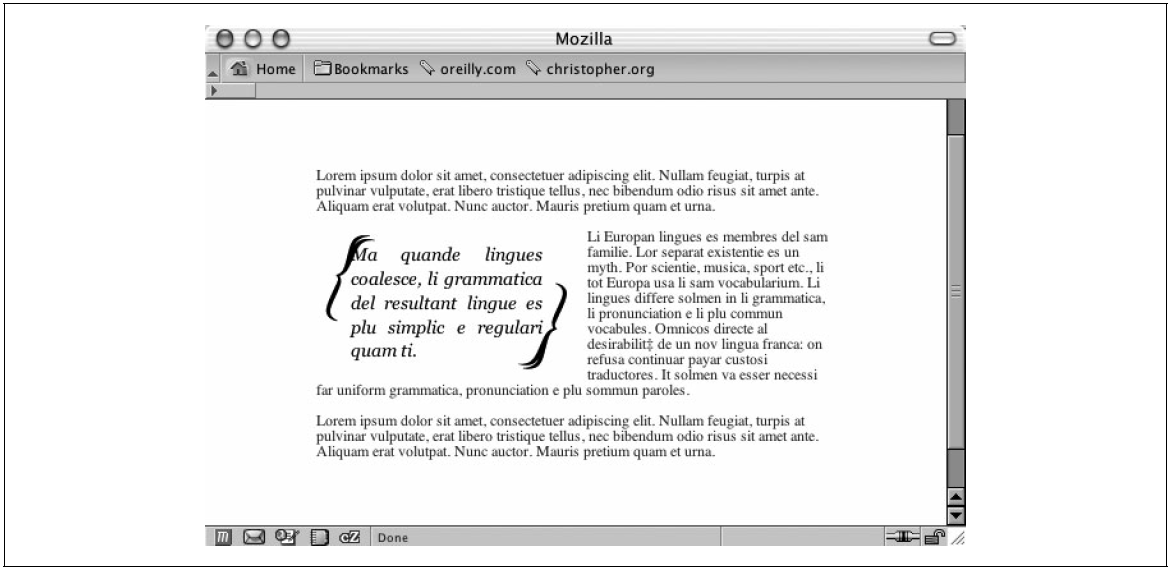
Figure: The images stay fixed in the corners even when the text is resized.
Note that Internet Explorer through version 5.5 renders the result somewhat differently from CSS2-compliant browsers because of its box model bug. For details and a workaround, see the recipe Special values for Internet Explorer 5.x for Windows.
See also
The recipe Dynamic visual menus for another example of the “rubber band technique.” Pulling a rubber band apart at both ends leaves the band itself intact. Similarly, the images’ presentation remains intact when you enlarge the text.
Copyright of the German edition © 2007 by O’Reilly Verlag GmbH & Co. KG
You may print the online version for your private use.
Otherwise, this chapter from “CSS Kochbuch” is subject to the same conditions as the bound edition: the work, including all its parts, is protected by copyright. All rights reserved, including reproduction, translation, microfilming, and storage and processing in electronic systems.
O’Reilly Verlag GmbH & Co. KG, Balthasarstr. 81, 50670 Köln