

XML technologies / CSS / CSS Cookbook / Typography for the web / Specifying fonts
(Excerpt from “CSS Kochbuch” by Christopher Schmitt)
Problem
You want the text of a web page to use a particular font.
Solution
Use the property font-family:
p {
  font-family: Georgia, Times, "Times New Roman", serif;
}
Discussion
A comma-separated list for the property font-family lets you specify which fonts the browser should use to display a web page. If the browser cannot find the first font, it tries the next, continuing until it finds a suitable font. If none is found, the cascade ultimately falls back to the font defined in the user-agent stylesheet.
If the font name contains spaces, as in Times New Roman, enclose it in single or double quotation marks.
End the list of explicit font names with at least one generic font family. This broadly preserves the intended appearance even if the browser cannot use any of the fonts listed earlier. CSS offers five font families (see the following table).
Table: CSS font families.
Generic font-family value | Examples of font names in this family |
|---|---|
| Georgia, Times, Times New Roman, Garamond and Century Schoolbook |
| Verdana, Arial, Helvetica, Trebuchet and Tahoma |
| Courier, MS Courier New and Prestige |
| Lucida Handwriting and Zapf-Chancery |
| Comic Sans, Whimsey, Critter and Cottonwood |
Every web browser has a list of fonts assignable to the families in the previous table. If no specific font name is selected by a CSS rule, or the selected font is unavailable on the user’s computer, the browser uses another font from one of these families.
The most problematic generic value is fantasy, which covers all fonts that do not fit any other category. Its actual rendering is unpredictable, so many designers avoid this family. Another problematic value is cursive, because some systems and browsers cannot display cursive typefaces. They instead use a browser-defined default font that is hard to predict. Since text marked as cursive may not appear in a cursive typeface, some designers avoid this generic value too.
When using a rare font that might not be installed on every user’s system, make a habit of ending the property font-family with either serif, sans-serif or monospace. This guarantees at least a degree of readability.
You do not need to repeat these properties for every tag you use. A child element inherits its parent’s values unless the CSS specification says otherwise. The child automatically receives the same property values as its parent element. For example, if a paragraph containing an element em has its property font-family set to a serif font, the contained element em also appears in that font:
<p style="font-family: serif;">The water fountain with the broken sign on it is <em>indeed</em> broken.</p>There are several exceptions to inheritance. One is part of the CSS specification and concerns elements that can create a box. Elements such as h2 and p are called block-level elements (or simply block elements). Some of their properties differ from those of inline-level elements, such as padding, margins, borders and backgrounds (see the following figure).
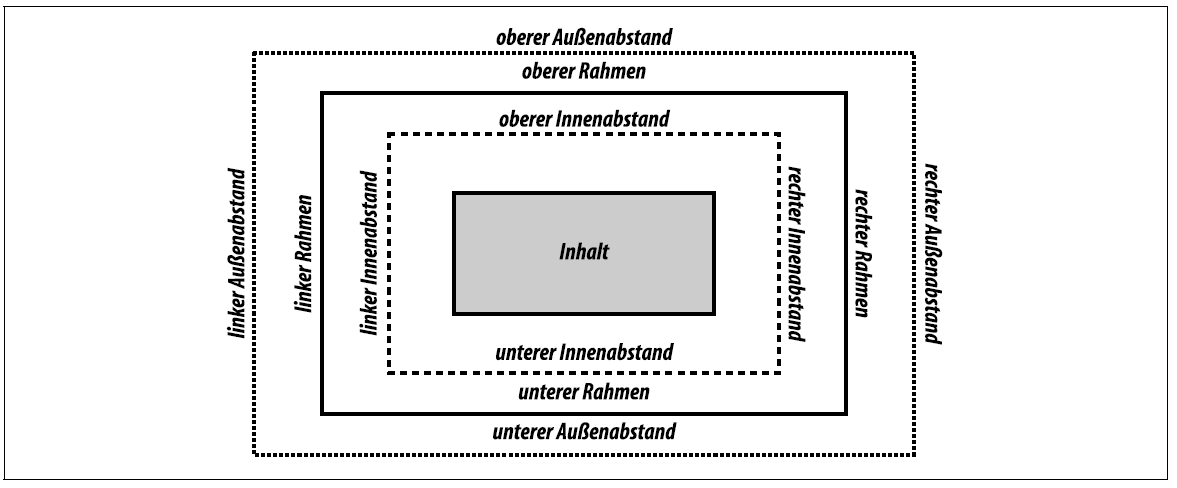
Figure: The box model for a block element.
Since these properties are not inherited by children that are themselves block-level elements, you need no extra rules to prevent the visual effects that might otherwise occur. If, for example, you gave an element body a 15% margin, the rule would also apply to all elements h2 and p that are children of body. The next figure shows the result if these properties were inherited.
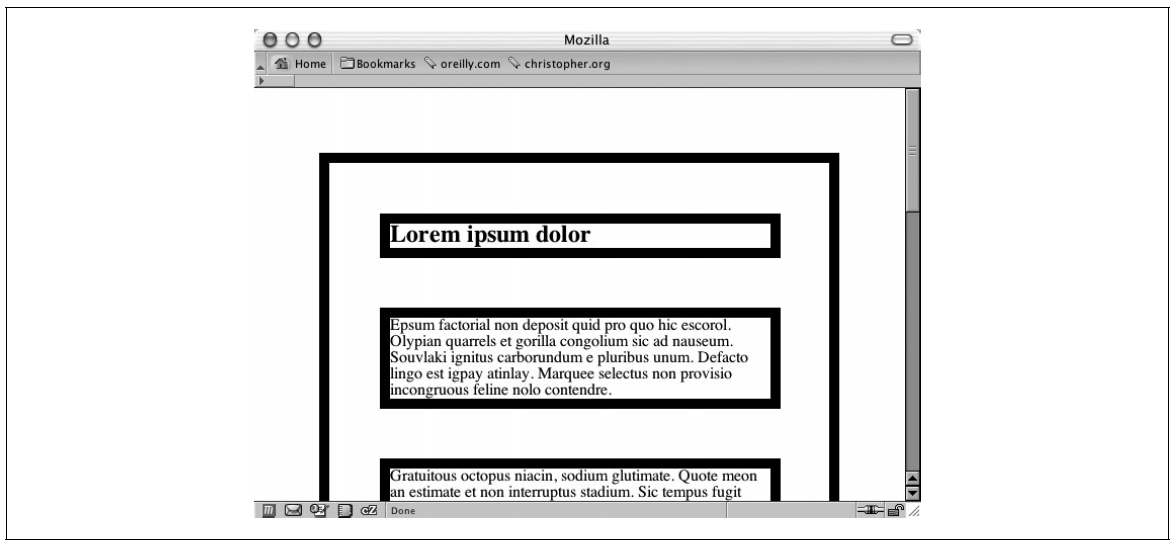
Figure: Hypothetical inheritance of margin and border property values.
Because some properties are inheritable by definition and others are not, a modern CSS-capable browser renders the page more like the following figure.
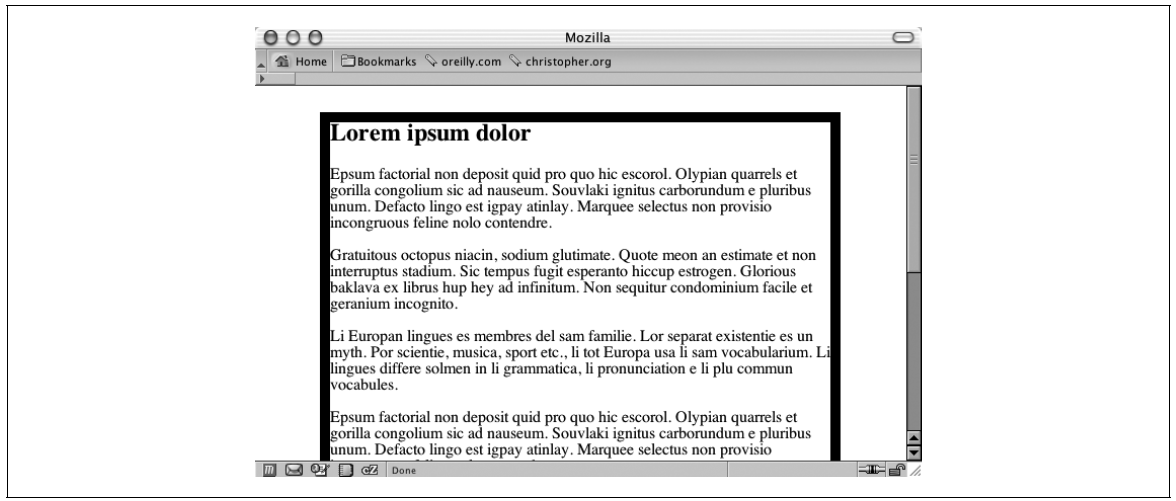
Figure: The page when block elements do not inherit certain property values.
Inheritance may also fail because a browser does not follow the CSS specification and does not pass the values set for the element body for the properties font-family and color to its children. Work around this by explicitly setting the values for font-family and color for block elements:
body {
  font-family: Georgia, Times, "Times New Roman", serif;
  color: #030;
}
h1, h2, h3, h4, h5, h6, p, td, ul, ol, li, dl, dt, dd, {
  font-family: Georgia, Times, "Times New Roman", serif;
  color: #030;
}
Another problem is that not all browsers inherit font family, size and color in table cells. Internet Explorer, for example, inherits the family and color but not the size. Since you rarely want just the family and usually want to set the size too, you can extend the CSS as follows:
p, td {
  font-family: Georgia, Times, "Times New Roman", serif;
  color: #000;
  font-size: 1.3em;
}
See also
The CSS 2.1 specification on inheritance. For details about values of font-family, see the CSS 2.1 specification.
Copyright of the German edition © 2007 by O’Reilly Verlag GmbH & Co. KG
You may print the online version for your private use.
Otherwise, this chapter from “CSS Kochbuch” is subject to the same conditions as the bound edition: the work, including all its parts, is protected by copyright. All rights reserved, including reproduction, translation, microfilming, and storage and processing in electronic systems.
O’Reilly Verlag GmbH & Co. KG, Balthasarstr. 81, 50670 Köln