

XML technologies / CSS / CSS Cookbook / Typography for the web / Setting font sizes and units
(Excerpt from “CSS Kochbuch” by Christopher Schmitt)
Problem
Set the font size used on a web page.
Solution
Set the required values with the property font-size:
p {
  font-size: 0.9em;
}
Discussion
The property font-size accepts various value types and units. This solution uses em units, but others, such as percentages, are possible.
With percentage font sizes, the browser calculates size from the parent element. If the font size of body is 12 pixels, for example, and that of the element p is 125%, the paragraph text appears at 15 pixels.
Font size can be set with percentages, length units or special keywords. (Note: some units allow decimal fractions, such as 0.1em. Use the English decimal point (.), not a comma.)
Length units
Length units are either absolute or relative. Absolute units include:
Inches (in)
Centimeters (cm)
Millimeters (mm)
Points (pt)
Picas (pc)
CSS defines one point as 1/72 inch and one pica as 12 points.
Relative length units
Relative length units determine a property’s length from another property defining a length. They include:
em units (em)
x-height (ex)
Pixels (px)
em units refer to the default font size in the browser preferences. The x-height (ex) refers to the height of the lowercase x in the relevant font.
A pixel is the smallest dot a computer screen can display.
Zero and negative font sizes
CSS does not specify how browsers should handle text whose property font-size is zero, so their interpretation cannot be predicted.
Firefox and Mozilla browsers, for example, hide such text. Internet Explorer for Macintosh and Safari use the default font size instead. Opera renders it smaller but still readable. Internet Explorer for Windows renders it as a tiny unreadable line, equivalent to 0.1em (see the following figure).
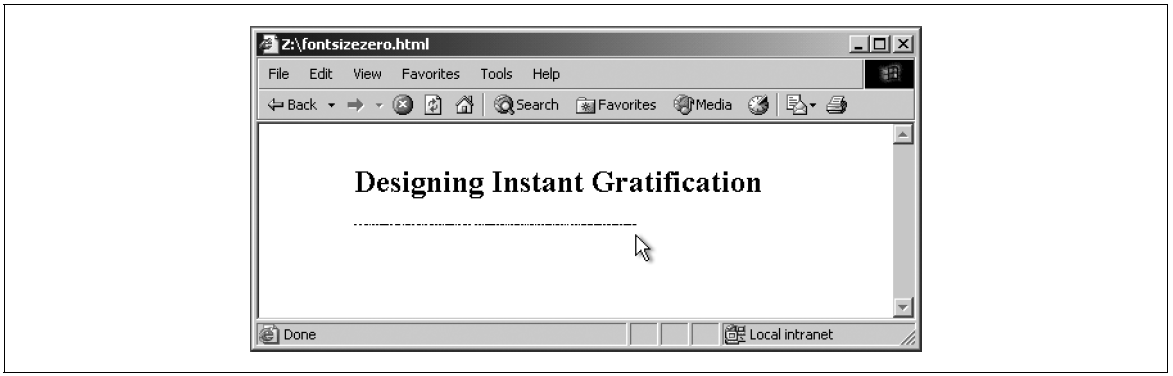
Figure: Setting font size to zero produces an unreadable line in Internet Explorer for Windows.
To hide text, use the properties visibility or display instead of setting font size to zero.
p {
  display: none;
}
Negative lengths for the property font-size, such as -25cm, are not allowed.
See also
The CSS 2.1 specification for font-size.
Copyright of the German edition © 2007 by O’Reilly Verlag GmbH & Co. KG
You may print the online version for your private use.
Otherwise, this chapter from “CSS Kochbuch” is subject to the same conditions as the bound edition: the work, including all its parts, is protected by copyright. All rights reserved, including reproduction, translation, microfilming, and storage and processing in electronic systems.
O’Reilly Verlag GmbH & Co. KG, Balthasarstr. 81, 50670 Köln