

XML technologies / CSS / CSS Cookbook / Forms / Entering form data as in a spreadsheet
(Excerpt from “CSS Kochbuch” by Christopher Schmitt)
Problem
Make data-entry form fields look like a spreadsheet.
Solution
Use CSS properties for form fields and tables to obtain the desired appearance. First add the required input fields to the HTML table, as shown in the following figure:
<form method="get" name="copresentations">
  <table cellspacing="0">
    <caption>Zusammenfassung der Finanzdaten</caption>
    <tr>
      <th scope="col">Steuerjahr</th>
      <th scope="col">Präsentationen</th>
      <th scope="col">Bestanden</th>
      <th scope="col">Anzahl der Präsentatoren</th>
    </tr>
    <tr>
      <th scope="row">1999</th>
      <td><input type="text" name="wkpst1999" /></td>
      <td><input type="text" name="pass1999" /></td>
      <td><input type="text" name="numpst1999" /></td>
    </tr>
    <tr>
      <th scope="row">2000</th>
      <td><input type="text" name="wkpst2000" /></td>
      <td><input type="text" name="pass2000" /></td>
      <td><input type="text" name="numpst2000" /></td>
    </tr>
    <tr>
      <th scope="row">2001</th>
      <td><input type="text" name="wkpst2001" /></td>
      <td><input type="text" name="pass2001" /></td>
      <td><input type="text" name="numpst2001" /></td>
    </tr>
    <tr>
      <th scope="row">2002</th>
      <td><input type="text" name="wkpst2002" /></td>
      <td><input type="text" name="pass2002" /></td>
      <td><input type="text" name="numpst2002" /></td>
    </tr>
    <tr>
      <th scope="row">2003</th>
      <td><input type="text" name="wkpst2003" /></td>
      <td><input type="text" name="pass2003" /></td>
      <td><input type="text" name="numpst2003" /></td>
    </tr>
    <tr>
      <th scope="row">2004</th>
      <td><input type="text" name="wkpst2004" /></td>
      <td><input type="text" name="pass2004" /></td>
      <td><input type="text" name="numpst2004" /></td>
    </tr>
  </table>
  <input type="submit" class="save" value="Speichern" />
</form>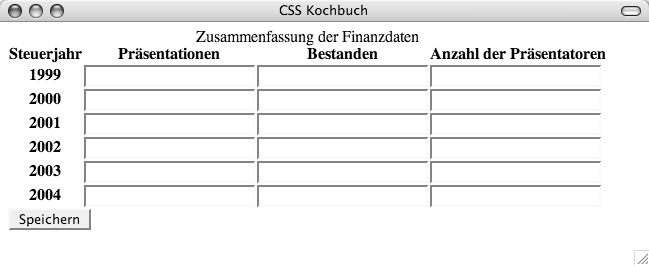
Figure: The form table without styles.
To surround the table with a thin border, set the property border-collapse to collapse. The table cells are then combined into a grid rather than displayed individually.
table {
 border-collapse: collapse;
 border: 1px solid black;
}
Next give the table cells a fixed width and their own thin border:
th {
 border: 1px solid black;
 width: 6em;
}
td {
 width:6em;
 border: 1px solid black;
}
Now remove the cells’ padding and margins:
th {
 border: 1px solid black;
 width: 6em;
}
td {
 width:6em;
 border: 1px solid black;
 padding: 0;
 margin: 0;
}
Next match the widths of the elements input to the cell widths, also removing the default browser borders around input fields:
input {
 width: 100%;
 border: none;
 margin: 0;
}
Setting the width of the elements input also expands the submit button to the full width of its parent element, the form, making it quite large. To undo this, we need a separate CSS rule for the button:
.save {
 margin-top: 1em;
 width: 5em;
}
To complete the spreadsheet appearance, finally align the text in the input fields to the right (see the next figure):
input {
 width: 100%;
 border: none;
 margin: 0;
 text-align: right;
}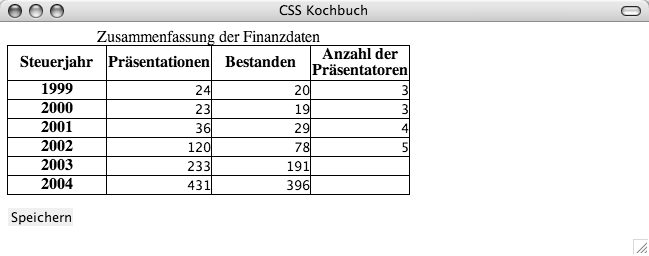
Figure: A table displayed as a spreadsheet.
Discussion
Spreadsheet programs help keep large amounts of numeric and financial information organized. The typical form presentation used in ecommerce applications or contact forms is rather obstructive here. Styling the form as a spreadsheet can make entering large quantities of numbers easier for users.
Extending this recipe with the pseudo-class :hover also lets you visually highlight the cell in which the user is currently entering data (see the following figure):
tr:hover {
 background-color: #ffc;
}
tr:hover input {
 background-color: #ffc;
}
input:focus {
 background-color: #ffc;
}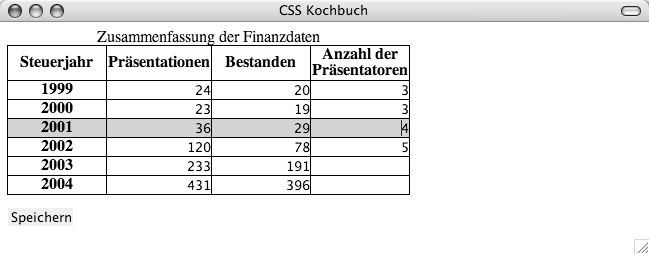
Figure: A table row is highlighted.
See also
The recipe Styling input elements for defining form element styles.
Copyright of the German edition © 2007 by O’Reilly Verlag GmbH & Co. KG
You may print the online version for your private use.
Otherwise, this chapter from “CSS Kochbuch” is subject to the same conditions as the bound edition: the work, including all its parts, is protected by copyright. All rights reserved, including reproduction, translation, microfilming, and storage and processing in electronic systems.
O’Reilly Verlag GmbH & Co. KG, Balthasarstr. 81, 50670 Köln