

XML technologies / CSS / CSS Cookbook / Forms / Grouping related form elements
(Excerpt from “CSS Kochbuch” by Christopher Schmitt)
Problem
A large form needs to be divided into several thematically related sections.
Solution
Use the HTML element fieldset to divide the form into separate sections (see the next figure):
<form id="msgform" name="msgform" method="post" action="/process.php">
  <fieldset>
    <legend>Kontaktinformationen</legend>
    <label for="fmtitle"Anrede</label>
    <select name="fmtitle" id="fmtitle">
      <option value="herr">Herr</option>
      <option value="frau">Frau</option>
      <option value="firma">Firma</option>
    </select>
    <label for="fmname">Name</label>
    <input type="text" name="fmname" id="fmname" />
    <label for="fmemail">E-Mail</label>
    <input type="text" name="fmemail" id="fmemail" />
  </fieldset>
  <fieldset
    <legend>Ihre Nachricht</legend>
    <label for="fmsubject">Betreff</label>
    <input type="text" name="fmsubject" id="fmsubject" />
    <label for="fmmsg">Nachricht</label>
    <textarea name="fmmsg" id="fmmsg" rows="5" cols="14"></textarea>
  </fieldset>
  <input type="submit" name="submit" value="Abschicken" class="submit" />
</form>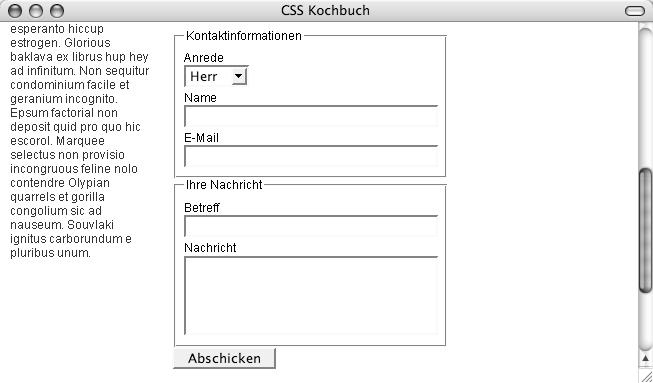
Figure: A form divided using fieldset tags.
Discussion
The HTML elements fieldset and legend make it easy to group related form fields.
The appearance of the elements fieldset and legend can also be controlled using CSS (see the following figure):
fieldset {
 margin-bottom: 1em;
 border: 1px solid #888;
 border-right: 1px solid #666;
 border-bottom: 1px solid #666;
}
legend {
 font-weight: bold;
 border: 1px solid #888;
 border-right: 1px solid #666;
 border-bottom: 1px solid #666;
 padding: .5em;
 background-color: #ccc;
}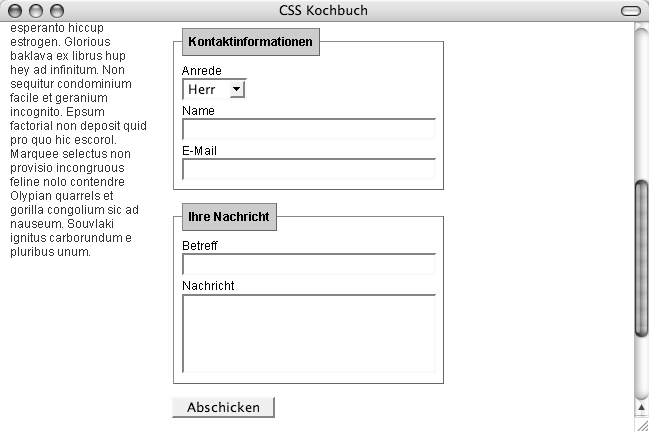
Figure: fieldset and legend with custom CSS styles.
See also
The HTML 4.01 specification for the elements fieldset and legend.
Copyright of the German edition © 2007 by O’Reilly Verlag GmbH & Co. KG
You may print the online version for your private use.
Otherwise, this chapter from “CSS Kochbuch” is subject to the same conditions as the bound edition: the work, including all its parts, is protected by copyright. All rights reserved, including reproduction, translation, microfilming, and storage and processing in electronic systems.
O’Reilly Verlag GmbH & Co. KG, Balthasarstr. 81, 50670 Köln