

XML technologies / XML / XML in a Nutshell / Document type definitions (DTDs) / Validation
(Excerpt from “XML in a Nutshell” by Elliotte Rusty Harold & W. Scott Means)
A valid document has a document type declaration identifying the DTD governing it. The document type declaration and the document type definition are different; DTD correctly abbreviates only document type definition.
The DTD lists elements, attributes and entities used in the document and their permitted contexts. It may also declare unused items. Validity follows the principle that everything not allowed is forbidden: every part must match a DTD declaration. A document with a document type declaration that conforms to its referenced DTD is valid; otherwise it is invalid.
DTDs leave many things unspecified, notably:
what the document’s root element looks like;
how many instances of each element occur;
what character data elements contain;
an element’s meaning, such as a date or person’s name.
DTDs restrict XML document shape but leave flexibility within those limits. They say nothing about the length, structure, meaning, permitted values or other aspects of an element’s or attribute’s text content.
Validity is optional. A parser may check it or not, and an application may handle errors or ignore them. Missing required database fields may be serious; an error while composing a web page may be harmless. Well-formedness is required for all XML documents; validity is not. Use validation as your documents and programs require.
A simple DTD example
This example builds on the code example A more complex XML document describing a person on the page Elements, tags and characters. It described a person, Alan Turing, with a first and last name and three professions. The specific person is irrelevant to DTDs, which describe types rather than instances. A person DTD would require a person element containing one name child followed by zero or more beruf children. The name element would contain exactly one vorname child followed by exactly one nachname child. Finally, vorname, nachname and beruf all contain text. This DTD describes such a person element.
<!ELEMENT person (name, beruf*)>
<!ELEMENT name (vorname, nachname)>
<!ELEMENT vorname (#PCDATA)>
<!ELEMENT nachname (#PCDATA)>
<!ELEMENT beruf (#PCDATA)>
Code example: A DTD for person
Usually this DTD would reside separately so multiple XML documents can reference it. It may instead be embedded using a document type declaration, discussed later. A separate file might be named person.dtd or similar. The extension .dtd is conventional, not mandated by XML. A web server should serve it with the MIME type application/xml-dtd.
Each line is an element declaration. The first declares person, the second name, the third vorname, and so on. Line breaks serve readability only: separate lines are customary, not mandatory, and long declarations may span several.
The first declaration requires each person element to have exactly one name child followed by zero or more beruf elements. The asterisk after beruf means zero or more. Each person must have a name and may have any number of professions, but the name must precede them. This person element is valid:
<person>
   <name>
      <vorname>Alan</vorname>
      <nachname>Turing</nachname>
   </name>
   <beruf>Informatiker</beruf>
   <beruf>Mathematiker</beruf>
   <beruf>Kryptograph</beruf>
</person>
This person element is also valid because beruf is optional:
<person>
   <name>
      <vorname>Alan</vorname>
      <nachname>Turing</nachname>
   </name>
</person>
This person element is invalid because the required name child is missing:
<person>
   <beruf>Informatiker</beruf>
   <beruf>Mathematiker</beruf>
   <beruf>Kryptograph</beruf>
</person>
This person element is invalid because a beruf element precedes name:
<person>
   <beruf>Informatiker</beruf>
   <name>
      <vorname>Alan</vorname>
      <nachname>Turing</nachname>
   </name>
   <beruf>Mathematiker</beruf>
   <beruf>Kryptograph</beruf>
</person>
The element person cannot contain undeclared elements. Only extra whitespace character data is permitted. This person element is invalid because of an extra veröffentlichungen element:
<person>
   <name>
      <vorname>Alan</vorname>
      <nachname>Turing</nachname>
   </name>
   <beruf>Mathematiker</beruf>
   <beruf>Kryptograph</beruf>
   <veröffentlichungen>On Computable Numbers...</veröffentlichungen>
</person>
This is an invalid person element because it adds text outside the permitted child elements:
<person>
   <name>
      <vorname>Alan</vorname>
      <nachname>Turing</nachname>
   </name>
   war <beruf>Informatiker</beruf>,
   <beruf>Mathematiker</beruf> und
   <beruf>Kryptograph</beruf>
</person>
Change the DTD to make these invalid examples valid. They are all well-formed, but fail the DTD in A DTD for person.
The declaration name requires each name element to contain exactly one vorname element followed by exactly one nachname element. All variations are forbidden.
The remaining declarations for vorname, nachname and beruf require #PCDATA, meaning Parsed Character Data: plain text possibly containing entity references such as & and <, but no tags or child elements.
The example “A DTD for person” put the highest, most complex declaration first, but this is optional. The next equivalent DTD changes only their order. DTDs allow forward, backward and circular references to declarations.
<!ELEMENT vorname (#PCDATA)>
<!ELEMENT nachname (#PCDATA)>
<!ELEMENT beruf (#PCDATA)>
<!ELEMENT name (vorname, nachname)>
<!ELEMENT person (name, beruf*)>
Code example: An alternative DTD for person
The document type declaration
A valid document references the DTD against which it is checked. This reference is in its document type declaration. A declaration looks like:
<!DOCTYPE person SYSTEM "http://www.cafeconleche.org/dtds/person.dtd"> It says the document root is person and its DTD is at "http://www.cafeconleche.org/dtds/person.dtd".
Put the declaration in the document prolog after the XML declaration but before the root element. The prolog is everything before the root start-tag. The next example illustrates this.
<?xml version="1.0" standalone="no"?>
<!DOCTYPE person SYSTEM "http://www.cafeconleche.org/dtds/person.dtd">
<person>
   <name>
      <vorname>Alan</vorname>
      <nachname>Turing</nachname>
   </name>
   <beruf>Informatiker</beruf>
   <beruf>Mathematiker</beruf>
   <beruf>Kryptograph</beruf>
</person>
If document and DTD share a location, use a relative URL rather than an absolute one, for example:
<!DOCTYPE person SYSTEM "/dtds/person.dtd"> If both share a directory, even a filename suffices:
<!DOCTYPE person SYSTEM "person.dtd"> PUBLIC identifiers
Standard DTDs may exist at several URLs. Drawing an SVG image on a laptop at the beach should not require a W3C connection to validate it. DTDs can have PUBLIC identifiers uniquely identifying the XML application, with a fallback URL if the validator does not recognize the PUBLIC identifier. Use the keyword PUBLIC instead of SYSTEM. This declaration references Netscape’s standardized Rich Site Summary (RSS) DTD:
<!DOCTYPE rss PUBLIC "-//Netscape Communications//DTD RSS 0.91//EN" "http://my.netscape.com/publish/formats/rss-0.91.dtd">A local catalog server maps public IDs to suitable local URLs. Catalogs may themselves be XML, specifically the OASIS XML catalog format. PUBLIC identifiers are rarely used in practice; validating parsers generally use the URL.
Internal DTD subsets
When developing a DTD, keeping it and a conforming sample together helps edit and test both. Put the DTD inside square brackets in the document type declaration rather than reference an external URL, as follows.
<?xml version="1.0"?>
   <!DOCTYPE person [
   <!ELEMENT vorname (#PCDATA)>
   <!ELEMENT nachname (#PCDATA)>
   <!ELEMENT beruf (#PCDATA)>
   <!ELEMENT name (vorname, nachname)>
   <!ELEMENT person (name, beruf*)>
]>
<person>
   <name>
      <vorname>Alan</vorname>
      <nachname>Turing</nachname>
   </name>
   <beruf>Informatiker</beruf>
   <beruf>Mathematiker</beruf>
   <beruf>Kryptograph</beruf>
</person>
Code example: A valid person document with an internal DTD
A declaration may include some declarations directly and reference others through a SYSTEM or PUBLIC identifier. This example declares beruf and person directly, but uses name.dtd for the element name:
<!DOCTYPE person SYSTEM "name.dtd" [
   <!ELEMENT beruf (#PCDATA)>
   <!ELEMENT person (name, beruf*)>
]>
The bracketed portion is the internal DTD subset; all externally originating parts are the external DTD subset. Together they form the complete DTD and must be compatible. Element declarations in one must not redefine the other’s. For instance, name.dtd cannot declare person, already declared internally. However, entity declarations may be redefined, with important design consequences discussed shortly with entities.
With an external subset, set the XML declaration’s attribute standalone to no:
<?xml version="1.0" encoding="UTF-8" standalone="no"?> Note: XML gives four detailed rules for when external subsets require standalone to equal no. In essence, nearly all documents using external subsets require standalone to be no. Since standalone set to no is always allowed, even when unnecessary, worrying about rare exceptions is not worthwhile.
A validating processor must read the external subset; a nonvalidating one may omit it even when standalone equals no. External declarations affecting content, such as default attributes, therefore make content parser- and configuration-dependent, causing much confusion. Though some early XML parsers did not resolve external entities, most still used can and generally do. Read the external subset unless efficiency is paramount or you know the documents’ structure very well.
Validating a document
Browsers generally check well-formedness, not validity. In your own XML programs, use the parser API for validation. For handwritten XML, use an online validator or a local program.
Online validators are probably easiest. Two deserve mention:
Brown University Scholarly Technology Group’s XML validation form
Richard Tobin’s XML well-formedness checker and validator: XML well-formedness checker and validator
Put the document and DTDs on a public server. Open the URL above in another tab and submit the document URL. The server fetches it and reports errors. The figure shows Brown’s results for a simple, well-formed but invalid document.
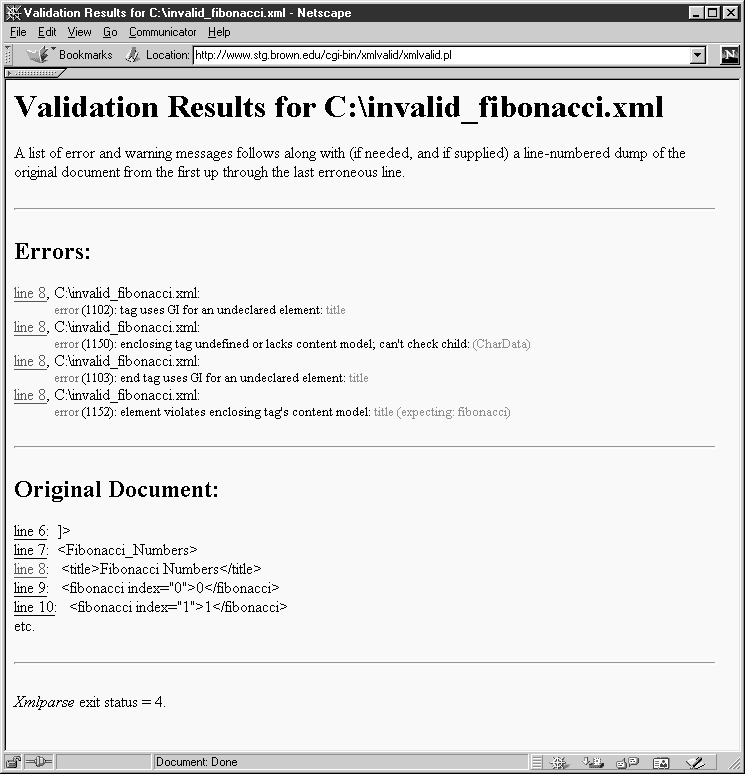
Figure: Validity errors found by Brown University’s online validator
Most XML libraries include a command-line validator. With xmllint, enable validation with --valid. By default, xmllint checks only well-formedness. Supply document URLs or filenames on the command line:
% xmllint --valid invalidhotcop.xml
invalidhotcop.xml:3: validity error: Element SONG content does not follow the DTD
Expecting (TITLE , COMPOSER+ , PRODUCER* , PUBLISHER* , LENGTH? , YEAR? , ARTIST+),
got (TITLE PRODUCER PUBLISHER LENGTH YEAR ARTIST )
</SONG>
       ^
The output identifies a validity error in invalidhotcop.xml at line 3, requiring correction.
Simple GUI validators also exist, such as Topologi’s Schematron validator for Windows. Despite its name, it supports DTDs, RELAX NG and W3C XML Schema schemas, as well as Schematron.
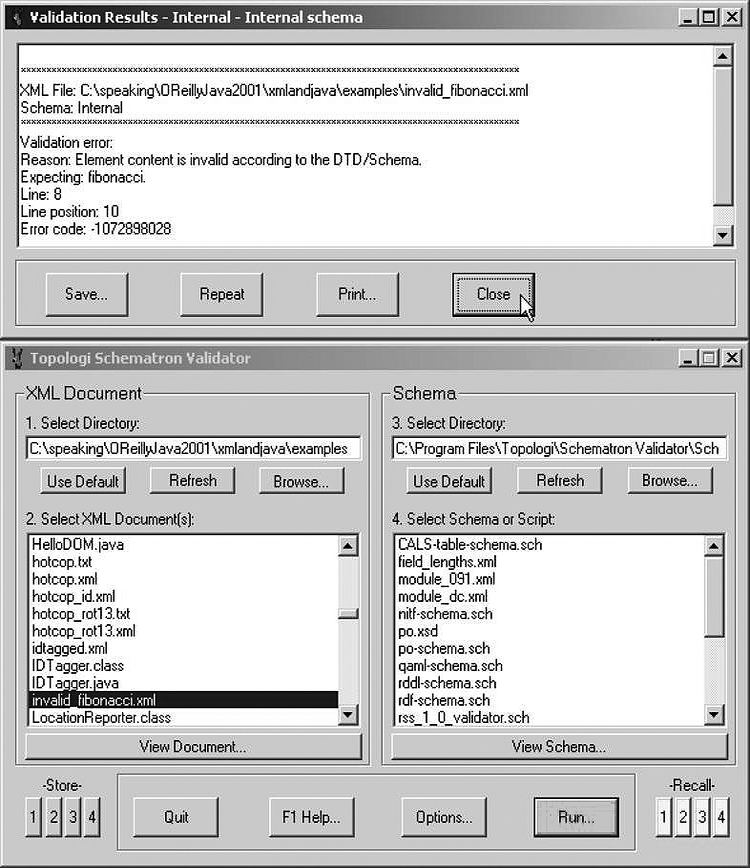
Figure: Validity errors found by Topologi’s Schematron validator
Copyright © 2005 O'Reilly Verlag GmbH & Co. KG
You may print the online version for your private use.
Otherwise, this chapter from “XML in a Nutshell” is subject to the same conditions as the bound edition: the work, including all its parts, is protected by copyright. All rights reserved, including reproduction, translation, microfilming, and storage and processing in electronic systems.
O’Reilly Verlag GmbH & Co. KG, Balthasarstraße 81, 50670 Köln, kommentar(at)oreilly.de