

XML technologies / ePUB / ePub für (In)Designer / Text / Bullets and lists / Combined list types
(Excerpt from “ePub für (In)Designer — Mit InDesign Schritt für Schritt zum E-Book” by Sascha Heck & Yves Apel)
Sometimes both list types must be combined. Beware: in InDesign CS5 and CS5.5, a bug currently requires code editing as a workaround.
Our example is numbered, with two bullet items inserted under its first item. Create two paragraph styles, one for numbering and one for bullets.
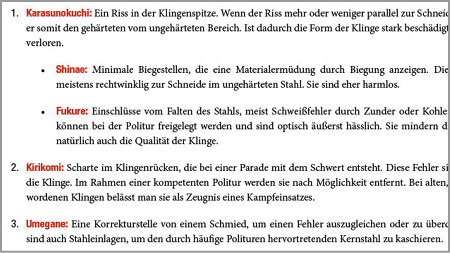
Figure: The combined list we want in ePub.
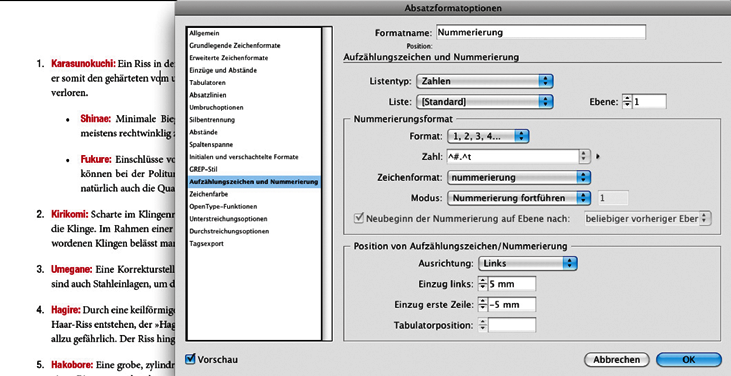
Figure: The list items correctly receive their paragraph style.
During ePub export, set the formatting options to Map to Unordered Lists and Map to Ordered Lists.
CS5 and CS5.5 convert the combined list differently to HTML, both incorrectly.
Digital Editions ignores the two bullet items and continues numbering, then suddenly restarts at 1 after 4. Sigil recognizes bullets from CS5, but numbering is confused. Two-level numbering, such as 1.2 and 1.3, fails too. CS5.5 output is also wrong, but differently.
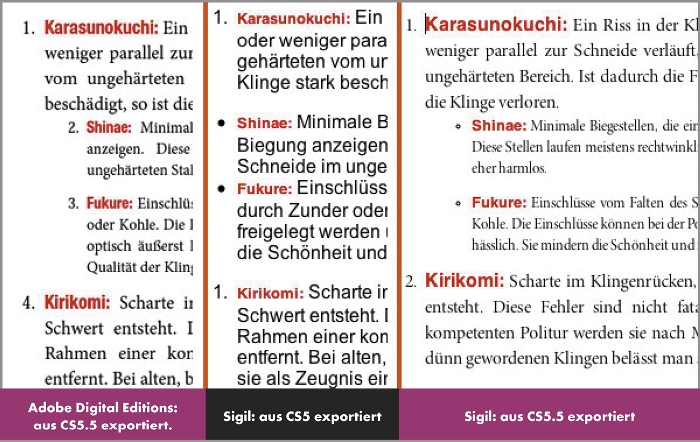
Figure: Combined-list display errors.
Editing is unavoidable to fix these issues. See Editing combined list types for the procedure.
Copyright © dpunkt.verlag GmbH 2012
You may print the online version for your private use.
Otherwise, this chapter from “ePub für (In)Designer” is subject to the same terms as the printed edition: the work and all its parts are protected by copyright. All rights reserved, including reproduction, translation, microfilming, and storage and processing in electronic systems.
dpunkt.verlag GmbH, Wieblinger Weg 17, 69123 Heidelberg, fon 06221-14830, fax 06221-148399, hallo(at)dpunkt.de
back to top