

XML technologies / ePUB / ePub für (In)Designer / Refining bullets and lists / Editing combined list types
(Excerpt from “ePub für (In)Designer — Mit InDesign Schritt für Schritt zum E-Book” by Sascha Heck & Yves Apel)
Under Combined list types we saw that InDesign struggles with combined list types. InDesign alone cannot produce the desired result, so inspect the ePub. Its HTML shows incorrect list export. Here is a simplified tag sequence as exported by InDesign CS5 and CS5.5. At the far right is the correct code for proper list display.
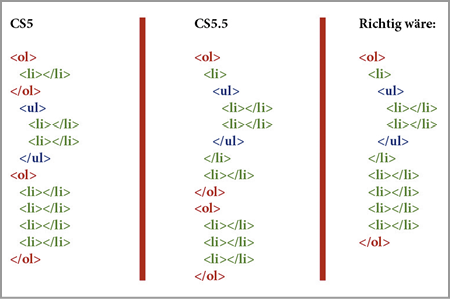
Figure: Simplified HTML generated by InDesign,
with the correction at the far right.
HTML marks lists with the tags <ol> (ordered list), <li> (list items) and <ul> (unordered list). Both InDesign CS5 and CS5.5 interrupt the <ol> and start a new list, explaining the numbering problem. CS5.5 even encloses the two bullet items within a <li>.
Open the document in Sigil and change HTML to match the right-hand example for the desired result. Here is the example in Sigil after correction:
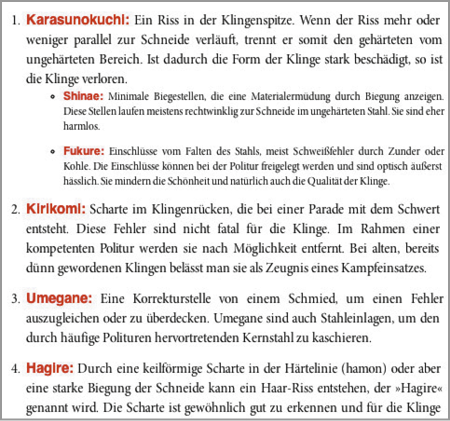
Figure: Correct combined lists in Sigil.
Copyright © dpunkt.verlag GmbH 2012
You may print the online version for your private use.
Otherwise, this chapter from “ePub für (In)Designer” is subject to the same terms as the printed edition: the work and all its parts are protected by copyright. All rights reserved, including reproduction, translation, microfilming, and storage and processing in electronic systems.
dpunkt.verlag GmbH, Wieblinger Weg 17, 69123 Heidelberg, fon 06221-14830, fax 06221-148399, hallo(at)dpunkt.de
back to top