

XML technologies / ePUB / ePub für (In)Designer / Text / Bullets and lists
(Excerpt from “ePub für (In)Designer — Mit InDesign Schritt für Schritt zum E-Book” by Sascha Heck & Yves Apel)
Lists have two forms: numbered or unnumbered. HTML calls them Ordered Lists and Unordered Lists. InDesign’s Numbered List tool creates them conveniently. Create a paragraph style for lists and also a character style for the bullet characters themselves.
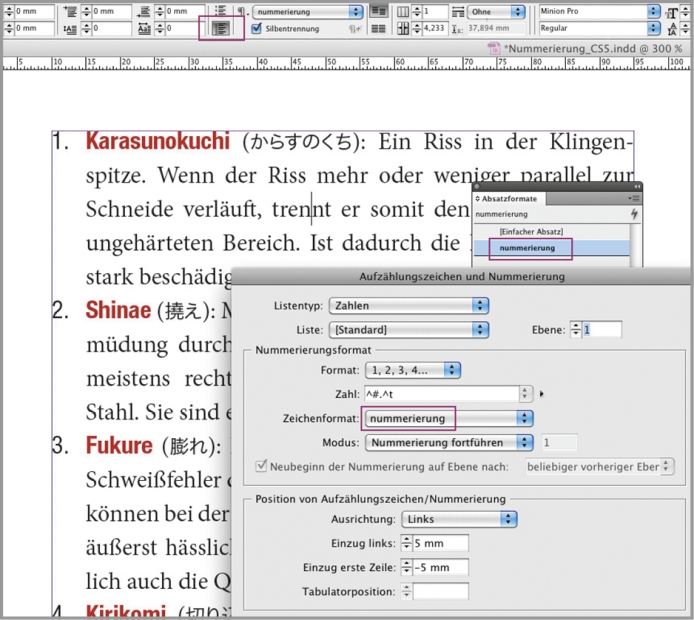
Figure: Use Bullets and Numbering, preferably in the paragraph style. Alt-clicking the top Control panel icon also opens it.
HTML represents numbered lists with <ol> for Ordered List. Entries follow with <li> (List Item).
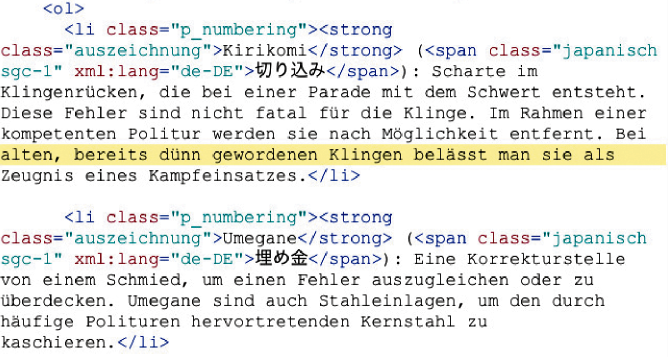
Figure: Numbered list in HTML.
ePub export formatting options convert bullets either to appropriate HTML tags or ordinary text.
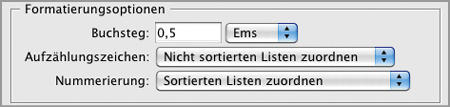
Figure: ePub export bullet and numbering formatting options.
Plain-text conversion loses hanging indents; our bullets even inherit the following character style and become red. Prefer Map to Ordered Lists or Map to Unordered Lists. This preserves HTML structure so the reader recognizes a list.
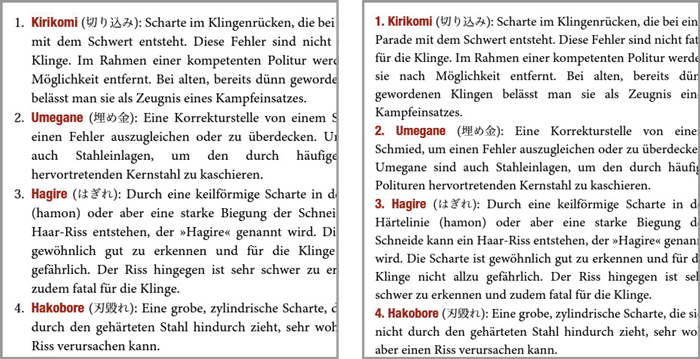
Figure: Exported lists (left) versus Convert to Text (right).
Copyright © dpunkt.verlag GmbH 2012
You may print the online version for your private use.
Otherwise, this chapter from “ePub für (In)Designer” is subject to the same terms as the printed edition: the work and all its parts are protected by copyright. All rights reserved, including reproduction, translation, microfilming, and storage and processing in electronic systems.
dpunkt.verlag GmbH, Wieblinger Weg 17, 69123 Heidelberg, fon 06221-14830, fax 06221-148399, hallo(at)dpunkt.de
back to top