

XML technologies / ePUB / ePub für (In)Designer / Text / Bullets and lists / Convert bullets to text?
(Excerpt from “ePub für (In)Designer — Mit InDesign Schritt für Schritt zum E-Book” by Sascha Heck & Yves Apel)
One exception calls for conversion to text in the formatting options: a special bullet character, for example from another font such as Zapf Dingbats. If you convert to unordered lists during ePub export, the reader always uses its default bullet. Custom bullets are also tricky because not all e-readers interpret fonts such as Zapf Dingbats. Apple iBooks and the Firefox ePub plug-in can, but Adobe Digital Editions displays only question marks.
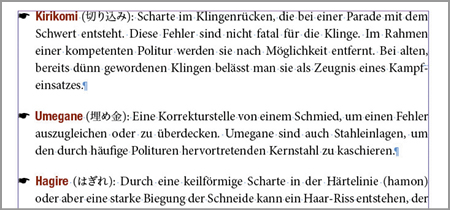
Figure: A Zapf Dingbats symbol is used as the bullet.
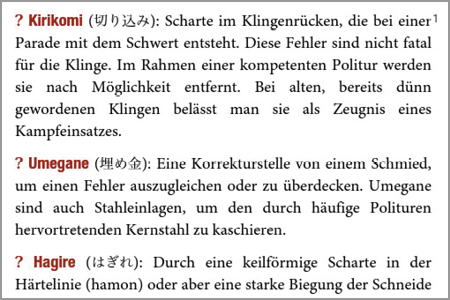
Figure: Adobe Digital Editions cannot render the bullet
and displays a question mark instead—not good.
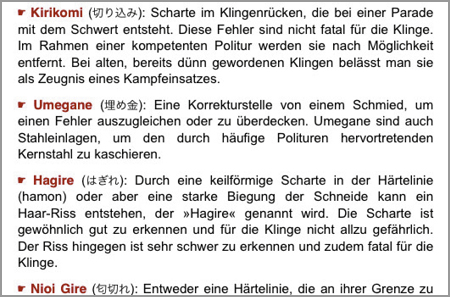
Figure: The Firefox ePub plug-in correctly renders the Dingbats character,
as does Apple iBooks. The hanging indent is lost, however;
the bullet adopts the first word’s properties
and appears red.
Copyright © dpunkt.verlag GmbH 2012
You may print the online version for your private use.
Otherwise, this chapter from “ePub für (In)Designer” is subject to the same terms as the printed edition: the work and all its parts are protected by copyright. All rights reserved, including reproduction, translation, microfilming, and storage and processing in electronic systems.
dpunkt.verlag GmbH, Wieblinger Weg 17, 69123 Heidelberg, fon 06221-14830, fax 06221-148399, hallo(at)dpunkt.de
back to top