

XML technologies / ePUB / ePub für (In)Designer / Text / Cleaning text / Double spaces
(Excerpt from “ePub für (In)Designer — Mit InDesign Schritt für Schritt zum E-Book” by Sascha Heck & Yves Apel)
Double spaces are already unacceptable in print, but before ePub export, check the document again with Find/Change (Ctrl + F). They look particularly bad on small screens such as the iPhone.
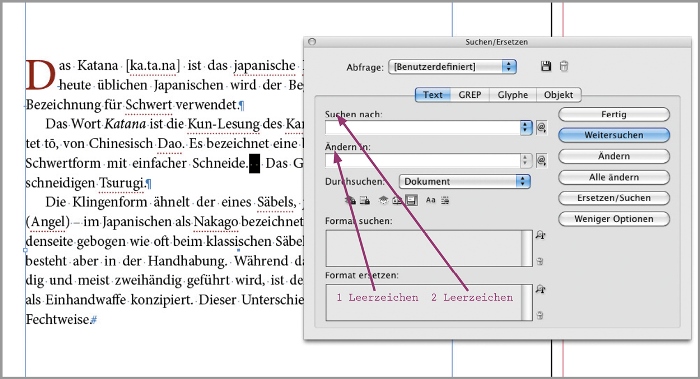
Figure: Replacing double spaces.
As in print, do not indent ePub text with spaces. Enter an indent value in the upper toolbar or Paragraph panel. For a one-em indent, enter the font size: 10 pt for 10-point text, which InDesign converts to millimeters.
If the indent should grow when readers enlarge text on their e-reader, define it in ePub with em, the typographic em square. InDesign cannot preset this: it exports only a fixed pixel value. Manually change it in the CSS file. We start editing HTML and CSS later under The ePub structure, but here is the line to find for changing the indent: text-indent: 10px;. Change it to text-indent: 1em; for a one-em indent. Larger and intermediate values such as 1.2 em are possible too.
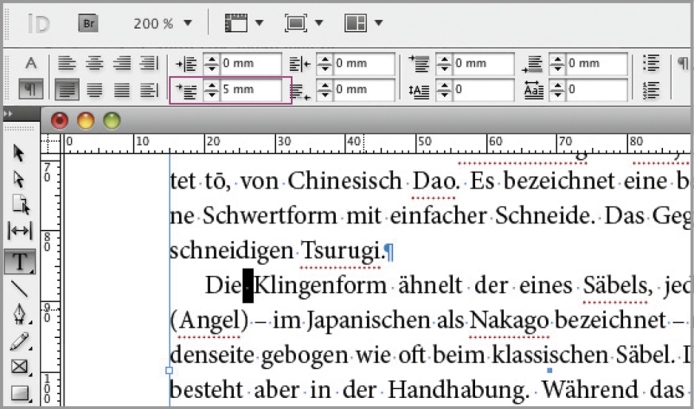
Figure: Use First Line Left Indent instead of spaces.
Copyright © dpunkt.verlag GmbH 2012
You may print the online version for your private use.
Otherwise, this chapter from “ePub für (In)Designer” is subject to the same terms as the printed edition: the work and all its parts are protected by copyright. All rights reserved, including reproduction, translation, microfilming, and storage and processing in electronic systems.
dpunkt.verlag GmbH, Wieblinger Weg 17, 69123 Heidelberg, fon 06221-14830, fax 06221-148399, hallo(at)dpunkt.de
back to top