

XML technologies / ePUB / ePub für (In)Designer / The ePub structure
(Excerpt from “ePub für (In)Designer — Mit InDesign Schritt für Schritt zum E-Book” by Sascha Heck & Yves Apel)
An ePub is a compressed collection of files forming an electronic book. Rename epub to zip and unpack to obtain them; see Unpacking an ePub.
InDesign-generated ePubs have this structure:
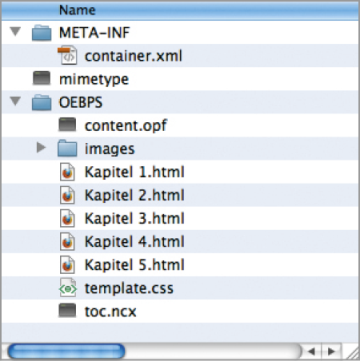
Figure: InDesign ePub file structure.
The top level contains:
mimetype identifies the file collection to some operating systems and readers. Do not edit or delete it.
META-INF contains just one XML file here. Readers use it for application- or device-specific display information. Under Embedded fonts and special characters we will add other XML files.
The OEBPS folder (Open eBook Publication Structure) is ePub’s heart, holding actual content, images and information. We often ask you to open files here in an editor. Here is a brief file overview.
Files inside OEBPS
[Dateiname].html: Usually several files contain chapter texts. Depending on the ePub, they may be HTML, XHTML or XML, essentially equivalent here.
template.css: Text styles, including size, color and font category.
content.opf: Metadata such as author, creation date and description, displayed by readers, plus manifest listing every file, required for ePub validation.
toc.ncx: Finally, the toc.ncx file defines navigation through chapters and text.
images folder: Images, video and similar resources used in ePub.
Together these form the ePub. Structure can vary by export options or authoring application.
Further editing with Sigil
Sigil changes InDesign’s folder structure, subdividing OEBPS into:
Text: HTML text files.
Styles: The CSS file or files (template.css).
Images: PNG, JPG, GIF and other document images.
Font: Fonts.
Misc: Other files, such as video.
Copyright © dpunkt.verlag GmbH 2012
You may print the online version for your private use.
Otherwise, this chapter from “ePub für (In)Designer” is subject to the same terms as the printed edition: the work and all its parts are protected by copyright. All rights reserved, including reproduction, translation, microfilming, and storage and processing in electronic systems.
dpunkt.verlag GmbH, Wieblinger Weg 17, 69123 Heidelberg, fon 06221-14830, fax 06221-148399, hallo(at)dpunkt.de