

XML technologies / ePUB / ePub für (In)Designer / Text / Cleaning text / Automating Find/Change
(Excerpt from “ePub für (In)Designer — Mit InDesign Schritt für Schritt zum E-Book” by Sascha Heck & Yves Apel)
These Find/Change routines can be automated by script. InDesign even supplies and installs FindChangeByList.jsx. Open the Scripts panel through Window → Utilities → Scripts.
| Figure: InDesign installs numerous useful sample scripts. |
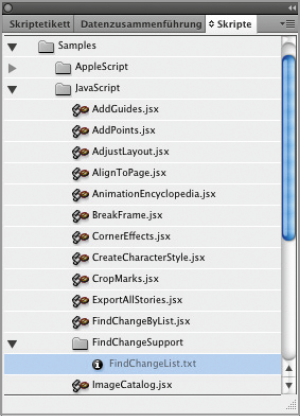
To use the script, adapt its associated FindChangeList.txt file. It already contains predefined searches and explanations of available search options. Essentially, the list finds the quoted text in {findWhat: "Suche"} and replaces it with the quoted text in {changeTo: "Ersetzen"}.
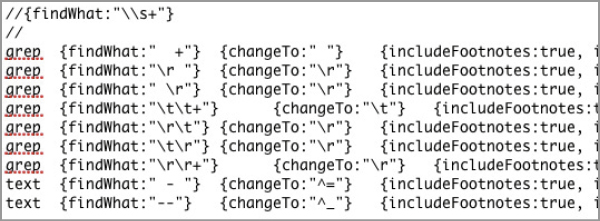
Figure: Excerpt from FindChangeList.txt.
“findWhat”: what to find; “changeTo”: what to replace it with.
You may copy and rename the script for ePub-specific Find/Change tasks. Then also edit the script line that calls the associated .txt file.

Figure: Automating Find/Change.
The script calls its Find/Change list here at line 116. For a custom list, enter the new name of your .txt file.
Gregor Fellenz’s website provides a detailed explanation as a PDF excerpt from his book “InDesign automatisieren”.
Copyright © dpunkt.verlag GmbH 2012
You may print the online version for your private use.
Otherwise, this chapter from “ePub für (In)Designer” is subject to the same terms as the printed edition: the work and all its parts are protected by copyright. All rights reserved, including reproduction, translation, microfilming, and storage and processing in electronic systems.
dpunkt.verlag GmbH, Wieblinger Weg 17, 69123 Heidelberg, fon 06221-14830, fax 06221-148399, hallo(at)dpunkt.de
back to top