

XML technologies / SVG / Filters, transformations and gradients / Using and combining filters and lighting effectively / Filters and masks / The feMorphology filter element
(Excerpt from “Das Einsteigerseminar SVG — Webgrafiken mit XML” by Helma Spona)
The element <feMorphology> makes a graphic thicker or thinner. Internally, a rectangular area is rendered, with its size calculated as follows:
Breite = 2*x-radius
Höhe = 2*y-radius
In addition to the universal attributes, the element has these properties:
operatordetermines how the image is manipulated. Available values aredilateanderode. The valueerodemakes it thinner, whiledilatemakes it thicker.radiussets the generated rectangle’s size. Why the parameter is calledradiusis not entirely clear to me, since only circles and ellipses have radii. Its syntax is:radius="x-radius, y-radius", wherey-radiusis optional. If omitted, the same value asx-radiusis used. Separate values with commas or spaces. Zero values make the effect invisible.
<filter id="Morph1">
  <feMorphology in="SourceGraphic" operator="erode" radius="5 0"/>
</filter>
<filter id="Morph2">
  <feMorphology in="SourceGraphic" operator="dilate" radius="5 0"/>
</filter>
Applied only to the example graphic’s text element, the defined filters produce the following result:
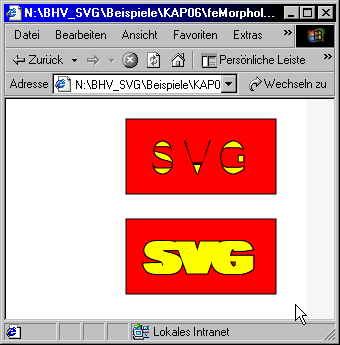
Figure: Results of operator="erode" and operator="dilate".
Copyright © verlag moderne industrie GmbH 2001
You may print the online version for your private use.
Otherwise, this chapter from “Das Einsteigerseminar SVG — Webgrafiken mit XML” is subject to the same conditions as the bound edition. The work, including all its parts, is protected by copyright. All rights reserved, including reproduction, translation, microfilming, and storage and processing in electronic systems.
verlag moderne industrie GmbH, Justus-von-Liebig-Straße 1, D-86899 Landsberg/Lech, fon ++49 (0) 81 91 / 125 – 0, leserservice(at)mi-verlag.de
back to top