

XML technologies / CSS / CSS Cookbook / Forms / A web form without tables
(Excerpt from “CSS Kochbuch” by Christopher Schmitt)
Problem
Form fields and labels should be displayed in rows without tables. CSS alone should create the layout, without presentational markup.
Solution
First create the input fields (input) and their labels (label) (see the next figure):
<form action="login.php" method="post">
  <label for="uname">Benutzername</label>
  <input type="text" name="uname" id="uname" value="" />
  <br />
  <label for="pword">Passwort</label>
  <input type="text" name="pword" id="pword" value="" />
  <br />
  <label for="recall">Daten merken?</label>
  <input type="checkbox" name="recall" id="recall" class="checkbox" />
  <br />
  <input type="submit" name="Submit" value="Abschicken" class="buttonSubmit" />
</form>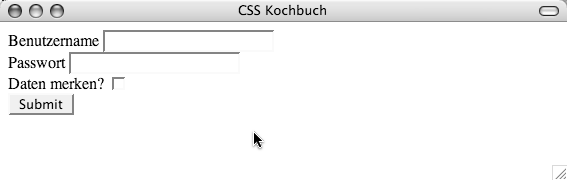
Figure: Form appearance without styles.
Next use the properties display and label to display elements label as block elements. The same rule floats labels to the left while aligning their text to the right (see the following figure):
input {
 display: block;
 width: 175px;
 float: left;
 margin-bottom: 10px;
}
label {
 display: block;
 text-align: right;
 float: left;
 width: 75px;
 padding-right: 20px;
}
.checkbox {
 width: 1em;
}
br {
 clear: left;
}
.buttonSubmit {
 width: 100px;
 margin-left: 95px;
}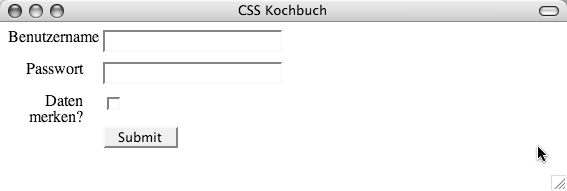
Figure: Form appearance with styles.
Discussion
For the elements input and label, the property display is assigned the value block, displaying both as block elements and allowing a width to be set for label text. Rather than overlapping the elements input, labels are moved to the left as a float. Since all labels have the same width, their appearance is consistent throughout the form.
The tag br separates individual rows composed of label and form. It also prevents form elements following the input field associated with a label from floating as well.
See also
The HTML 4.1 specification for more information on the element
label,the CSS 2.1 specification on the property
clear.
Copyright of the German edition © 2007 by O’Reilly Verlag GmbH & Co. KG
You may print the online version for your private use.
Otherwise, this chapter from “CSS Kochbuch” is subject to the same conditions as the bound edition: the work, including all its parts, is protected by copyright. All rights reserved, including reproduction, translation, microfilming, and storage and processing in electronic systems.
O’Reilly Verlag GmbH & Co. KG, Balthasarstr. 81, 50670 Köln