XML technologies / XSL-FO / Reference / Antenna House Formatter XSL Extensions / Properties / overflow-condense
(Excerpt from "XSL-FO ― Die Referenz" by Manuel Montero Pineda & Steffen Herkert, 2016, dpunkt.verlag)
A | B | C | D | E | F | G | H | I | J | K | L | M | N | O | P | Q | R | S | T | U | V | W | X | Y | Z
Category Overflow Extensions
The axf:overflow-condense specifies how to condense the overflowed text within the region.
Value: | letter-spacing | font-stretch | font-size | line-height | auto | none |
Initial value: | auto |
Applies to: | all block-level formatting objects |
Inherited: | yes |
Percentages: | N/A |
Values have the following meanings.
letter-spacing | Condenses the text by adjusting the letter spacing. |
font-stretch | Condenses the text by adjusting the font width. |
Condenses the text by adjusting the font size. | |
line-height | Condenses the text by adjusting the line height. |
auto | Dependent on the system setting. |
none | Specifies not to condense the text. This can also be specified to the in-line element and is not inherited. |
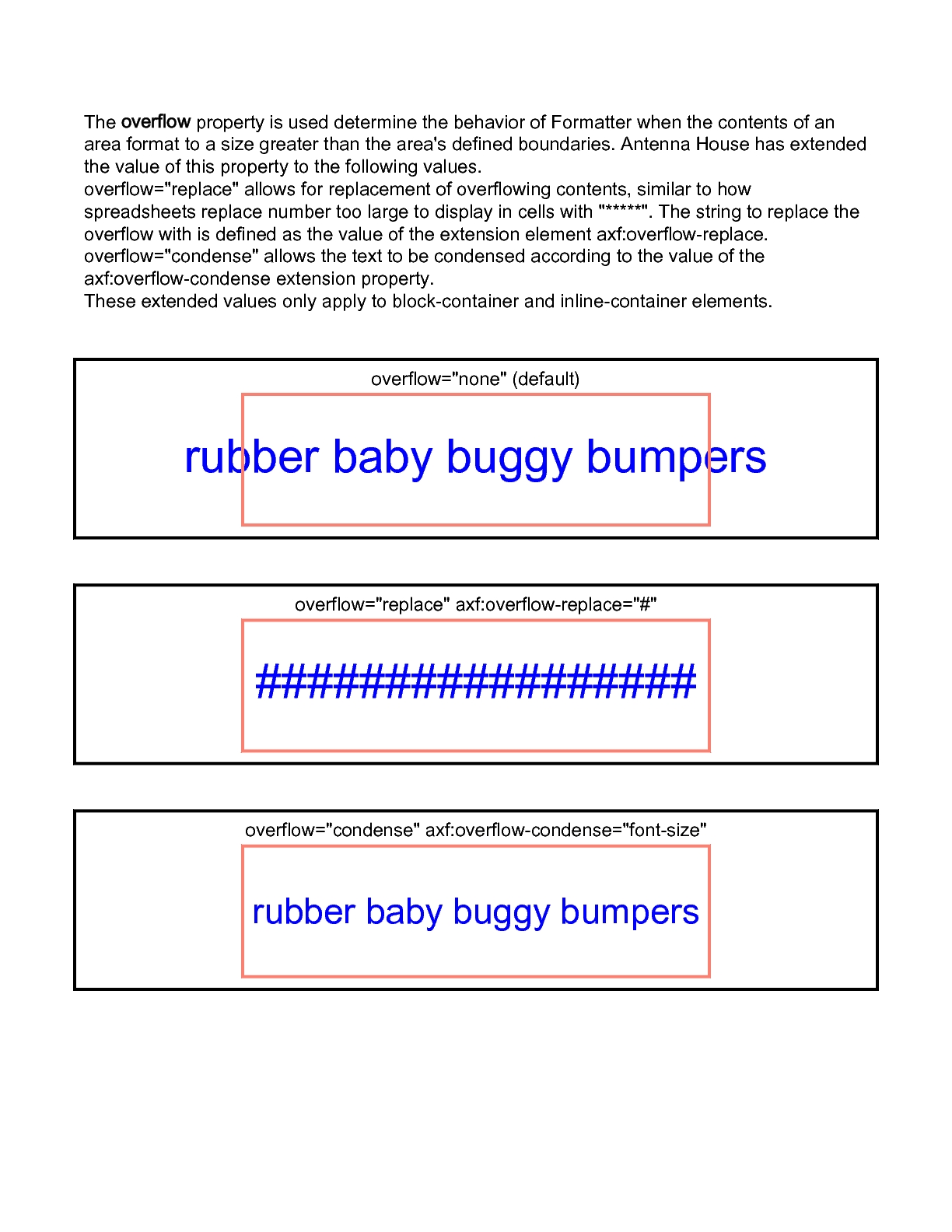
Condensing the text within the region can be specified with the properties of overflow="condense". The adjustment for condensing the text includes both the inline progression direction and the block progression direction. The system will process the specified method by combining the methods considered as suitable.
There is a difference in the condensation process between inline and block. The condensation process occurs in the inline when there is only one line with <fo:inline-container> or <fo:block-container keep-together.within-line="always"> etc. In other cases, the condensation process occurs in the block.
The length of the absolute value specified inside the block will not be adjusted. For example, in the following case, the length will not be adjusted.
<fo:block-container width="4in" overflow="condense" axf:overflow-condense="font-size"> this text will be condenced <fo:block font-size="24pt">no condenced text</fo:block> </fo:block-container>
Moreover, when the adjustment by font-size or font-stretch in the block takes place, text-align-last="justify" is set implicitly. Please specify text-align-last="left" etc., explicitly when justify is unnecessary.
XSL-FO sample:
<fo:root font-family="Arial Unicode MS" font-size="12pt" xmlns:fo="http://www.w3.org/1999/XSL/Format" xmlns:cpfo="http://www.compart.net/xmlns/cpfo" xmlns:svg="http://www.w3.org/2000/svg" xmlns:axf="http://www.antennahouse.com/names/XSL/Extensions">
<axf:document-info name="author" value="Alex Critchfield, Antenna House"/>
<axf:document-info name="keywords" value="extensions, value, overflow"/>
<axf:document-info name="subject" value="overflow extended values"/>
<axf:document-info name="title" value="overflow extended values example"/>
<fo:layout-master-set>
<fo:simple-page-master page-width="8.5in" page-height="11in" master-name="main">
<fo:region-body region-name="body" margin-top="1in" margin-bottom="1in" margin-left=".75in" margin-right=".75in"/>
</fo:simple-page-master>
</fo:layout-master-set>
<fo:page-sequence master-reference="main">
<fo:flow flow-name="body">
<fo:block>

The
<fo:wrapper font-weight="bold">
overflow
</fo:wrapper>
 property is used determine the behavior of Formatter when the contents of an area format to a size greater than the area's defined boundaries. Antenna House has extended the value of this property to the following values.
<fo:block/>
 overflow="replace" allows for replacement of overflowing contents, similar to how spreadsheets replace number too large to display in cells with "*****". The string to replace the overflow with is defined as the value of the extension element axf:overflow-replace.
<fo:block/>
overflow="condense" allows the text to be condensed according to the value of the axf:overflow-condense extension property.
<fo:block/>
 These extended values only apply to block-container and inline-container elements.
</fo:block>
<fo:block space-before="10mm" padding="5pt" text-align-last="center" border="2pt solid black">

overflow="none" (default)
<fo:block/>
<fo:inline-container color="blue" font-size="30pt" padding="5pt" text-align-last="center" display-align="center" width="4in" height="1in" border="2pt solid salmon">
<fo:block keep-together="always">
rubber baby buggy bumpers
</fo:block>
</fo:inline-container>
</fo:block>
<fo:block space-before="10mm" padding="5pt" text-align-last="center" border="2pt solid black">

overflow="replace" axf:overflow-replace="#"
<fo:block/>
<fo:inline-container overflow="replace" axf:overflow-replace="#" color="blue" font-size="30pt" padding="5pt" text-align-last="center" display-align="center" width="4in" height="1in" border="2pt solid salmon">
<fo:block keep-together="always">
rubber baby buggy bumpers
</fo:block>
</fo:inline-container>
</fo:block>
<fo:block space-before="10mm" padding="5pt" text-align-last="center" border="2pt solid black">

overflow="condense" axf:overflow-condense="font-size"
<fo:block/>
<fo:inline-container overflow="condense" axf:overflow-condense="font-size" color="blue" font-size="30pt" padding="5pt" text-align-last="center" display-align="center" width="4in" height="1in" border="2pt solid salmon">
<fo:block keep-together="always">
rubber baby buggy bumpers
</fo:block>
</fo:inline-container>
</fo:block>
</fo:flow>
</fo:page-sequence>
</fo:root>Output: