XML technologies / XSL-FO / Reference / Attributes in XSL-FO / overflow
(Excerpt from "XSL-FO ― Die Referenz" by Manuel Montero Pineda & Steffen Herkert, 2016, dpunkt.verlag)
A | B | C | D | E | F | G | H | I | J | K | L | M | N | O | P | Q | R | S | T | U | V | W | X | Y | Z
Recommendation section: 7.21.2
Category: 7.21 Layout-related Properties
Description
If an area has size limits, its content may require more space than is available, producing overflow. The overflow attribute controls its treatment: display it despite the limit (visible), hide it (hidden), provide scrolling (scroll), or raise an error (error-if-overflow). The default, auto, uses system-dependent handling; inherit uses the ancestor settings. Scrolling comes from CSS and is available only in browsers. In PDF output, this setting is usually ignored and the overflow is displayed in full. Likewise, not every formatter raises an error for error-if-overflow.
Values
visible | This value displays all overflow. |
hidden | This value displays only the defined area, clipping the overflow. |
scroll | This value is intended to provide scrolling. |
error-if-overflow | This value is intended to raise an error if overflow occurs. |
repeat | This value is intended to repeat the object if its content no longer fits. |
auto | This value behaves according to the system. |
Inherited: | yes |
Default value: auto
XSL-FO version: 1.0
Allowed in:
<fo:block-container> , <fo:external-graphic> , <fo:inline-container> , <fo:instream-foreign-object> , <fo:region-after> , <fo:region-before> , <fo:region-body> , <fo:region-end> and <fo:region-start>
Support:
Conformance level | Antenna House | FOP | RenderX XEP | Altsoft XML2PDF | Compart DocBridge |
Basic | Y | Y | Y | Y | Y |
XSL-FO example:
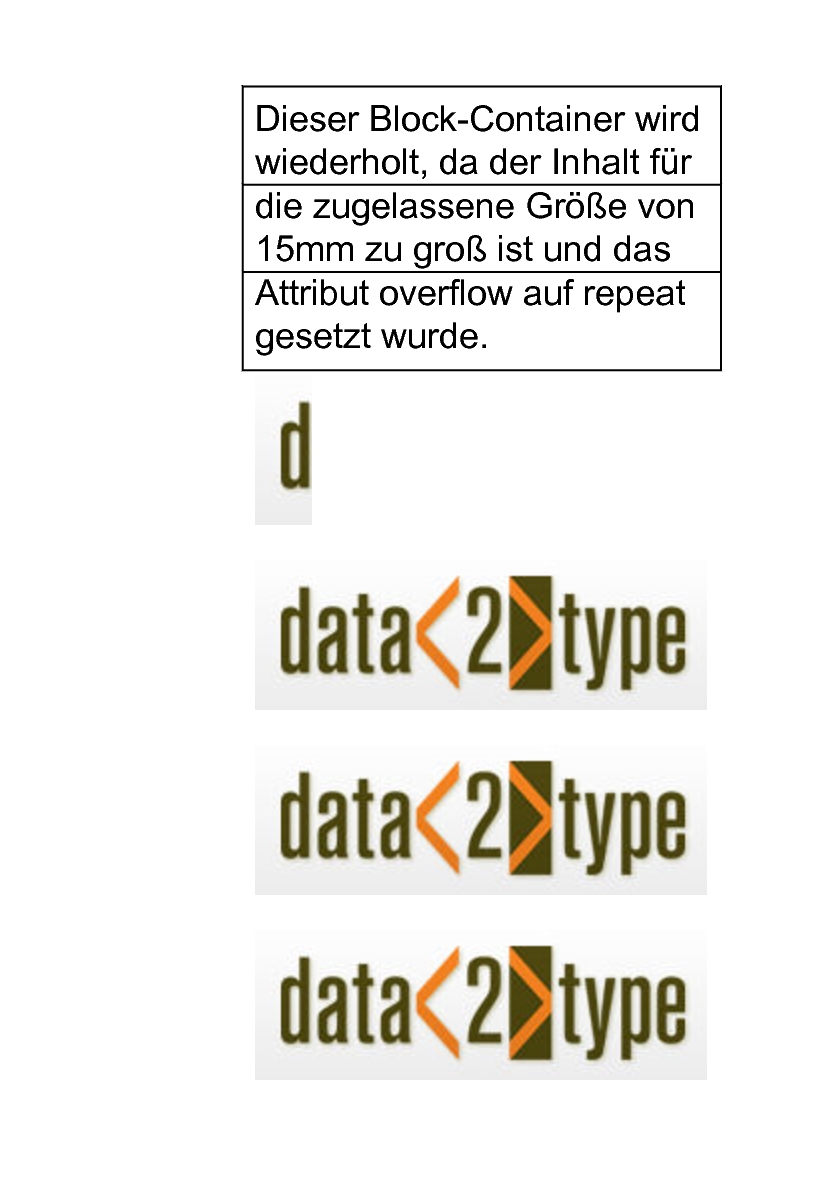
<fo:root font-family="Arial" font-size="18pt" line-height="1.2em" xmlns:fo="http://www.w3.org/1999/XSL/Format" xmlns:cpfo="http://www.compart.net/xmlns/cpfo" xmlns:svg="http://www.w3.org/2000/svg" xmlns:axf="http://www.antennahouse.com/names/XSL/Extensions">
<fo:layout-master-set>
<fo:simple-page-master master-name="Inhalt-Seiten" margin="0mm 0mm 0mm
                      0mm" page-height="210mm" page-width="148mm">
<fo:region-body margin="15mm 35mm 10mm
                        45mm"/>
</fo:simple-page-master>
</fo:layout-master-set>
<fo:page-sequence master-reference="Inhalt-Seiten">
<fo:flow flow-name="xsl-region-body">
<fo:block-container block-progression-dimension="15mm" inline-progression-dimension="80mm" overflow="repeat" border-before-width.conditionality="retain" border="1pt
                      solid" padding="2mm">
<fo:block>
Dieser Block-Container wird wiederholt, da der Inhalt für die zugelassene Größe von
                15mm zu groß ist und das Attribut overflow auf repeat gesetzt wurde.
</fo:block>
</fo:block-container>
<fo:block>
<fo:external-graphic src="data2type-logo.TIF" width="10mm" height="30mm" overflow="hidden"/>
</fo:block>
<fo:block>
<fo:external-graphic src="data2type-logo.TIF" width="10mm" height="30mm" overflow="auto"/>
</fo:block>
<fo:block>
<fo:external-graphic src="data2type-logo.TIF" width="10mm" height="30mm" overflow="scroll"/>
</fo:block>
<fo:block>
<fo:external-graphic src="data2type-logo.TIF" width="10mm" height="30mm" overflow="visible"/>
</fo:block>
</fo:flow>
</fo:page-sequence>
</fo:root>In the output:
Excerpt from the W3C Recommendation: