

XML technologies / CSS / CSS Cookbook / Tables / Styling table headings
(Excerpt from “CSS Kochbuch” by Christopher Schmitt)
Problem
Table headings and ordinary table cell content should use different styles. The next figure shows a table with headings displayed in the formerly customary way; the figure after that shows the same table with styles applied to its headings.
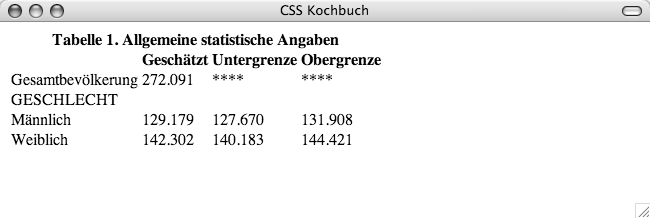
Figure: The table without special styles for heading cells.
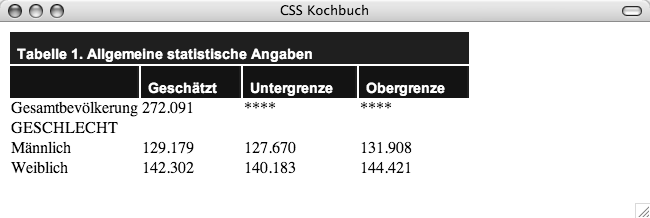
Figure: A heading cell with styles applied.
Solution
Use the element selector th to assign the appropriate styles to the table’s heading cells:
th {
 text-align: left;
 padding: 1em 1.5em 0.1em 0.5em;
 font-family: Arial, Helvetica, Verdana, sans-serif;
 font-size: .9em;
 color: white;
 background-color: blue;
 border-right: 2px solid blue;
}
If a table contains several rows with elements th, use a class selector instead:
.secondrow th {
 /* Hintergrund in einem helleren Blau darstellen */
 background-color: #009;
}
Assign the appropriate class to the table row:
<tr>
  <th colspan="4">Tabelle 1. Allgemeine statistische Angaben</th>
</tr>
<tr class="secondrow">
  <th> </th>
  <th>Geschätzt</th>
  <th>Untergrenze</th>
  <th>Obergrenze</th>
</tr>
Discussion
The element th identifies a cell’s content as a heading. To visually distinguish heading cells from ordinary table cells (td), define different styles for the two cell types. Simply assign different values to the properties font-family, background-color, font-size, font-weight and text align. (In this context, also see the recipe Specifying typefaces for defining fonts and the recipe Specifying font sizes and measurements for setting font sizes and styles.)
See also
Information on type selectors.
Copyright of the German edition © 2007 by O’Reilly Verlag GmbH & Co. KG
You may print the online version for your private use.
Otherwise, this chapter from “CSS Kochbuch” is subject to the same conditions as the bound edition: the work, including all its parts, is protected by copyright. All rights reserved, including reproduction, translation, microfilming, and storage and processing in electronic systems.
O’Reilly Verlag GmbH & Co. KG, Balthasarstr. 81, 50670 Köln