

XML technologies / CSS / CSS Cookbook / Tables / Setting cell borders and padding
(Excerpt from “CSS Kochbuch” by Christopher Schmitt)
Problem
Adjust cell borders and padding for a stronger visual effect than default tables (see the figure).
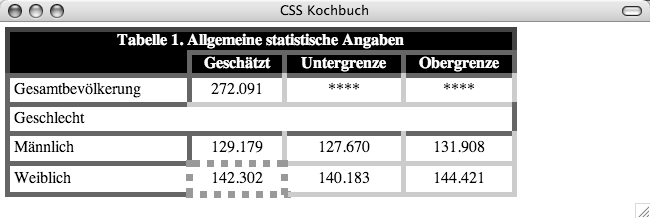
Figure: Cells with adjusted borders and padding.
Solution
Use the property padding to set space between cell content and edges. Define cell and table borders with the property border (Note: the identical rules for td and th+th are not grouped because Internet Explorer 5.5 and 6 ignore any rule containing the adjacent sibling selector +, even as part of a selector list):
table {
 border-collapse: collapse;
 border: 5px solid #444;
}
td {
 padding: 4px;
}
th {
 color: white;
 background-color: black;
}
td {
 border: 5px solid #666;
}
th+th {
 border: 5px solid #666;
}
td+td {
 border: 5px solid #ccc;
 text-align: center;
}
td#winner {
 border: 7px dotted #999;
}
Discussion
HTML tables have two border models: collapsed (collapse) and separate (separate). Collapsed borders share edges between adjacent cells; separate borders give each cell its own border. At the time of writing, collapsed borders are most widespread and therefore more commonly used by designers.
All current browsers default to collapsed borders except Firefox, which uses separate cells. CSS prescribes no default behavior, so explicitly specify the model. For collapsed borders, set the property border-collapse to collapse:
table {
 border-collapse: collapse;
}
In HTML, the attribute border for the element table sets border width for the table and its cells. For separate widths, use the CSS property border.
Conflicting cell border rules are resolved as follows:
If
border-styleishidden, all other border sides are hidden too.If
border-styleisnone, other values forborder-styletake precedence.Except when a cell’s
border-styleishiddenornone, wider borders outrank narrower ones. With equal widths, styles follow this descending priority:double,solid,dashed,dotted,ridge,outset,groove,inset.For equal widths and styles but different colors, priority follows: cell, row, row group, column, column group, table.
The second model, separate, gives each cell an independently styled border. Horizontal and vertical gaps use the property border-spacing:
table#runoffdata {
 border-collapse: separate;
 border-spacing: 4px 4px;
}
If the property border-collapse is separate, styles for rows, columns and cell groups are ignored. The property empty-cells controls whether empty cells appear.
Separate borders offer more control, but at the time of writing only Firefox, Mozilla, Safari and Netscape 6 support them, not Internet Explorer for Windows. Most designers therefore use collapsed borders.
See also
The CSS 2.1 specification on border models and a detailed discussion of CSS tables in chapter 11 of CSS – Das umfassende Handbuch by Eric A. Meyer (O’Reilly).
Copyright of the German edition © 2007 by O’Reilly Verlag GmbH & Co. KG
You may print the online version for your private use.
Otherwise, this chapter from “CSS Kochbuch” is subject to the same conditions as the bound edition: the work, including all its parts, is protected by copyright. All rights reserved, including reproduction, translation, microfilming, and storage and processing in electronic systems.
O’Reilly Verlag GmbH & Co. KG, Balthasarstr. 81, 50670 Köln