

XML technologies / CSS / CSS Cookbook / Forms / Highlighting required form fields
(Excerpt from “CSS Kochbuch” by Christopher Schmitt)
Problem
Users should immediately see which form fields must be completed. If the form must be redisplayed because fields were empty or incorrect, those fields should receive additional highlighting.
Solution
Place a text warning and an icon beside the form labels (labels) for required fields (see the next figure).
Give the required form elements (in our example, input and textarea) and their associated elements label an attribute class with the value required (“required”), as shown here:
<form id="msgform" name="msgform" method="post" action="/process.php">
  <fieldset>
    <legend>Kontaktinformationen</legend>
    <label for="fmtitle" accesskey="a"><span class="akey">A</span>nrede</label>
    <select name="fmtitle" id="fmtitle">
      <option value="herr">Herr</option>
      <option value="frau">Frau</option>
      <option value="firma">Firma</option>
    </select>
    <label for="fmname" accesskey="n"><span class="akey">N</span>ame</label>
    <input type="text" name="fmname" id="fmname"/>
    <label for="fmemail" accesskey="e" class="required"><span class="akey">E-</span>Mail <img src="img/warning.gif"/>Notwendige Eingabe!</label>
    <input type="text" name="fmemail" id="fmemail" class="required"/>
  </fieldset>
  <fieldset>
    <legend>Ihre Nachricht</legend>
    <label for="fmstate" accesskey="b"><span class="akey">B</span>etreff</label>
    <input type="text" name="fmcountry" id="fmcountry"/>
    <label for="fmmsg" class="required"><span class="akey">N</span>achricht <img src="img/warning.gif"/>Notwendige Eingabe!</label>
    <textarea name="fmmsg" accesskey="n" id="fmmsg" rows="5" cols="14" class="required"></textarea>
  </fieldset>
  <input type="submit" name="submit" value="Abschicken" class="submit"/>
</form>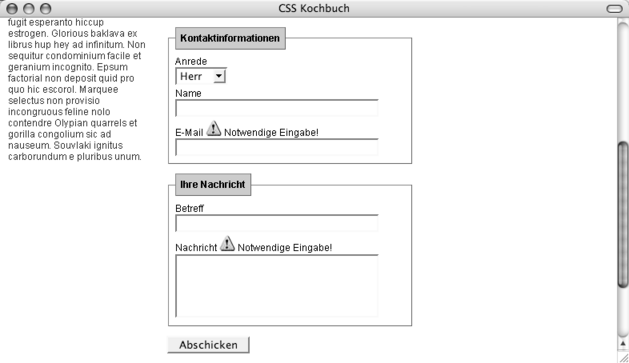
Figure: Icon and text for required fields are displayed.
For additional highlighting, change these fields’ borders and background colors (see the following figure):
label {
 margin-top: .33em;
 display: block;
}
input {
 display: block;
 width: 250px;
}
textarea {
 width: 250px;
 height: 75px;
}
label.required {
 color: #c00;
 font-weight: bold;
}
textarea.required, input.required {
 border: 1px solid red;
 background-color: #eee;
}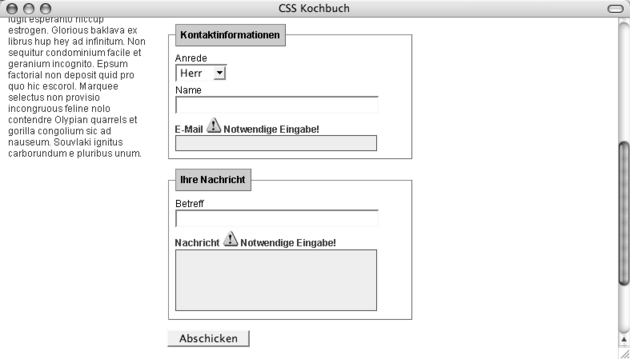
Figure: Form fields receive additional highlighting.
Discussion
Changing the input and label elements makes required form fields easy to identify.
The message “Required field!”, together with the warning icon and colored highlighting of required fields, quickly shows users which fields caused problems. If the browser does not support CSS, the text and icon are the only indications that parts of the form need correction.
See also
A tutorial on Integrating form validation with PHP.
Copyright of the German edition © 2007 by O’Reilly Verlag GmbH & Co. KG
You may print the online version for your private use.
Otherwise, this chapter from “CSS Kochbuch” is subject to the same conditions as the bound edition: the work, including all its parts, is protected by copyright. All rights reserved, including reproduction, translation, microfilming, and storage and processing in electronic systems.
O’Reilly Verlag GmbH & Co. KG, Balthasarstr. 81, 50670 Köln