

XML technologies / CSS / CSS Cookbook / Lists / Using custom graphics as list markers
(Excerpt from “CSS Kochbuch” by Christopher Schmitt)
Problem
You want to use a custom graphic as a list marker, such as the diamond image in the following figure.
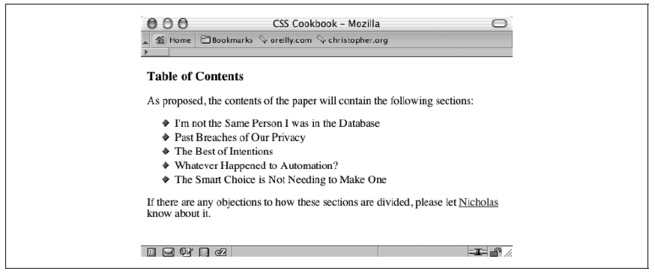
Figure: Custom graphical list markers.
Solution
Use the property list-style-image to specify a marker image:
ul {
 list-style-type: disc;
 list-style-image: url(bullet.gif);
}
Discussion
The property list-style-image specifies the location of the graphic to use as a marker. CSS cannot resize the image, so it must already have the correct dimensions. Oversized images can reduce readability or place part of the marker outside the visible area, as shown in the next figure. Ensure that custom marker graphics have the size required by your page design.
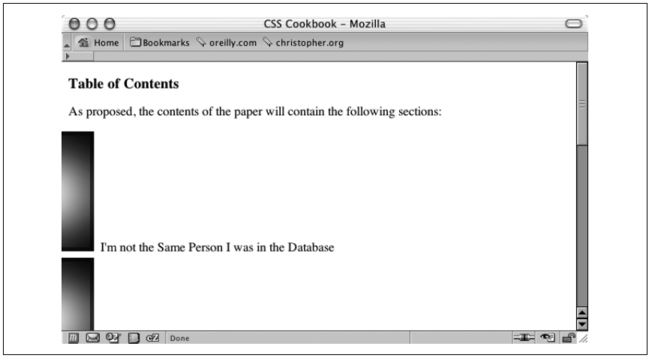
Figure: Oversized marker images may not be displayed in full.
The graphical marker value is inherited. Nested items therefore use the same image as their parent element. To prevent this, specify the value none for the child element.
ul {
 list-style-type: disc;
 list-style-image: url(bullet.gif);
}
ul ul { list-style-image: none; }
In case the image cannot be displayed for any reason, always specify an alternative using the property list-style-type. Our solution uses the marker type disc if the graphic bullet.gif cannot be displayed.
See also
The recipe Custom list markers for creating custom text markers, and the CSS 2.1 specification on the property list-image-type.
Copyright of the German edition © 2007 by O’Reilly Verlag GmbH & Co. KG
You may print the online version for your private use.
Otherwise, this chapter from “CSS Kochbuch” is subject to the same conditions as the bound edition: the work, including all its parts, is protected by copyright. All rights reserved, including reproduction, translation, microfilming, and storage and processing in electronic systems.
O’Reilly Verlag GmbH & Co. KG, Balthasarstr. 81, 50670 Köln