

XML technologies / ePUB / ePub für (In)Designer / Images / Optimizing images / Images in InDesign CS5
(Excerpt from “ePub für (In)Designer — Mit InDesign Schritt für Schritt zum E-Book” by Sascha Heck & Yves Apel)
InDesign CS5 handles images like InDesign CS5.5, with one major exception. Images exported at 600-pixel width retain their InDesign width but are downsampled to 72 ppi, with no export-resolution setting. InDesign’s image conversion also yields poorer quality than processing directly in Photoshop at 72 dpi.
Forums often ask how to include higher-resolution images without CS5.5. Here are the steps, potentially laborious with many images.
First finalize images in Photoshop, directly setting resolution, size, rotation and effects.
Import them at 1:1 scale into InDesign and create the ePub.
Unpack the ePub as described under Unpacking an ePub and open the images folder.
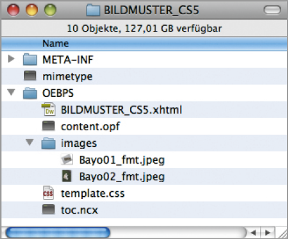
Figure: images folder.
Back up the Photoshop-processed images previously imported into InDesign, and give them exactly the names found in the extracted ePub.
Overwrite the extracted ePub images with the Photoshop versions.
Repackage the extracted folder as an ePub, as explained under Packaging an ePub.
Copyright © dpunkt.verlag GmbH 2012
You may print the online version for your private use.
Otherwise, this chapter from “ePub für (In)Designer” is subject to the same terms as the printed edition: the work and all its parts are protected by copyright. All rights reserved, including reproduction, translation, microfilming, and storage and processing in electronic systems.
dpunkt.verlag GmbH, Wieblinger Weg 17, 69123 Heidelberg, fon 06221-14830, fax 06221-148399, hallo(at)dpunkt.de
back to top