XML technologies / Regular expressions / Solutions
(Excerpt from "Regular expressions" by Jeffrey E. F. Friedl)
Solution 1
How do you read ˹^ding$˼, ˹^$˼, and ˹^˼?Answer to the question in Start and end of a line: ˹^ding$˼ Literally: Matches when a line has a beginning, as every line does, followed by d‧i‧n‧g, followed immediately by the end of the line. Effect: Matches lines containing only ding and nothing else: no extra words, spaces, punctuation, and so on.
˹^$˼ Literally: Matches when a line has a beginning immediately followed by its end. Effect: Matches blank lines, genuinely empty ones: even spaces are not allowed.
˹^˼ Literally: Matches when a line has a beginning. No effect! Every line has a beginning, so this regex always matches—even blank lines!
|
Solution 2
Why doesn’t ˹q[^u]˼ match ›Qantas‹ and ›Iraq‹? |
Answer to the question in Negated character classes: |
|
Qantas is not matched because the regex requires a lowercase q, whereas the Q in Qantas is uppercase. If we used ˹Q[^u]˼, it would match Qantas but not the other words, since they have no uppercase Q. The regex ˹[Qq][^u]˼ would match all of them.
|
|
The problem with Iraq is almost a trick question. The regex requires a q followed by a character that is not u. But egrep removes all line-ending characters before testing regexes, a detail I withheld—sorry! Thus, after the q no character remains to match any part of the regex. Certainly, after the q there is no u, but there is no non-u! |
|
Don’t worry about the trick question. Anecdote: in fourth grade, a spelling contest asked me to spell “miss.” I answered m‧i‧s‧s. But the teacher, Miss Smith, said she meant M‧i‧s‧s with a capital M, and that I should have asked for an example sentence. A traumatic moment in a boy’s life! After that, I no longer liked Miss Smith, and spelling and I have been on bad terms ever sinse. |
|
If egrep did not strip line endings, as some other programs do not, or if the word Iraq were followed by another word or even a space, it would match. Sometimes a tool’s finer details matter, but this example is meant only to show that a character class, even a negated one, requires a character to match. |
|
Solution 3
Making a subexpression optional |
Answer to the question in Other quantifiers: Repetition: |
|
Here, optional means allowed once but not required, so we use ˹?˼. Since the optional component contains more than one character, it needs parentheses: ˹(...)?˼. Inserting that into our regex gives: |
|
˹<HR(●+ SIZE●*=●*[0-9]+)?●*>˼ |
|
Notice that the final ˹●*˼ is outside ˹(...)?˼ . That lets text such as <HR●> match too. Inside the parentheses, it would allow spaces before > only when an explicit width is present. |
|
In contrast, notice that ˹●+˼ before SIZE is inside the parentheses. Otherwise at least one space would be required after HR, even without a SIZE attribute in the tag, so <HR> would not match. |
|
Solution 4
Extending the time regex to a 24-hour clock |
Answer to the question in American times such as “9:17 am” and “12:30 pm”: |
|
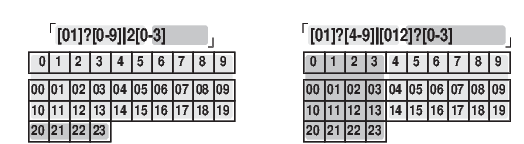
There are many correct answers; this one follows the earlier logic. Split the task into three parts: morning hours 00–09, with optional leading zeros; daytime hours 10–19; and evening hours 20–23. Translating step by step into regex notation gives: ˹0?[0-9]|1[0-9]|2[0-3]˼. |
|
The first two alternatives can be combined into one, giving the shorter ˹[01]|?[09]|2[0-3]˼. Why this works may not be obvious at first. The figure may help and also shows another approach. Each shaded group contains numbers describable by one branch of an alternation. |
|
|
Solution 5
Non-capturing parentheses: ˹(?:...)˼ |
Answer to the question in Nested regular expressions: |
|
In the figure Nested parentheses, the parentheses in ˹(\.[0-9]*)?˼ were used only to group, making the question mark apply to the whole subexpression ˹\.[0-9]*˼ and make it optional. The matched text was automatically captured in the variable $2, but we never used it. Wouldn’t parentheses that only group and avoid unnecessary capture be better? |
|
In Perl, and more recently other regex dialects, such parentheses exist. Besides ˹(...)˼, which groups and captures text, the special notation ˹(?:...)˼ groups without capturing. Its opening parenthesis consists of the three characters (?:, which certainly takes getting used to. This question mark has no connection to the metacharacter ˹?˼ that makes a subexpression optional. The section The origins of regular expressions explains why this odd notation was chosen. |
|
The entire expression in the figure Nested parentheses becomes:
if ($input =~ m/^([+]?[09]+(?:\.[09]*)?)([CF])$/)
Although the parentheses around ˹[CF]˼ are clearly the third pair, the captured text is still stored in $2, because pairs with ˹(?:...)˼ do not count. |
|
This has two advantages. First, not storing text is more effi⟦U+0002⟧cient; more about effi⟦U+0002⟧ciency ⟦U+0002⟧is in The art of writing regular expressions. Second, always using the appropriate parentheses is clear programming style: a reader seeing ˹(?:...)˼ knows that the matched text will not be used later. |
|
On the other hand, ˹(?:...)˼ looks rather ugly and makes the expression harder to read, at least initially. Are the advantages worth it? I usually use the type appropriate to the task, but here ˹(?:...)˼ may confuse more than it helps. Effi⟦U+0002⟧ciency is less important since this regex is used only once; a loop would be different. |
|
For the rest of this chapter, I use ordinary ˹(...)˼ parentheses for aesthetic reasons, even when their captured text is unused. |
|
Solution 6
What differs between ˹[●TAB]*˼ and ˹(●*|TAB*)˼? |
Answer to the question in Nested regular expressions: Quick question: |
|
˹(●*|TAB*)˼ allows either ˹●*˼ or ˹TAB*˼ to match: spaces or nothing, or tabs or nothing, but no combination of spaces and tabs. |
|
˹[●TAB]*˼ means any number of ˹[●TAB]˼. A string such as ›TAB●●‹ matches it three times: once with the tab and twice with spaces. |
|
In contrast, ˹[●TAB]*˼ does have the same effect as ˹(●*|TAB*)˼, but How regex engines work explains why the character class is usually much more effi⟦U+0002⟧cient. |
|
Solution 7
What does $var =~ s/\bJeff\b/Jeff/i do? |
Answer to the question in Modifying text with regular expressions: |
|
The question looks hard only because of its wording. Had I used ˹\bJEFF\b˼ or ˹\bjeff\b˼, or perhaps ˹\bjEfF\b˼ as the regex, the answer would be immediate. Because of /i, “Jeff” is matched without regard to case, then replaced by Jeff with exactly that capitalization. /i has no effect on replacement text, although other modi⟦U+0002⟧fiers introduced in Perl do. |
|
The net effect is to replace every capitalization of “jeff” with “Jeff.” |
|
Solution 8
What does s/(?=s\b)(?<=\bJeff)/⟦U+001F⟧'/g? |
Answer to the question in More lookahead examples: |
|
Here, the order of the subexpressions ˹(?=s\b)˼ and ˹(?<=\bJeff)˼ does not matter. From a given position, checking left then right or right then left is equivalent; what matters is that both checks start at the same position. For example, the two subexpressions ˹(?=s\b)˼ and ˹(?<=\bJeff)˼ match the marked positions in Thoma▵s●Jeff▵erson, but no position matches their combination. |
|
“Their combination” is slightly imprecise, but intuitively clear here. In other cases, the precise way the regex engine performs matching matters greatly and is not always intuitive. It directly affects a regex’s meaning. How regex engines work explores this in detail. |
|
Solution 9
Which Jeff solutions preserve case with /i? |
Answer to the question in Summary of Jeffs: |
|
Case is preserved either by reinserting exactly the consumed characters, rather than simply ›Jeff⟦U+001F⟧'s‹, or by consuming nothing. The second solution in the table Approaches to the Jeffs problem uses the first approach: all consumed characters are saved and can be inserted into the replacement using $1 and $2. The table’s last two solutions consume nothing, so they have nothing to replace. |
|
The first and third solutions explicitly insert replacement text with fixed capitalization. JEFFS would incorrectly become Jeff⟦U+001F⟧'s or Jeff'⟦U+001F⟧S. |
|
Solution 10
Can s/(\d)((\d\d\d)+\b)/$1.$2/g group digits into threes?Answer to the question in Grouping without lookbehind: The substitution does something, but not what we want: the population example yields “82.499213.” The first triple now belongs to the match and cannot be given back for the next round of /g. Each new round starts where the previous match ended. We want that position immediately after the inserted period, allowing us to process the next triple, but unfortunately ˹(\d\d\d)+˼ has already consumed all the digits, so the second round begins at the end of the entire digit sequence. The point of lookahead is precisely to inspect text to the right without including it in the match. We can rescue this approach by repeating the substitution in a loop provided by the programming language. The modified text is then processed again from the very start, not where the previous iteration ended. Each iteration adds another grouping period, to every number in the subject string because of the /g modifier. Here is the Perl example: while ( $text =~ s/(\d)((\d\d\d)+\b)/$1.$2/g ) {
# Leere Schleife -- wir starten nur die Regex immer wieder neu, bis sie nichts mehr findet.
}
|
Solution 11
Is ›eine●▵1234●Zahl‹ part of a saved state when ˹[0-9]*˼ is applied to
›eine●1234●Zahl‹?Answer to the question in Backtracking with star and plus: No. This question targets a common beginner’s mistake. A starred component can always match. If it is the entire regex, the regex can also match at every position, including the very first position tried by the transmission: the start of the string. Here the whole regex matches at ›▵eine●1234●Zahl‹, and that is it: the engine never reaches the digits. If you answered incorrectly, you can still earn half a point. If something after ˹[0-9]*˼ prevented the regex as a whole from matching until the state in the text: ›eine●▵1234●...‹ | in the regex: ˹▵[0-9]*...˼ |
, the attempt at ›1‹ would indeed have saved this state: in the text: ›eine●▵1234●...‹ | in the regex: ˹[0-9]*▵...˼ | |
|
Solution 12
What does ˹(?>.*?)˼ match?Answer to the question in Atomic groups: The essence. This construct can never match a character. It is simply a complicated way of doing nothing. ˹*?˼ is the lazy version of ˹*˼ and quantifies the dot. The first path tried is to skip matching the dot, saving the alternative as a state. But the group then ends, discarding every state saved inside it. Only the skip-the-dot path is ever followed; try-the-dot alternatives are saved and immediately discarded upon leaving the group. If something is always skipped, it might as well be omitted. |
Solution 13
Effects of a simple changeAnswer to the question in A simple change: Put the best alternative first: - Which engine type is affected?
The change has no effect on a POSIX NFA engine: it must test every regex permutation anyway, so test order is irrelevant. For a traditional NFA, putting the most common alternative first helps because, after the first local match, it need not consider the remaining alternatives. - Which kind of result is affected?
This improves performance only when a match is actually found. An NFA gives up only after every permutation has failed; again, a POSIX NFA tries them all anyway. If the text does not match, every permutation must be checked, so order does not matter.
The table lists comparisons, or tests, and backtracking operations, marked BT. Smaller numbers mean better results. | Traditional NFA | POSIX NFA | | ˹"(\\.|[^"\\])*"˼
| ˹"([^"\\]|\\.)*"˼
| both expressions | Sample text | Tests | BT | Tests | BT | Tests | BT | "2\"x3\" likeness"
| 32 | 14 | 22 | 4 | 48 | 30 | "makudonarudo"
| 28 | 14 | 16 | 2 | 40 | 26 | "sehr...99 Zeichen...lang"
| 218 | 109 | 111 | 2 | 325 | 216 | "No \"match\" here
| 124 | 86 | 124 | 86 | 124 | 86 |
Both regexes obviously give identical results with a POSIX NFA. Traditional NFAs do better with the new regex because less backtracking is required. The final, nonmatching example gives identical results everywhere, since all permutations must be checked. |
Solution 14
What does this code output?Answer to the question in What context is this?: The example produces this output: WHILE raus ist Eene.
WHILE raus ist Meene.
WHILE raus ist Muh.
IF raus ist Eene.
FOREACH raus ist Muh.
FOREACH raus ist Muh.
FOREACH raus ist Muh.
If the print statement in the foreach loop printed $_ instead of $&, the result would be the same as the while loop. But the given foreach loop does not use the return value of m/.../g, the list ('Eene', 'Meene', 'Muh'). Only the side effect $& is printed, suggesting a programming error: the side effects of m/.../g in list context are usually useless. |
Solution 15
Pattern pAmEnde = Pattern.compile("\\G\\z");
Pattern pWort = Pattern.compile("\\G\\w+");
Pattern pKeinHtml = Pattern.compile("\\G[^\\w<>&]+");
Pattern pImgTag = Pattern.compile("\\G(?i)<img\\s+([^>]+)>");
Pattern pLink = Pattern.compile("\\G(?i)<A\\s+([^>]+)>");
Pattern pLinkX = Pattern.compile("\\G(?i)</A>");
Pattern pEntity = Pattern.compile("\\G&(#\\d+|\\w+);");
boolean needClose = false;
Matcher m = pAmEnde.matcher(html); // Matcher kann man mit jedem Pattern erzeugen.
Integer aktuellePos = 0; // Suche beginnt am Anfang des Strings.
while ( aktuellePos < html.length()) {
if (m.usePattern(pWort).find(aktuellePos)) {
// Ein Wort oder eine Zahl in m.group() -- auf Obszönitäten usw. prüfen ...
} else if (m.usePattern(pKeinHtml).find(aktuellePos)) {
// Weder Wort noch Zahl noch HTML -- zulassen.
} else if (m.usePattern(pImgTag).find(aktuellePos)) {
// Ein IMG-Tag -- Inhalt auf Zulässigkeit prüfen ...
} else if (! needClose && m.usePattern(pLink).find(aktuellePos)) {
// Ein Link -- den wir hier überprüfen können ...
needClose = true;
} else if (needClose && m.usePattern(pLinkX).find(aktuellePos)) {
System.out.println("/LINK [" + m.group() + "]");
needClose = false;
} else if (m.usePattern(pEntity).find(aktuellePos)) {
// Entities wie > oder { zulassen.
} else {
// Bis hier nichts erkannt; also Fehler. Wir holen ein Dutzend Zeichen aus dem
// HTML-Text ab der aktuellen Position und geben damit eine Fehlermeldung aus.
m.usePattern(Pattern.compile("\\G(?s).{1,12}")).find(aktuellePos);
System.out.println("Unerwartetes HTML bei '" + m.group() + "'");
System.exit(1);
}
aktuellePos = m.end(); // Die neue aktuelle Position ist das Ende des letzten Treffers.
}
if (needClose) {
System.out.println("Kein </A> am Ende.");
System.exit(1);
}
However, the version of find used here resets the region, unlike the original. If that is a problem, maintain the region yourself and at each find use the region method: m.usePattern(pWort).region(anfang, ende).find(aktuellePos)
|
Solution 16
Does this change the output?Answer to the question in preg_replace: Order of array elements The code produces this output on a single line, wrapped here: Wort<Dieser> Wort<Satz> Wort<hat> Wort<Zahl><8> Wort<Wörter> Wort<und> Wort<Zahl><39> Wort<Zeichen>
When several regexes are passed to preg_replace as a pattern array, they are processed sequentially, not in parallel. Each regex applies to the result of the previous search-and-replace pass. Here, the first pass inserts two Zahl<...> sequences. But these ›Zahl‹ strings are recognized as words in the next pass and replaced by ›Wort<Zahl>‹, producing the perhaps surprising output above. The moral is that the order of regexes in a pattern array passed to preg_replace does matter. |
Solution 17
What do the parentheses capture when ˹^.*([0-9]+)˼ is applied to ›Copyright 2003.‹?Answer to the question in First come, first served. The intention was to capture the last whole number in the string, but it fails. As before, ˹.*˼ must give back characters because the following ˹[0-9]+˼ requires characters. Here that means unmatching the final period and the digit 3, allowing ˹[0-9]˼ to match. It is quantified by ˹+˼; one character, the minimum, has already matched, and the next character is the period ›.‹, which does not match. Unlike before, however, there are no more elements that must match, so ˹.*˼ is not forced to give back more characters, namely 0. If it did, the following ˹[0-9]+˼ would gladly accept them, but first come, first served applies. Greedy elements are stingy too: once they have taken something, they give it back only under pressure, not to be nice. Ultimately, $1 stores only the final 3. If this is hard to grasp, compare ˹[0-9]+˼ with ˹[0-9]*˼, which is only one step away. ˹[0-9]*˼ belongs to the same family as ˹.*˼. Replacing it in our expression ˹^.*([0-9]+)˼ yields ˹^.*(.*)˼, which looks suspiciously like the example ˹^Subject:●(.*).*˼, where the final ˹.*˼ got nothing at all. |
German edition copyright © 2008 by O’Reilly Verlag GmbH & Co. KG
You may print the online version for private use.
Otherwise, this chapter from "Reguläre Ausdrücke" is subject to the same terms as the bound edition: the work and all its parts are protected by copyright. All rights reserved, including reproduction, translation, microfilming, storage and processing in electronic systems.
O’Reilly Verlag GmbH & Co. KG, Balthasarstr. 81, 50670 Köln
back to top
