

XML technologies / Regular expressions / Introduction to regular expressions / Regular expressions as a way of thinking
(Excerpt from "Reguläre Ausdrücke" by Jeffrey E. F. Friedl)
Regexes consist of small building blocks. Each is simple, but their endless combinations require experience to obtain the desired result. This section introduces basic concepts without going too deep, laying a foundation for the book and its important side issues before getting lost in details.
Some examples seem ridiculous—and often are ridiculous—but illustrate common problems you may not yet recognize. Do not worry about understanding every detail immediately. Take each lesson’s central idea and let it sink in; that is this section’s purpose.
If you already have regex experience
If regexes are familiar, this overview may offer little new material, but at least ⟦U+0003⟧ skim it. Even if you know the metacharacters, the approach may be new.
Producing sounds on an instrument differs from truly playing it. Likewise, understanding regexes differs from truly understanding them. Some steps present familiar material in a new way, perhaps leading to real understanding of regular expressions.
Searching text files: egrep
Searching for text is the simplest regex application; many editors and word processors let you search a document with regexes. egrep is simpler still: give egrep a regex and the names of files to search. egrep applies the regex to every line of every file and prints matching lines. egrep is freely available for DOS, MacOS, Windows, Unix, and other systems. The book’s website explains how to obtain egrep for your operating system.
Returning to email, the following figure shows the command that produced my simple email contents listing. egrep treats the first argument as the regex and the rest as files to search. The single quotes in the figure are not part of the regex; my shell requires them. (Note: The shell reads commands and runs programs. Mine uses single quotes to enclose arguments and preserve their contents. Without them, it would interpret a regex’s * itself as a filename glob. The quoted contents must instead pass unchanged to egrep, which interprets them as a regex. Windows and COMMAND.COM users may prefer double quotes.) When using egrep , I almost always single-quote the regex. Which characters are special, for which interpreter, in what context, and in what evaluation order become important in real programming languages, beginning under Extended introductory examples.
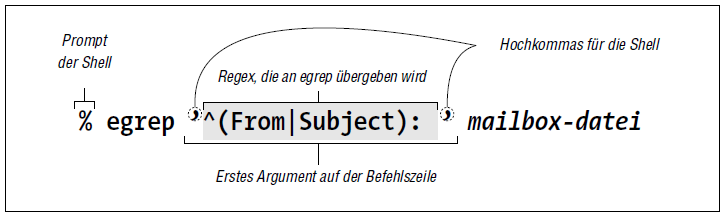
Figure: Invoking egrep from the command line.
We will analyze each part later, but some clearly have special meanings. Here, parentheses and the characters ˹^˼ and ˹|˼ are metacharacters, working with the other characters to produce the result.
If your regex uses none of the dozen metacharacters understood by egrep, it becomes a simple substring search. Searching a file for ˹ding˼ makes egrep print every line containing the four characters d‧i‧n‧g consecutively, even inside a word such as bedingen.
The line need not contain the word ding; the sequence d‧i‧n‧g suffices. That is all the regex seeks; finding it makes egrep print the line. Regex matching is not word-based: egrep knows file bytes and lines but nothing about German or any other language’s words, sentences, paragraphs, or higher-level concepts.
German edition copyright © 2008 by O’Reilly Verlag GmbH & Co. KG
You may print the online version for private use.
Otherwise, this chapter from "Reguläre Ausdrücke" is subject to the same terms as the bound edition: the work and all its parts are protected by copyright. All rights reserved, including reproduction, translation, microfilming, storage and processing in electronic systems.
O’Reilly Verlag GmbH & Co. KG, Balthasarstr. 81, 50670 Köln