

XML technologies / Regular expressions / Extended introductory examples / Modifying text with regular expressions / Grouping large numbers into threes: Lookaround
(Excerpt from "Regular expressions" by Jeffrey E. F. Friedl)
Large numbers are often grouped into threes to make them easier to read. Translator’s note: with monospaced fonts, groups are separated by commas in the USA, periods in Germany, and apostrophes in Switzerland; typeset text uses a thin space: 82 499 213. The command
print "Deutschland hat $pop Einwohner\n";might output something like “Deutschland hat 82499213 Einwohner,” but most people would automatically write “82.499.213.” How can we do that with a regex?
To form groups of three, we count digits from the right. It would be nice to reproduce this directly with regexes, but they work from left to right. Rephrasing the procedure as “insert periods between digits so that only groups of three digits remain to the right and at least one digit remains to the left” lets us accomplish it quite easily with the relatively new feature lookaround.
Lookaround constructs are related to word-boundary metacharacters (˹\b˼) and the anchors ˹^˼ and ˹$˼ in that they match no actual text, only a position, a specific place between characters in the subject string. But lookaround is much more general than the special cases of word boundaries and line anchors.
One form of lookaround is lookahead: the subject string is checked forward, to the right, for a subexpression, and that part of the regex succeeds when the subexpression matches. A positive lookahead, or positive forward-looking assertion, uses the special parentheses ˹(?=...)˼, for example ˹(?=\d)˼, which succeeds at positions with a digit to the right. Its counterpart, lookbehind, or backward-looking assertion, checks backward, to the left. Lookbehind uses ˹(?<=...)˼, for example ˹(?<=\d)˼, which matches positions with a digit to the left—in other words, after a digit.
Lookaround consumes no text
An important point about lookaround and similar constructs is that they consume no characters from the subject text, even though they inspect the string forward or backward. This can be confusing at first, so let’s illustrate it with an example. The regex ˹Jeffrey˼ ⟦U+0002⟧ matches the underlined part of this text:
... by Jeffrey Friedl.
The same subexpression in a lookahead matches only at the marked position:
... by ▵Jeffrey Friedl.
Lookahead checks the subject text against the subexpression but finds only the position where the subexpression matches, not the actual text that matched. Combining this with an ordinary subexpression such as ˹Jeff˼ that matches actual text makes the search more precise. The combined regex ˹(?=Jeffrey)Jeff˼ matches “Jeff,” but only as part of “Jeffrey.” The next figure shows this in more detail.
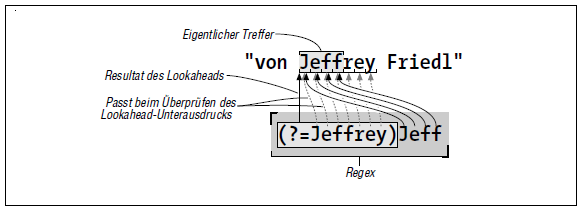
Figure: Matching with ˹(?=Jeffrey)Jeff˼.
The expression matches these characters:
... by Jeffrey Friedl.
Plain ˹Jeff˼ would do that too, but the combined expression does not match:
... by Thomas Jefferson
The part ˹Jeff˼ would match this line too, but no position also matches ˹(?=Jeffrey)˼, so the whole expression finds no match.
The possibilities may not be immediately obvious. Focus on what a forward-looking assertion does; don’t worry, more realistic applications will follow shortly.
It may help to see that ˹(?=Jeffrey)Jeff˼ does exactly the same thing as ˹Jeff(?=rey)˼. Both match the four characters “Jeff,” but only as part of “Jeffrey.”
The order of regex components matters. ˹Jeff(?=Jeffrey)˼ matches none of the examples above: it matches “Jeff” only when followed by “Jeffrey.”
Lookaround syntax is again rather ugly, like the non-capturing parentheses “(?:...)” from Solution 5. What is special is the opening parenthesis, which consists of several characters. Several such opening sequences exist, all starting with “(?”. The third character, after the question mark, defines the function of the entire construct. You already know non-capturing parentheses “(?:...)”, lookahead “(?=...)”, and lookbehind “(?<=...)”; more will follow.
More lookahead examples
We will eventually return to grouping large numbers, but first you need more practice with lookaround. The task is to replace the German genitive “Jeffs” with the English “Jeff's.” This is easy even without lookaround: s/Jeffs/Jeff⟦U+001F⟧'s/g. Remember, /g means global replacement. We can improve this with word boundaries: s/\bJeffs\b/Jeff⟦U+001F⟧'s/g.
We could be more sophis⟦U+0002⟧ticated and use parentheses, s/\b(Jeff)(s)\b/$1'⟦U+001F⟧$2/g, but that is excessive for this simple task. So for the mo⟦U+0002⟧ment, we will keep s/\bJeffs\b/Jeff'⟦U+001F⟧s/g. Compare it with:
s/\bJeff(?=s\b)/Jeff'⟦U+001F⟧/g
The only difference is that ˹s\b˼ now appears in lookahead parentheses.
The next figure shows how the regex fi⟦U+0002⟧nds a match. The replacement text has also had ›s‹ removed.
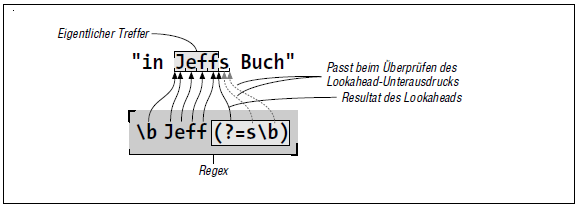
Figure: Matching with ˹\bJeff(?=s\b)˼.
After ˹Jeff˼ has matched, lookahead is tried. It succeeds only when its subexpression matches from the current position, that is, when ›Jeff‹ is followed by ›s‹ and a word boundary. But since ˹s\b˼ appears inside lookahead, its matched ›s‹ is not part of the overall match. Remember, ˹Jeff˼ matches text and consumes it, while lookahead matches only a position in the string. Here, lookahead’s only advantage is preventing the whole regex from matching in some cases, but not others. We can apply the whole regex ˹Jeffs˼, but its match contains only ˹Jeff˼.
Why pretend to match less than we have actually checked? Often, we want to examine the following text with later parts of the regex or with the same regex again. That is how we will handle number grouping. Here, we want to match the whole regex ˹Jeffs˼ ⟦U+0002⟧ before inserting an apostrophe, but keep the replacement shorter. Since the overall match does not include ›s‹, we need not append it to the replacement.
Both the regex and replacement text differ, but the result is the same. So far this looks like a dry exercise, but I have a specific goal in mind.
Moving from the first regex to the second shifted the final ˹s˼ from the main regex into lookahead. Can we similarly move ˹Jeff˼ into lookbehind? This would give ˹(?<=\bJeff)(?=s\b)˼, or in plain language: “Find a position where looking backward finds ›Jeff‹ ⟦U+0002⟧ and looking forward finds ›s‹.” Insert the apostrophe at this position. This gives the substitution:
s/(?<=\bJeff)(?=s\b)/'⟦U+001F⟧/g
Now it gets interesting. The regex as a whole matches or consumes no text: it ⟦U+0002⟧finds a match at a position in the string, exactly where the apostrophe belongs. There, “nothing” is replaced by the replacement string, as the next figure shows. We saw a similar effect when using s/^/|>●/ to insert ›|>●‹ at the start of email lines.
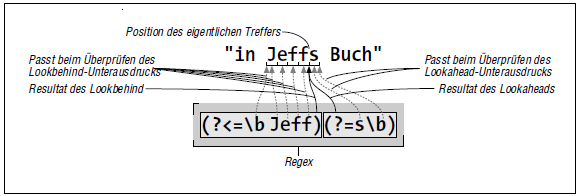
Figure: Matching with ˹(?<=\bJeff)(?=s\b)˼.
Would swapping the two lookaround constructs change the regex’s behavior? In other words: What is the effect of s/(?=s\b)(?<=\bJeff)/'⟦U+001F⟧/g? The answer ⟦U+0002⟧is in Solution 8.
Summary of “Jeffs”
The next table lists the approaches for converting Jeffs to Jeff⟦U+001F⟧'s.
Table: Approaches to the “Jeffs” problem.
Solution | Comment |
|---|---|
| The simplest, most obvious, clearest, and most effi⟦U+0002⟧cient solution; the one I would use if not demonstrating other methods. No lookaround; consumes the entire string › |
| Complicated, with no particular advantage. Consumes the entire string › |
| The › |
| This regex consumes no text. Lookahead and lookbehind locate a position in the string where an apostrophe is inserted. Illustrates lookaround’s principle. |
| The same regex as above, with lookahead and lookbehind swapped. Since these checks consume no characters, their order does not matter. |
Before returning to number grouping, here is another small problem about these regexes. To search for “Jeffs” without regard to case, while preserving the original capitalization after inserting the apostrophe, which of the four substitutions can simply have the /i modi⟦U+0002⟧fier added? Hint: two solutions in the table do not work correctly. Identify the other two and explain why they do work. The answer ⟦U+0002⟧is in Solution 9.
Back to grouping large numbers...
You have probably noticed the connection: both the Jeff example and number grouping require inserting a character at a particular place, a position, in a string, and that position can be described with a regex.
We decided to insert grouping periods at a position where only groups of three digits remain to the right and at least one digit remains to the left. The second condition is easy with lookbehind: one digit to the left is enough, giving ˹(?<=\d)˼.
Requiring only groups of three digits to the right is a little harder. One group of three is clearly recognized by ˹\d\d\d˼. Wrapping this in ˹(...)+˼ allows one or more groups. No single digit or pair may follow: the string must end after the last group. We enforce this with the anchor ˹$˼. The subexpression ˹(\d\d\d)+$˼ recognizes groups of three up to the end of the subject string. Inside lookahead, however, it matches only the positions where those sequences can begin, such as the marked positions here: ›▵123▵456▵789‹. That is one too many: we do not want a period before the very first digit, so we add ˹(?<=\d)˼ to restrict the possible positions further.
The code fragment
$pop =~ s/(?<=\d)(?=(\d\d\d)+$)/./g;
print "Deutschland hat $pop Einwohner\n";
does output the desired “Deutschland hat 82.499.213 Einwohner.” The parentheses around ˹\d\d\d˼ are ordinary capturing parentheses. Here they merely group the digits so the plus applies to the entire triple; storing the match in $1 is unnecessary.
I could have used the non-capturing parentheses ˹(?:...)˼ introduced in Solution 5, giving the regex ˹(?<=\d)(?=(?:\d\d\d)+$)˼. This is more precise, hence better: readers need not wonder what happens to the text in $1. It is also more effi⟦U+0002⟧cient, since the matched string need not be stored. On the other hand, ˹(?:...)˼ is harder to read than the simpler ˹(...)˼, and here I chose clarity. Such factors often need to be weighed when writing reg⟦U+0002⟧exes. Personally, I use ˹(?:...)˼ when appropriate to the problem, as here. But for demonstrations, as throughout most of this book, I omit everything super⟦U+0003⟧fluous.
Word boundaries and negative lookaround
Suppose the number you want to group is part of a longer string, for example:
$text = "Deutschland hat 82499213 Einwohner";
   .
   .
   .
$text =~ s/(?<=\d)(?=(\d\d\d)+$)/,/g;
print "$text\n";
Unfortunately this does not work, because ˹$˼ requires the string to end after the final triple. But removing the dollar sign would insert periods at every position with a digit to the left and at least three to the right, giving “…hat 8.2.4.9.9.213 Ein…”.
Odd as it may seem, we could replace the dollar sign with the word-boundary metacharacter \b. That works even though we are dealing only with numbers and digits, because of Perl’s somewhat odd notion of a word. In Perl and most other programs, ˹\w˼ stands for a word character: an alphanumeric character or underscore. A word boundary is a position with such a character on one side, here a digit, and something else on the other, such as a space or the end of the line.
This wording—one thing on one side and another on the other—sounds familiar, doesn’t it? That is exactly what we did with Jeffs. But here one side must not match a character. What we have called lookahead and lookbehind should more precisely be called positive lookahead and positive lookbehind, since they match positions where the parenthesized subexpression matches. The next table also shows their negative counterparts: negative lookahead and negative lookbehind succeed when the parenthesized subexpression does not match.
Table: Four types of lookaround.
Type | Construct | Succeeds when the parenthesized subexpression... |
Positive lookbehind |
| ...on the left side matches. |
Negative lookbehind |
| ...on the left side does not match. |
Positive lookahead |
| ...on the right side matches. |
Negative lookahead |
| ...on the right side does not match. |
If a word boundary is a position where ˹\w˼ matches on one side and ˹\w˼ does not on the other, then ˹(?<!\w)(?=\w)˼ can recognize the start of a word, and its counterpart ˹(?=\w)(?<!\w)˼ the end. Combining both as ˹(?<!\w)(?=\w)|(?=\w)(?<!\w)˼ emulates the word-boundary metacharacter ˹\b˼. That is rather silly in a language like Perl, which supports ˹\b˼, but the separate start- and end-of-word expressions can be useful.
For our grouping problem, however, we can use ˹(?!\d)˼ instead of ˹$˼ to recognize the end of a sequence of triples. This gives:
$text =~ s/(?<=\d)(?=(\d\d\d)+(?!\d))/./g;
This now works for something like “ein Ton von 12345Hz,” which is good, but also for “…in den 1970ern…,” where it is inappropriate. All the solutions above insert a period in “…1970…”. Using regexes properly requires knowing your text. If it contains years, grouping digits into threes is surely a bad idea.
All these approaches use a negative lookahead, ˹(?!\w)˼ or ˹(?!\d)˼, to require that a certain class of characters not match. Remembering ˹\D˼, meaning a non-digit character, you might think it could replace the negative lookahead. That would be a mistake. ˹\D˼ requires an actual character that is not a digit. If nothing follows the last triple, ˹\D˼ cannot match.
Grouping without lookbehind
Lookbehind support is less com⟦U+0002⟧mon, and it is used less often than lookahead. It is newer: Perl added it years after lookahead. Perl now has both, but not every regex-supporting language does. So a grouping solution without lookbehind can be useful. In this approach,
$text =~ s/(\d)(?=(\d\d\d)+(?!\d))/$1./g;
we simply replace the first ˹\d˼ parentheses with ordinary capturing parentheses; the text captured in $1 must then be reinserted in the replacement immediately before the grouping period.
What if lookahead is unsupported too? We can again use ˹\b˼ instead of the one lookahead construct ˹(?!\d)˼, but can we replace the other lookahead following the same pattern as lookbehind? Does this substitution work?
$text =~ s/(\d)((\d\d\d)+\b)/$1.$2/g;
The answer ⟦U+0002⟧is in Solution 10.
German edition copyright © 2008 by O’Reilly Verlag GmbH & Co. KG
You may print the online version for private use.
Otherwise, this chapter from "Reguläre Ausdrücke" is subject to the same terms as the bound edition: the work and all its parts are protected by copyright. All rights reserved, including reproduction, translation, microfilming, storage and processing in electronic systems.
O’Reilly Verlag GmbH & Co. KG, Balthasarstr. 81, 50670 Köln