

XML technologies / Regular expressions / Introduction to regular expressions / Metacharacters in egrep
(Excerpt from "Regular expressions" by Jeffrey E. F. Friedl)
We will begin with some metacharacters from egrep to explore the tool’s capabilities. I will introduce them briefly with examples; later sections provide exhaustive descriptions.
Typogra⟦U+0002⟧phical conventions
Before starting, make sure you know the typogra⟦U+0002⟧phical conventions used here (see Regular expressions overview: Typographical conventions).
Start and end of a line
Perhaps the simplest metacharacters are ˹^˼ (circumflex) and ˹$˼ (dollar), marking the start and end of the line being examined. As we saw, ⟦U+0002⟧the regex ˹ding˼ finds the characters d‧i‧n‧g anywhere on the line, whereas ˹^ding˼ ⟦U+0002⟧finds the characters d‧i‧n‧g only at the line’s start. Similarly, ˹ding$˼ matches only at the end, for example a line ending with Unding. Because circumflex and dollar pin the regex to a line’s start or end, they are called line anchors, or simply anchors.
Get into the habit of interpreting regexes literally. Do not read:
˹
^ding˼ matches a line withdingat the beginning
but rather:
˹
^ding˼ matches a line beginning immediately followed byd, immediately followed byi, immediately followed byn, immediately followed byg.
The result is the same, but the literal reading makes a new expression easier to understand. How would egrep interpret ˹^ding$˼ , ˹^$˼, or simply ˹^˼ alone? The answer is in Solution 1.
The circum⟦U+0003⟧flex and dollar are special because they describe a position in the line, not a character. There are of course ways to test actual characters. Besides literals standing for themselves, other metacharacters follow.
Character classes
Matching one of several characters
Suppose you want Birma but also Burma, the usual Swiss and English spelling. The construct ˹[...]˼, usually called a character class , lets you list characters to search for. An ˹i˼ matches only an i, an ˹u˼ only a u, but an ˹iu˼ matches both. The regex ˹B[iu]rma˼ thus literally means: find B followed by an i or a u, followed by r, an m, and then an a. I spell badly, so I often use regexes to ⟦U+0002⟧find words I repeatedly misspell. One of my fre⟦U+0002⟧quent mistakes is ˹sep[ea]r[ea]te˼, since I can never remember whether it is seperate, separate, separete, or something else.
Notice that outside the class, the characters ˹r˼, ˹m˼, and ˹a˼ in the full regex ˹B[iu]rma˼ imply sequence, “and then”: first ˹r˼ and then a ˹m˼ and then a ˹a˼. Inside the class, order is irrelevant: it means or.
Or you may want initial uppercase or lowercase: ˹[Rr]ot˼. This still matches lines where rot or Rot is part of a word, as in Protest. I emphasize this because beginners often stumble over it. We will return after learning more metacharacters.
The brackets may contain any number of characters. For example, ˹[123456]˼ matches any listed digit. As part of ˹<H[123456]>˼, matching <H1>, <H2>, <H3> and so on, it can help check HTML tags.
The character-class metacharacter ›-‹ (hyphen) marks a range within a class: ˹<H[1-6]>˼ means exactly the same as the earlier example. ˹[0-9]˼ and ˹[a-z]˼ are common shortcuts for digits and lowercase letters. Multiple ranges are allowed. ˹[0123456789abcdefABCDEF]˼ can therefore be shortened to ˹[0-9a-fA-F]˼, or ˹[A-Fa-f0-9]˼; range order does not matter. These three ranges commonly match hexadecimal numbers. Ranges and literals can mix: ˹[0-9A-Z_!.?]˼ matches digits, uppercase letters, underscore, exclamation mark, period, or question mark.
Hyphen is special only inside classes; outside it is ordinary. Even inside, an initial hyphen cannot define a range, so it is literal. Similarly, question mark and dot normally are special, but not in classes! To be clear, only two hyphens in ˹[0-9A-Z_!.?]˼ are metacharacters.
Character classes have their own miniature language. Rules for what is special and what it does differ inside and outside classes.
More examples follow soon.
Negated character classes
Using ˹[^...]˼ instead of ˹[...]˼ makes the class match all characters not among those listed. For example, ˹[^1-6]˼ matches all characters except 1 through 6. Thus, the circum⟦U+0003⟧flex as the first class character negates the list: specify unwanted characters instead of wanted ones.
You may have noticed that ^ is the same circumflex that just meant start of line. Same character, entirely different meaning—like German Hahn, which can mean a rooster or a tap depending on context. We have seen hyphen too: it marks ranges inside classes, but not in first position. ^ is an anchor outside classes and a class metacharacter only immediately after the opening bracket; elsewhere inside a class it is ordinary. Don’t worry: this was the trickiest special case, and the others are easier.
Here is an English word-list example. As in German, q is almost always followed by u. To find words containing q followed by something other than u, the regex is ˹q[^u]˼. Searching my list found almost no exceptions! Of the few found, some were unfamiliar:
% egrep '⟦U+001F⟧q[^u]'⟦U+001F⟧ word.list
 Iraqi
 Iraqian
 miqra
 qasida
 qintar
 qoph
 zaqqum
 %
Two familiar words were missing: Qantas, the Australian airline, and Iraq. Both appear in my word list word.list but were not printed by my egrep command. Why? The answer is in Solution 2.
A negated class means a character not listed is required, rather than a listed character may not appear. They look similar, but Iraq shows the subtle difference. Think of a negated class as an ordinary class containing every character except those listed in the brackets.
Matching any character: Dot
The metacharacter ˹.˼, dot, abbreviates a class containing every possible character. It is fre⟦U+0002⟧quently useful as an anything-here placeholder. For dates that may look like 03/19/76, 03-19-76 or even 03.19.76, you can specify the separators. Translator’s note: dates should never be written this way, since before the thirteenth of a month Europe and the USA interpret this format differently. The ISO 8601 form 1976-05-01 is unambiguous. End of translator’s note. An explicit regex allows only /, hyphen, and period between numbers: ˹03[-./]19[-./]76˼. The shorter alternative is simply ˹03.19.76˼.
Some points may be unclear. First, the periods in ˹03[-./]19[-./]76˼ are not metacharacters, because they are inside a class. Again, special characters and their meanings differ inside and outside classes. Nor are the hyphens special here: an initial hyphen loses its range meaning. Writing ˹[./]˼ would be wrong: its hyphen is a class metacharacter.
In contrast, the periods in ˹03.19.76˼ are indeed metacharacters, meaning any character, including slash, hyphen, and period—the expected ones. But remember that dot may stand for any character, so the regex may also match ›Losnummer: 19 203319 7639‹.
˹03[./]19[./]76˼ is more precise but harder to write and read. ˹03.19.76˼ reads more easily but is less specific. Which should you use? It depends greatly on the data or your assumptions about it. Balance what you know about the text against the need for precision. If there are no other numbers, such as phone numbers, besides dates, safely use ˹03.19.76˼.
Alternation
Matching one of several subexpressions
The useful metacharacter ˹|˼ means or. It combines regexes into one that matches if a subexpression matches. If ˹Bob˼ and ˹Robert˼ are separate regexes, ˹Bob|Robert˼ combines them, matching either one. Subexpressions combined this way are called alternatives.
Returning to our ˹B[iu]rma˼ example, we could write ˹Birma|Burma˼ or even ˹B(i|u)rma˼. The parentheses in the last form limit the alternatives’ scope, introducing two new metacharacters. Something like ˹B[i|u]rma˼ would be wrong: inside a class, the vertical bar is ordinary, like ˹i˼ and ˹u˼.
Without parentheses, ˹Bi|urma˼ would mean only ˹Bi˼ or ˹urma˼, also not intended. Alternation reaches far, but no farther than enclosing parentheses. Another example is ˹(First|1st)●[Ss]treet˼. Remember the typogra⟦U+0002⟧phical conventions: ● marks a visible space. Both ˹First˼ and ˹1st˼ end with ˹st˼, so this can be shortened to ˹(Fir|1)st●[Ss]treet˼, although that is harder to read. Make sure you understand why the forms are equivalent.
Here are spellings of my first name. Compare these three equivalent regexes:
˹Jeffrey|Jeffery˼
 ˹Jeff(rey|ery)˼
 ˹Jeff(re|er)y˼
Including British variants gives:
˹(Geoff|Jeff)(rey|ery)˼
 ˹(Geo|Je)ff(rey|ery)˼
 ˹(Geo|Je)ff(re|er)y˼
These last three also do the same as the longer but clearer ˹Jeffrey|Geoffery|Jeffery|Geoffrey˼. They express the same thing in different ways.
Despite what ˹B[iu]rma˼ and ˹B(i|u)rma˼ might suggest, classes and alternations are entirely different. A class represents exactly one character in the text, while each alternation branch can be a complete regex. Classes are miniature languages, with their own metacharacter rules, within the main regex language; alternation is part of that main language. Both have their place and are useful.
Take care with line anchors ^ and $. Compare ˹^From|Subject|Date:●˼ and ˹^(From|Subject|Date):●˼. Both resemble the email example but differ greatly. The first has three alternatives and matches “˹^From˼ or ˹Subject˼ or ˹Date:●˼”—not very useful. The circum⟦U+0003⟧flex at the start and ˹:●˼ at the end should apply to all alternatives. Parentheses constrain the alternation:
˹^(From|Subject|Date):●˼
This finds:
1) a line start followed by
F‧r‧o‧mfollowed by›:●‹
or 2) a line start followed byS‧u‧b‧j‧e‧c‧tfollowed by›:●‹
or 3) a line start followed byD‧a‧t‧efollowed by›:●‹
More simply, it finds lines starting with ›From:●‹, ›Subject:●‹ or ›Date:●‹, precisely what we need to extract relevant email information. For example:
% egrep ⟦U+001F⟧'^(From|Subject|Date): '⟦U+001F⟧ mailbox
 From: elvis@tabloid.org (The King)
 Subject: be seein'⟦U+001F⟧ ya around
 Date: Mon, 11 Jun 2007 11:04:13
 From: The Prez <president@whitehouse.gov>
 Date: Wed, 13 Jun 2007 8:36:24
 Subject: now, about your vote...
 ...
Ignoring case
These email headers introduce case nicely. Header keywords usually start uppercase, like Subject and From, but the email standard also allows DATE and any mixture of cases. The previous regexes miss these.
Replacing ˹From˼ with [Ff][Rr][Oo][Mm] covers every capitalization of From, but is tedious. So egrep offers a case-insensitive comparison option. It is not strictly part of regex syntax, but almost every regex tool has such a facility. In egrep the option is “-i”:
% egrep -i '^(From|Subject|Date): ⟦U+001F⟧' mailbox
This prints the earlier lines plus ones such as:
SUBJECT: MAKE MONEY FAST
I use -i very fre⟦U+0002⟧quently, perhaps because of the anecdote in Solution 2, so remember this option. Later chapters introduce more options of this kind.
Word boundaries
Fre⟦U+0002⟧quently a regex finds a desired word inside another unwanted word. We have already ⟦U+0002⟧seen ding inside bedingen and rot inside Protest. I said egrep generally knows nothing of higher-level concepts such as words, but some versions of egrep have rudimentary word-boundary recognition: they locate where a word starts or ends.
They use the odd-looking metasequences ˹\<˼ and ˹\>˼, if your egrep supports them; not all versions do. They are anchors like ˹^˼ and ˹$˼, but refer to words rather than lines. Like circum⟦U+0003⟧flex and dollar, they consume no characters. The expression ˹\<ding\>˼ literally says: find a start-of-word position immediately followed by d‧i‧n‧g, then an end-of-word position. More simply: find the word ding. Using ˹\<ding˼ or ˹ding\>˼ searches words starting or ending with ding.
Notice that ˹<˼ and ˹>˼ are not special by themselves. Only a preceding backslash makes the sequence special, hence metasequence. The important thing is the special interpretation, not whether one or several characters compose it, so I generally use metacharacter and metasequence interchangeably.
Not all egrep programs support word boundaries; those that do have no magical understanding of German or English. A word start to egrep is simply where an alphanumeric sequence begins. A word end is where it stops. The figure marks these positions in a sample line.
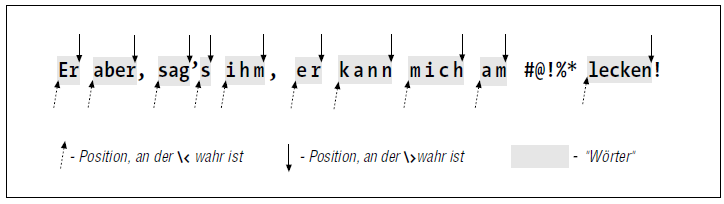
Figure: Word-start and word-end positions in the Götz quotation.
Word starts, as defined by egrep, have upward arrows; ends have downward arrows. Start and end of an alphanumeric sequence would be more accurate, but perhaps too cumbersome.
Brief review
Table: Metacharacters encountered so far.
Metacharacter | Name | Meaning |
| dot | any character |
| character class | any character listed |
| negated character class | any character not listed |
| circumflex, caret | position at the start of a line |
| dollar | position at the end of a line |
| backslash less-than | start-of-word position, unsupported in some egrep versions |
| backslash greater-than | end-of-word position, unsupported in some egrep versions |
| or, pipe | separates alternation branches |
| parentheses | limit the scope of ˹|˼; other meanings later |
Also remember:
Metacharacter rules and exact meanings differ inside and outside classes. Dot is special outside but ordinary inside; hyphen is special inside but ordinary outside. Circumflex is special outside and has a different special meaning as the first class character.
Classes and alternation are not the same. The class ˹
[abc]˼ and alternation ˹(a|b|c)˼ have the same effect, but not generally. A class matches exactly one character, however long its list. Alternatives may be arbitrarily long and need not resemble one another:˹\<(1●000●000|eine●Million|tausend●Tausender)\>˼. Alternation cannot be negated like a class.A negated class is just an ordinary class containing all unlisted characters.
˹[^x]˼does not mean “matches if noxappears,” but rather “matches a character other thanx.” The subtle distinction matters: the wrong first reading would match a blank line, which the regex˹[^x]˼does not.The useful option
-iinstructs egrep to ignore case.
This already allows useful work, but things really start with optional and counting elements.
Optional elements
Compare the nearly identical words Marlen and Maren: they differ only in the missing l. The regex ˹Marl?en˼ matches both. The metacharacter ˹?˼ (question mark) means optional. Place question mark after the character: the regex matches whether that character occurs or is missing.
Unlike earlier metacharacters, question mark applies only to the immediately preceding component. ˹Marl?en˼ thus means “first ˹M˼, then ˹a˼, then r, then ˹l?˼, then ˹e˼, and finally ˹n˼.”
The fragment ˹l?˼ always matches: sometimes a real l in the text, sometimes not. Optional components let the regex work whether they match or not; this does not mean every regex containing ? always matches. For the text Marlon both ˹Mar˼ and ˹l?˼ match, but the following o prevents an overall match.
Another example: how do we match spellings of July Fourth, the American national holiday: “July 4th”, “July fourth”, or just “Jul 4”? Listing every combination gives ˹(July|Jul)●(fourth|4th|4)˼, but let me show alternatives with the same meaning.
First simplify ˹(July|Jul)˼ to ˹(July?)˼. Do you see why they are equivalent? Removing ˹|˼ makes parentheses unnecessary. Leaving them would not hurt, but July? reads better without them. We now have ˹July?●(fourth|4th|4)˼.
In the second part, simplify ˹4th|4˼ to ˹4(th)?˼. The ˹?˼ can also apply to parentheses. However complex their contents, from outside the group is one unit. This common use of parentheses groups for ˹?˼ and similar metacharacters introduced soon.
Our expression is now ˹July?●(fourth|4(th)?)˼. Despite many metacharacters and nested parentheses, it is still readable and understandable. Two simple examples have led to a long discussion, but touched related areas that build regex understanding, perhaps unconsciously. We have practiced different approaches to the same problem. Later chapters often call for creativity to solve problems optimally. Writing regexes is often more art than dry science.
Other quantifiers: Repetition
Similar to question mark are ˹+˼ (plus) and ˹*˼, asterisk, or simply star. The metacharacter ˹+˼ means one or more of the preceding item, while ˹*˼ means any number, including zero. In other words, ˹...*˼ means “match the preceding item as often as possible, but zero times is fine.” The plus version, ˹...+˼, also tries to match as much as possible, but requires at least one occurrence. Question mark, plus, and star are called quantifiers, English quanti⟦U+0002⟧fier, since they concern the quantity of the preceding item.
Like ˹...?˼, the component ˹...*˼ always matches; only how much text it matches is uncertain. In contrast, ˹...+˼ requires the preceding item at least once.
For example, ˹●?˼ allows one space or none, while ˹●*˼ allows any number of spaces. We can use this to make the <H[1-6]> example more fl⟦U+0003⟧exible. The HTML specifi⟦U+0002⟧cation says spaces are allowed immediately before >. Note: familiarity with HTML is not required. I use it as a real-world example and explain enough for the regexes; experts may see subtleties beyond this introduction. Examples include <H3●> and <H4●●●>. Inserting ˹●*˼ where spaces are allowed but optional gives ˹<H[1-6]●*>˼. It still matches <H1> because spaces are not required, but is more fl⟦U+0003⟧exible, matching the other variants too.
Consider another HTML tag, <HR●SIZE=14>, which speci⟦U+0002⟧fies a fourteen-pixel horizontal rule. As with the <H3> example, spaces may precede the closing bracket. Spaces may also surround the equals sign. At least one space must separate HR and SIZE; more are allowed. We could write ˹●●*˼ for this last requirement, but we use ˹●+˼. Plus requires one space but allows more. Do you see why this matches the same as ˹●●*˼? This gives the regex ˹<HR●+ SIZE●*= ●*14●*>˼.
Our regex ⟦U+0003⟧is now flexible about spaces but still rigid about thickness. Instead of just one thickness (14), we want bars of any thickness. ⟦U+0002⟧To find these, replace ˹14˼ with an expression for any integer. A number has one or more digits, and a digit is described by ˹[09]˼. Plus expresses one or more, so replace ˹14˼ with ˹[0-9]+˼. A class is one unit and can take plus, question mark, and so on directly without parentheses.
This gives ˹<HR●+ SIZE ●*= ●* [0-9]+●*>˼, already rather complicated despite boldface, small gaps, and visible spaces ●. At least egrep has the option -i to ignore case, otherwise we would need ˹[Hh][Rr]˼ instead of ˹HR˼. The unadorned regex ˹<HR + SIZE *= *[0-9]+*>˼ is even more confusing. Most stars and pluses apply to preceding spaces, and our eyes habitually treat whitespace differently. Reading regexes requires adjustment: space has no special meaning and is conceptually no different from, say, j or 4. Later chapters show tools configurable to ignore regex spaces, but egrep is not one of them.
There is more to explore. The thickness attribute SIZE is optional in the HR tag: simply write <HR> for a default-thickness rule. Extra spaces before > remain allowed. What regex allows both forms? Hint: the size-specifying part is optional. The answer is in Solution 3.
The answer deserves attention: it shows question mark, star, and plus working together in practice. The table summarizes them.
Each quantifier requires a minimum number of matches and permits a maximum number of attempts. Some minima are zero; some maxima are unlimited.
Table: Repetition quantifiers.
Minimum | Maximum | Meaning | |
? | zero | 1 | One allowed, none possible (›zero or one‹) |
* | zero | no limit | Any number, including zero (›zero, one, or more‹) |
+ | 1 | no limit | One required, more allowed (›one or more‹) |
Explicit minimum and maximum: Intervals
Some egrep versions offer a metasequence specifying numeric minima and maxima: ˹...{min, max}˼. This is the interval quantifier. For example, ⟦U+0002⟧the expression ˹...{3,12}˼ matches up to twelve preceding items, but at least three are required. The expression ˹[a-zA-Z]{1,5}˼ would match all New York Stock Exchange ticker symbols, one to five letters. In this notation, {0,1} means precisely question mark.
Few versions of egrep support it, but many substantial tools do. We will discuss it in Features and dialects while surveying the metacharacters available in modern tools.
Parentheses and backreferences
So far, parentheses limit alternation scope and group for quantifiers such as question mark and star. A third use in egrep is fre⟦U+0002⟧quently unavailable, although the widely used GNU version of egrep supports it; other tools use it often.
Many implementations let parentheses remember text matched inside them. We will use this for an initial solution to repeated words. If the repeated word is known, as with das in the German example’s das das—did you notice?—we can search explicitly: ˹das●das˼. Using the -i option also finds das●Dasein ⟦U+0002⟧. A tool such as egrep supporting word boundaries (˹\<...\>˼) avoids this: ˹\<das●das>˼. We could also use ˹●+˼ instead of the space.
Searching explicitly for every repeated word is impossible. After matching one word, we want to say “now match that same word again.” If your egrep supports backreferences, you can: backreferences match earlier text again without knowing it explicitly.
Starting with ˹\<das●+das\>˼, replace the first ˹das˼ with a regex for any word, say ˹[A-Zaz]+˼. Enclose it in parentheses, for reasons that will soon be clear, and replace the second ›das‹ with the new metasequence ˹\1˼, giving ˹\<([A-Za-z]+)●+\1\>˼.
Tools supporting backreferences remember text matched inside parentheses, and ˹\1˼ represents that same text later in the regex.
This works with multiple pairs: ˹\1˼, ˹\2˼, ˹\3˼ and so on refer to the first, second, third pairs. Count opening parentheses from left to right. In ˹([a-z])([0-9])\1\2˼, the ˹\1˼ refers to text matched by ˹[a-z]˼, and ˹\2˼ refers to ˹[0-9]˼.
In our ›das●das‹ example, the subexpression ˹[A-Za-z]+˼ matches the first das. Parentheses make that ›das‹ available through ˹\1˼. After the following ˹●+˼ matches, the regex seeks not any word but the one stored in ˹\1˼. Finding that identical second word, ˹\>˼ tests the word end, avoiding partial matches such as das●Dasein. Only then does the whole regex match. We cannot fi⟦U+0002⟧nd a solution covering every case: repeated words can be correct, as the repeated der in the German source’s corresponding sentence demonstrates. Suspicious lines make errors easy to spot.
I tested this example on the book text written so far, using an egrep version supporting both ˹\<...\>˼ and backreferences. To make the test more useful, including ›Das●das‹, I added -i for case-insensitive matching. Note: some versions of egrep, including GNU egrep, require a backreference’s text to have identical case to its captured text even with -i. Thus the egrep command finds das das and Das Das but not Das das, whereas Perl does.
% egrep i ⟦U+001F⟧'\<([az]+) +\1\>⟦U+001F⟧' datei ...
Embarrassingly, I found fourteen incorrect pairs of ›verdoppelten●verdoppelten‹ words in the book!
Useful though it is, this regex has limits. Since egrep treats lines independently, it cannot ⟦U+0002⟧find repeated words straddling two lines, one ending a line and the duplicate starting the next. Those are particularly easy to overlook. We need tools more powerful than egrep; you will meet some in Extended introductory examples.
Escaping!
One important point remains: searching for a normally special character. Searching for an Internet hostname such as ega.att.com with ˹ega.att.com˼ also finds things such as megawatt●computing. As we know, ˹.˼ matches any character.
To match a real period, put a backslash before it: ˹ega\.att\.com˼. Here, the backslash is an escape, breaking out of the usual meaning. This works for all metacharacters outside classes. Note: many tools and languages allow escapes inside classes too, but not egrep, where backslash becomes an ordinary listed character. A preceding backslash removes a metacharacter’s special meaning. Think of backslash-metacharacter as a new metasequence producing the original literal, if you like; either interpretation works.
Another example: ˹\([azAZ]+\)˼ searches a parenthesized word such as ›(sehr)‹. The backslashes in ˹\(˼ and ˹\)˼ remove the parentheses’ special meaning, making them literal parentheses to match.
Before ordinary characters, backslash behavior varies by tool and version. Some versions of egrep treat ˹\<˼ , ˹\>˼ , ˹\1˼ and so on as metasequences, others do not. Later chapters explore more.
German edition copyright © 2008 by O’Reilly Verlag GmbH & Co. KG
You may print the online version for private use.
Otherwise, this chapter from "Reguläre Ausdrücke" is subject to the same terms as the bound edition: the work and all its parts are protected by copyright. All rights reserved, including reproduction, translation, microfilming, storage and processing in electronic systems.
O’Reilly Verlag GmbH & Co. KG, Balthasarstr. 81, 50670 Köln