

XML technologies / Regular expressions / Extended introductory examples / Pattern matching with regular expressions / Nested regular expressions
(Excerpt from "Regular expressions" by Jeffrey E. F. Friedl)
In languages like Perl, regexes closely interact with the rest of a program. Improve our example further: allow floating-point numbers, lowercase c and f , and spaces between number and letter, permitting input like ›98.6●f‹.
The floating-point part is familiar. Add ˹(\.[0-9]*)?˼:
if ($eingabe =~ m/^([-+]?[0-9]+(\.[0-9]*)?)([CF])$/)This goes inside the first capture, since its digits feed the temperature calculation, including those after the decimal point. The new parentheses merely group for the question mark, but also capture; being the second opening pair, they store text in $2, as the figure shows.
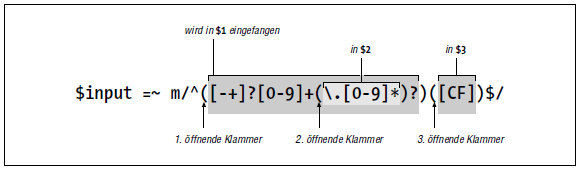
Figure: nested parentheses.
Adding parentheses indirectly affects ˹[CF]˼, whose surrounding parentheses become capture three. Thus the assignment to $Typ must change $2 to $3. An alternative appears in Solution 5.
Spaces are straightforward: one regex space matches one input space. To allow any number, including none, use ˹●*˼:
if ($eingabe =~ m/^([-+]?[0-9]+(\.[0-9]*)?) *([CF])$/)This is fairly ⟦U+0003⟧ flexible, but a practical program should allow any kind of whitespace . Tabs, usually called tabs, count as whitespace. ˹TAB*˼ alone excludes spaces, so use a class with both: ˹[●TAB]*˼.
Quick question: How does this fundamentally differ from ˹(●*|TAB*)˼? The answer ⟦U+0002⟧ appears in Solution 6.
Here, spaces and tabs are easy to see through ⟦U+0002⟧ typographical symbols ● and TAB. Screens are less clear. Seeing [ ]*, you may suspect a space and tab, but must check. Perl provides ˹\t˼ to match a tab visibly. I use it for that clarity. Thus, ˹[●TAB]*˼ becomes ˹[●/t]*˼.
Other convenient shorthands are ˹\n˼ for newline, ˹\f˼ for ASCII form feed, and ˹\b˼ for backspace. Wait a moment! But ˹\b˼ previously meant word boundary. Which is it? It is actually both!
Metacharacters everywhere
We have seen \n in strings, not regexes. Perl's quoted strings have their own metacharacters, fundamentally distinct from regular expressions. Beginners confuse them; VB.NET has fewer string metacharacters. Some nevertheless perform similar roles. The string escape \t inserts a tab; the identical-looking regex metacharacter ˹\t˼ searches for one.
Despite the convenience, these are two different types. For something simple like \t it may matter little, but with other languages and tools the distinction becomes crucial.
We have already seen metacharacter ⟦U+0003⟧ conflicts. Under Introduction to regular expressions, with egrep, regexes were single-quoted. The shell parses commands first and has its own metacharacters: spaces separate arguments and commands. Single quotes suppress interpretation in many shells; DOS uses double quotes.
Quoting allowed regex spaces. Otherwise the shell would interpret them instead of passing them unchanged to egrep , which interprets them in its own way. Many shells recognize $, *, ? , also needed in regexes.
Shell and string metacharacters are not regexes themselves, but matter greatly to their use in real situations. We will encounter complex cases ⟦U+0002⟧ involving metacharacters from multiple sources, whose rules must be respected and can be exploited.
Back to ˹\b˼: in Perl regexes it normally means word boundary, but inside classes it means backspace. Classes always match single characters, so boundaries make no sense there. Perl reuses \b for another purpose. The warning under Introduction to regular expressions about classes' own language also applies to Perl and other dialects.
Whitespace with \s
We left whitespace at ˹[●/t]*˼. Many dialects offer a shorthand. While ˹\t˼ matches a tab, ˹\s˼ denotes a class of whitespace characters: space, tab, newline, form feed, etc. Newline and form feed do not matter here, and ˹\s*˼ is easier to type than ˹[●\t]*˼ and remains readable in complex expressions.
Our condition becomes:
$eingabe =~ m/^([-+]?[0-9]+(\.[0-9]*)?)\s*([CF])$/Finally allow lowercase by extending the class: ˹[CFcf]˼. Another approach:
$eingabe =~ m/^([-+]?[0-9]+(\.[0-9]*)?)\s*([CF])$/iThe i after m/.../ is a modi⟦U+0002⟧fier (English modifi⟦U+0002⟧er) telling Perl to ignore case throughout matching. It is not part of the regex itself, but i belongs to the m/.../ construct, telling Perl what to do with which regex. We saw something similar with the -i option of egrep.
“The i-modifier”⟦U+0002⟧ is cumbersome, so “/i” is often used, even without adding a slash. Perl also allows modifier ⟦U+0002⟧ specification in other ways, discussed under Features and dialects, including other languages. We will also encounter more ⟦U+0002⟧ modifiers, including⟦U+0002⟧: /g for global matching, and /x for free-spacing mode.
Run the new program:
% perl -w konvert
Geben Sie eine Temperatur ein (z.B. 32F, 100C):
32 f
0.00 C = 32.00 F
% perl -w konvert
Geben Sie eine Temperatur ein (z.B. 32F, 100C):
50 c
10.00 C = 50.00 FNotice that despite c the second temperature was treated as 50° Fahrenheit. Can you see why?
The relevant part is:
if ($eingabe =~ m/^([+]?[09]+(\.[09]*)?)\s*([CF])$/i) {
.
.
.
$Typ = $3; # ... damit der Rest des Programms lesbarer wird.
if ($Typ eq "C") { # eq vergleicht zwei Strings
.
.
.
} else {
.
.
.We changed the regex but not the rest of the program. Unless $Typ is exactly C, Fahrenheit is assumed. But lowercase c also means Celsius, so update the test of $Typ:
if ($Typ eq "C" or $Typ eq "c") {Or, since this is a regex book:
if ($Typ =~ m/c/i) {Now it works. The final program follows, demonstrating how closely regexes interact with other code.
Temperature-conversion program, final version.
print "Geben Sie eine Temperatur ein (z.B. 32F, 100C):\n";
$eingabe = <STDIN>; # liest eine Eingabe-Zeile
chomp($eingabe); # entfernt das Newline von $eingabe
if ($eingabe =~ m/^([+]?[09]+(\.[09]*)?)\s*([CF])$/i) {
# Mustererkennung war erfolgreich. $1 ist die Zahl, $3 ist "C", "F", "c" oder "f".
$EingabeZahl = $1; # in benannte Variablen kopieren, ...
$Typ = $3; # ... damit der Rest des Programms lesbarer wird.
if ($Typ =~ m/c/i) { # "C" oder "c"?
# Eingabe war in Celsius, also Fahrenheit berechnen
$celsius = $EingabeZahl;
$fahrenheit = ($celsius * 9 / 5) + 32;
} else {
# Muss ein "F" oder ein "f" sein, also Celsius berechnen
$fahrenheit = $EingabeZahl;
$celsius = ($fahrenheit 32) * 5 / 9;
}
# Hier haben wir beide Temperaturen, Resultat ausgeben:
printf "%.2f C = %.2f F\n", $celsius, $fahrenheit;
} else {
# Regex passt nicht: Warnung ausgeben.
print "Zahl, gefolgt von \"C\" oder \"F\", erwartet,\n";
print "nicht \"$eingabe\".\n";
}
German edition copyright © 2008 by O’Reilly Verlag GmbH & Co. KG
You may print the online version for private use.
Otherwise, this chapter from "Reguläre Ausdrücke" is subject to the same terms as the bound edition: the work and all its parts are protected by copyright. All rights reserved, including reproduction, translation, microfilming, storage and processing in electronic systems.
O’Reilly Verlag GmbH & Co. KG, Balthasarstr. 81, 50670 Köln