XML technologies / XSL-FO / Reference / Compart XSL extensions / Attributes / alt
(Excerpt from "XSL-FO ― Die Referenz" by Manuel Montero Pineda & Steffen Herkert, 2016, dpunkt.verlag)
A | B | C | D | E | F | G | H | I | J | K | L | M | N | O | P | Q | R | S | T | U | V | W | X | Y | Z
Category: Erweiterte Properties for FO elements - cpfo:alt
Description
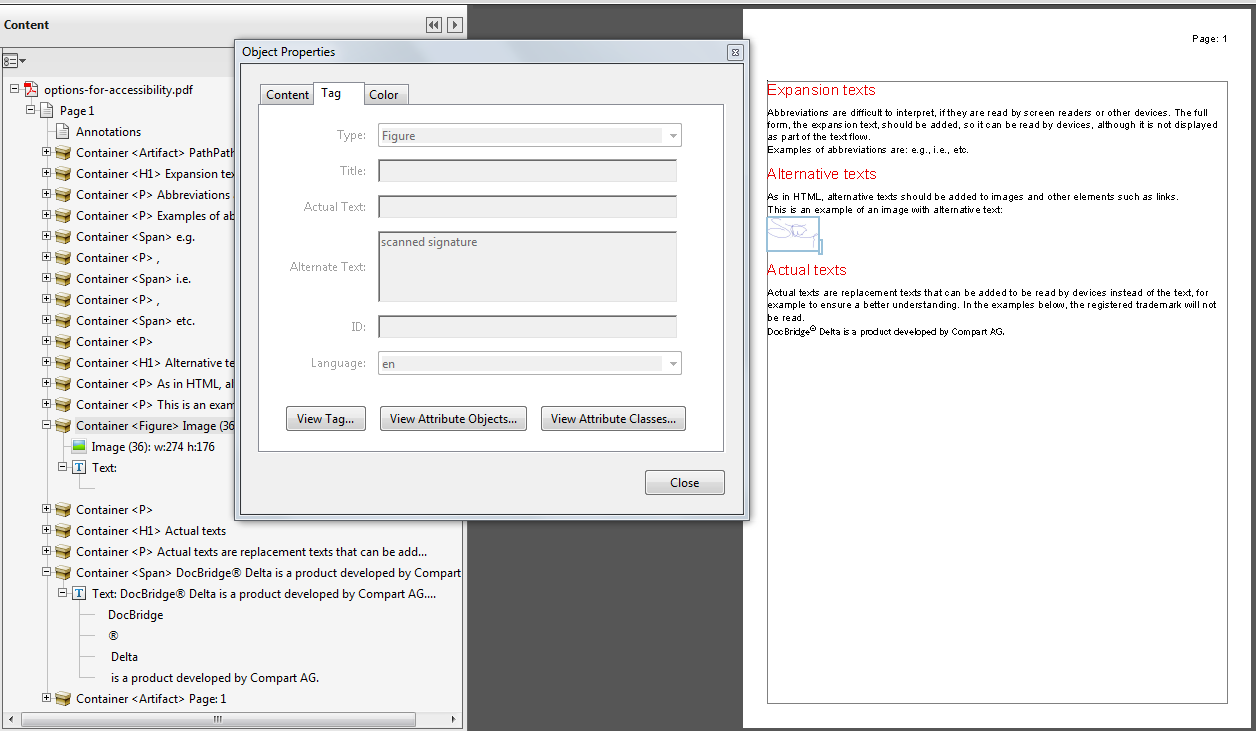
This attribute specifies the alternative description of an object in PDF output.
Value: | string |
Initial value: | empty string |
Inherited: | no |
Element: | Elements to which the Common Accessibility Properties can be applied. |
XSL-FO example:
<fo:root font-size="12pt" role="Document" language="en" white-space-treatment="ignore-if-after-linefeed" xmlns:fo="http://www.w3.org/1999/XSL/Format" xmlns:cpfo="http://www.compart.net/xmlns/cpfo" xmlns:svg="http://www.w3.org/2000/svg" xmlns:axf="http://www.antennahouse.com/names/XSL/Extensions">
<cpfo:document-info document-info-name="title" document-info-value="Accessibility Features"/>
<fo:layout-master-set>
<fo:simple-page-master margin="1cm" page-width="21cm" page-height="29.7cm" master-name="DinA4">
<fo:region-body region-name="xsl-region-body" margin-top="2cm" border=".1pt solid gray"/>
<fo:region-before region-name="xsl-region-before" extent="1cm"/>
</fo:simple-page-master>
</fo:layout-master-set>
<fo:page-sequence master-reference="DinA4">
<fo:static-content flow-name="xsl-region-before">
<fo:block text-align="right">
Page:
<fo:page-number/>
</fo:block>
</fo:static-content>
<fo:flow flow-name="xsl-region-body">
<fo:block-container space-before="1em">
<fo:block role="H1" font-size="18pt" color="#E60000" space-after="8pt" cpfo:title="Expansion texts title">
Expansion texts
</fo:block>
<fo:block role="P">
Abbreviations are difficult to interpret, if they are read by screen readers or other devices. The full form, the expansion text, should be added, so it can be read by devices, although it is not displayed as part of the text flow.
</fo:block>
<fo:block role="P">
Examples of abbreviations are:
<fo:inline role="Span" cpfo:abbr="for example" cpfo:title="Abbreviation title">
e.g.
</fo:inline>
,
<fo:inline role="Span" cpfo:abbr="that is" cpfo:title="Abbreviation title">
i.e.
</fo:inline>
,
<fo:inline role="Span" cpfo:abbr="and so on" cpfo:title="Abbreviation title">
etc.
</fo:inline>
</fo:block>
</fo:block-container>
<fo:block-container space-before="1em">
<fo:block role="H1" font-size="18pt" color="#E60000" space-after="8pt" cpfo:title="Alternative texts title">
Alternative texts (or alternate texts)
</fo:block>
<fo:block role="P">
As in HTML, alternative texts should be added to images and other elements such as links.
</fo:block>
<fo:block role="P">
This is an example of an image with alternative text:
</fo:block>
<fo:block role="P">
<fo:inline role="Figure" cpfo:alt="scanned signature">
<fo:external-graphic content-height="50px" content-width="100px" scaling="uniform" src="Unterschrift_Turner.jpg" content-type="content-type:image/png"/>
</fo:inline>
</fo:block>
</fo:block-container>
<fo:block-container space-before="1em">
<fo:block role="H1" font-size="18pt" color="#E60000" space-after="8pt" cpfo:title="Actual texts title">
Actual texts
</fo:block>
<fo:block role="P">
Actual texts are replacement texts that can be added to be read by devices instead of the text, for example to ensure a better understanding. In the examples below, the registered trademark will be read as "trademark", and the list bullet symbol will be read as bullet.
</fo:block>
<fo:block space-before="1em" role="P">
Example 1:
</fo:block>
<fo:block font-family="Corporate S Pro,SYMBOL,ZAPFDINGS" font-weight="normal" text-align="left" role="P">
<fo:block keep-with-next.within-column="always" hyphenate="false">
 DocBridge
<fo:inline font-size="75%" baseline-shift="super" cpfo:actual="®" role="Span">
®
</fo:inline>
<fo:inline>
Delta
</fo:inline>
 is a product developed by Compart AG.
</fo:block>
</fo:block>
<fo:block space-before="1em" role="P">
Example 2:
</fo:block>
<fo:list-block provisional-label-separation="0.3cm" provisional-distance-between-starts="0.5cm" margin-left="0.3in" role="L" cpfo:list-numbering="square" id="d0e759">
<fo:list-item role="LI">
<fo:list-item-label role="Lbl" end-indent="label-end()">
<fo:block>
<fo:inline color="#E60000" font-family="Symbola" role="Span" cpfo:actual="•">
▪
</fo:inline>
</fo:block>
</fo:list-item-label>
<fo:list-item-body start-indent="body-start()" role="LBody">
<fo:block role="P">
Expansion texts
</fo:block>
</fo:list-item-body>
</fo:list-item>
<fo:list-item role="LI">
<fo:list-item-label role="Lbl" end-indent="label-end()">
<fo:block>
<fo:inline color="#E60000" font-family="Symbola" role="Span" cpfo:actual="•">
▪
</fo:inline>
</fo:block>
</fo:list-item-label>
<fo:list-item-body start-indent="body-start()" role="LBody">
<fo:block role="P">
Alternative texts
</fo:block>
</fo:list-item-body>
</fo:list-item>
<fo:list-item role="LI">
<fo:list-item-label role="Lbl" end-indent="label-end()">
<fo:block>
<fo:inline color="#E60000" font-family="Symbola" role="Span" cpfo:actual="•">
▪
</fo:inline>
</fo:block>
</fo:list-item-label>
<fo:list-item-body start-indent="body-start()" role="LBody">
<fo:block role="P">
Actual texts
</fo:block>
</fo:list-item-body>
</fo:list-item>
</fo:list-block>
<fo:block-container space-before="1em">
<fo:block role="H1" font-size="18pt" color="#E60000" space-after="8pt" cpfo:title="Structure tree titles">
Tag titles
</fo:block>
<fo:block role="P">
In PDF (PDF/UA) a semantic structure is added to the text using a tag hierarchy. Compart uses the XSL:FO role attributes to identify the tag types.
</fo:block>
<fo:block role="P">
The tags can further be identified by titles. These tag titles will appear next to the element tag in the logical structure tree.
</fo:block>
</fo:block-container>
</fo:block-container>
</fo:flow>
</fo:page-sequence>
</fo:root>In the output: