

XML technologies / XSLT / XSLT Cookbook / Converting XML into SVG / Creating tree diagrams
(Excerpt from “XSLT Kochbuch” by Sal Mangano)
Problem
You want to display your data’s hierarchy as a tree.
Solution
This section presents two tree-layout algorithms. Neither is the most sophisticated available, but both produce useful results.
If every tree were balanced, layout would be easy: divide horizontal space by the number of nodes at each level, and vertical space by the number of levels. Actually, divide by the number of nodes plus 1 to avoid a fencepost error, an off-by-one mistake. Real trees are less symmetric, so the algorithm must account for every branch’s width.
The first method traverses the tree once, embedding some bookkeeping attributes in the resulting SVG. These attributes are placed in a namespace to avoid conflicts with SVG attributes:
<?xml version="1.0" encoding="UTF-8"?>
<!-- version 1.1 ist erloschen, aktiviert aber in Saxon die Eigenschaft xsl:script. -->
<xsl:stylesheet version="1.1" xmlns:emath="http://www.exslt.org/math" xmlns:xsl="http://www.w3.org/1999/XSL/Transform" xmlns:tree="http://www.ora.com/XSLTCookbook/ns/tree" xmlns:Math="java:java.lang.Math" extension-element-prefixes="Math" exclude-result-prefixes="Math emath">
  <xsl:script implements-prefix="Math" xmlns:Math="java:java.lang.Math" language="java" src="java:java.lang.Math"/>
  <xsl:include href="../math/math.max.xslt"/>
  <xsl:output method="xml" version="1.0" encoding="UTF-8" indent="yes" doctype-public="-//W3C//DTD SVG 1.0/EN" doctype-system="http://www.w3.org/TR/2001/REC-SVG-20010904/DTD/svg10.dtd"/>
  <!-- Diese Parameter steuern die Ausdehnung des Baums und seiner Knoten -->
  <xsl:variable name="width" select="500"/>
  <xsl:variable name="height" select="500"/>
  <xsl:variable name="nodeWidth" select="2"/>
  <xsl:variable name="nodeHeight" select="1"/>
  <xsl:variable name="horzSpace" select="0.5"/>
  <xsl:variable name="vertSpace" select="1"/>
  <xsl:template match="/">
    <svg width="{$width}" height="{$height}">
      <!-- Halte den Unterbaum dieses Knotens in einer Variablen fest -->
      <xsl:variable name="subTree">
        <xsl:apply-templates/>
      </xsl:variable>
      <!-- maxPos ist das Maximum der entferntesten X- oder Y-Koordinate, die beim Rendern eines Knotens benutzt wird. -->
      <xsl:variable name="maxPos" select="Math:max(number($subTree/g/@tree:MAXX), number($subTree/g/@tree:MAXY))"/>
      <xsl:variable name="maxDim" select="Math:max($width,$height)"/>
      <!-- Wir skalieren den Baum, damit alle Knoten ins Koordinatensystem passen. -->
      <g transform="scale({$maxDim div ($maxPos + 1)})">
      <!-- Verwenden Sie exsl:node-set($subTree), falls Ihr XSLT-Prozessor die Version 1.0 hat. -->
        <xsl:copy-of select="$subTree/g/*"/>
      </g>
    </svg>
  </xsl:template>
  <!-- Das passt auf alle Knoten, die keine Blätter sind. -->
  <xsl:template match="*[*]">
    <xsl:variable name="subTree">
      <xsl:apply-templates/>
    </xsl:variable>
    <!-- Positioniere diesen Knoten horizontal abhängig von der mittleren Position seiner Kindknoten -->
    <xsl:variable name="thisX" select="sum($subTree/*/@tree:THISX) div count($subTree/*)"/>
    <xsl:variable name="maxX" select="$subTree/*[last( )]/@tree:MAXX"/>
    <!-- Positioniere diesen Knoten vertikal abhängig von seiner Tiefe -->
    <xsl:variable name="thisY" select="($vertSpace + $nodeHeight) * count(ancestor-or-self::*)"/>
    <xsl:variable name="maxY">
      <xsl:call-template name="emath:max">
        <!-- Verwenden Sie exsl:node-set($subTree), falls Ihr XSLT-Prozessor die Version 1.0 hat. -->
        <xsl:with-param name="nodes" select="$subTree/*/@tree:MAXY"/>
      </xsl:call-template>
    </xsl:variable>
    <!-- Wir platzieren den Elternknoten und seine Kindknoten sowie die Verbindungen in eine Gruppe. Außerdem fügen wir zur Gruppe ein paar Verwaltungsattribute hinzu, um im Baum Information nach oben weitergeben zu können. -->
    <g tree:THISX="{$thisX}" tree:MAXX="{$maxX}" tree:MAXY="{$maxY}">
      <rect x="{$thisX - $nodeWidth}" y="{$thisY - $nodeHeight}" width="{$nodeWidth}" height="{$nodeHeight}" style="fill: none; stroke: black; stroke-width:0.1"/>
      <!-- Zeichne eine Verbindungslinie zwischen dem aktuellen Knoten und dessen Kindknoten -->
      <xsl:call-template name="drawConnections">
        <xsl:with-param name="xParent" select="$thisX - $nodeWidth"/>
        <xsl:with-param name="yParent" select="$thisY - $nodeHeight"/>
        <xsl:with-param name="widthParent" select="$nodeWidth"/>
        <xsl:with-param name="heightParent" select="$nodeHeight"/>
        <xsl:with-param name="children" select="$subTree/g/rect"/>
      </xsl:call-template>
      <!-- Kopiere das SVG des Unterbaums -->
      <xsl:copy-of select="$subTree"/>
    </g>
  </xsl:template>
  <!-- Das passt auf alle Blattknoten -->
  <xsl:template match="*">
    <!-- Positioniere Blattknoten horizontal abhängig von der Anzahl der vorherigen Blattknoten -->
    <xsl:variable name="maxX" select="($horzSpace + $nodeWidth) * (count(preceding::*[not(child::*)] ) + 1)"/>
You can use count(ancestor-or-self::*) to obtain the level, or tree depth, each time. Alternatively, pass the current level down as a parameter rather than recalculating it:
    <!-- Positioniere diesen Knoten vertikal abhängig von seiner Tiefe -->
    <xsl:variable name="maxY" select="($vertSpace + $nodeHeight) * count(ancestor-or-self::*) "/>
    <g tree:THISX="{$maxX}" tree:MAXX="{$maxX}" tree:MAXY="{$maxY}">
      <rect x="{$maxX - $nodeWidth}" y="{$maxY - $nodeHeight}" width="{$nodeWidth}" height="{$nodeHeight}" style="fill: none; stroke: black; stroke-width:0.1;"/>
    </g>
  </xsl:template>
  <!-- Überschreiben Sie das im importierenden Stylesheet, wenn Sie gerade oder eigene Verbindungslinien haben möchten. -->
  <xsl:template name="drawConnections">
    <xsl:param name="xParent"/>
    <xsl:param name="yParent"/>
    <xsl:param name="widthParent"/>
    <xsl:param name="heightParent"/>
    <xsl:param name="children"/>
    <xsl:call-template name="drawSquareConnections">
      <xsl:with-param name="xParent" select="$xParent"/>
      <xsl:with-param name="yParent" select="$yParent"/>
      <xsl:with-param name="widthParent" select="$widthParent"/>
      <xsl:with-param name="heightParent" select="$heightParent"/>
      <xsl:with-param name="children" select="$children"/>
    </xsl:call-template>
  </xsl:template>
  <!-- Gerade Verbindungen nehmen den kürzesten Pfad vom Zentrum des unteren Elternknotenteils zum Zentrum des oberen Kindknotenteils. -->
  <xsl:template name="drawStraightConnections">
    <xsl:param name="xParent"/>
    <xsl:param name="yParent"/>
    <xsl:param name="widthParent"/>
    <xsl:param name="heightParent"/>
    <xsl:param name="children"/>
    <xsl:for-each select="$children">
      <line x1="{$xParent + $widthParent div 2}" y1="{$yParent + $heightParent}" x2="{@x + $nodeWidth div 2}" y2="{@y}" style="stroke: black; stroke-width:0.1;"/>
    </xsl:for-each>
  </xsl:template>
  <!-- Rechteckige Verbindungen nehmen den kürzesten Pfad vom Zentrum des unteren Elternknotenteils zum Zentrum des oberen Kindknotenteils und bestehen nur aus horizontalen und vertikalen Linien. -->
  <xsl:template name="drawSquareConnections">
    <xsl:param name="xParent"/>
    <xsl:param name="yParent"/>
    <xsl:param name="widthParent"/>
    <xsl:param name="heightParent"/>
    <xsl:param name="children"/>
    <xsl:variable name="midY" select="($children[1]/@y + ($yParent + $heightParent)) div 2"/>
    <!-- vertikale Linie vom Elternknoten -->
    <line x1="{$xParent + $widthParent div 2}" y1="{$yParent + $heightParent}" x2="{$xParent + $widthParent div 2}" y2="{$midY}" style="stroke: black; stroke-width:0.1;"/>
    <!-- horizontale Linie in der Mitte -->
    <line x1="{$children[1]/@x + $children[1]/@width div 2}" y1="{$midY}" x2="{$children[last( )]/@x + $children[1]/@width div 2}" y2="{$midY}" style="stroke: black; stroke-width:0.1;"/>
    <!-- vertikale Linien zu den Kindknoten -->
    <xsl:for-each select="$children">
      <line x1="{@x + $nodeWidth div 2}" y1="{$midY}" x2="{@x + $nodeWidth div 2}" y2="{@y}" style="stroke: black; stroke-width:0.1;"/>
    </xsl:for-each>
  </xsl:template>
</xsl:stylesheet>
This stylesheet draws any XML document’s structure as a tree. The figure shows the result for a simple XML input.
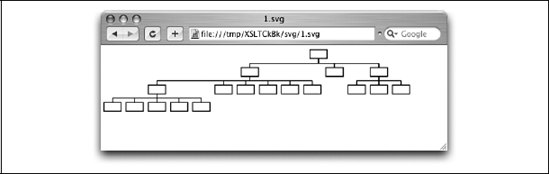
Figure: XML document structure converted to SVG.
The first algorithm places parents horizontally at their children’s average position. For unbalanced trees, the root is therefore off centre. The next algorithm improves this and avoids foreign attributes in SVG, but requires two passes over the input:
<?xml version="1.0" encoding="UTF-8"?>
<xsl:stylesheet version="1.1" xmlns:emath="http://www.exslt.org/math" xmlns:xsl="http://www.w3.org/1999/XSL/Transform" xmlns:tree="http://www.ora.com/XSLTCookbook/ns/tree" xmlns:Math="java:java.lang.Math" extension-element-prefixes="Math" exclude-result-prefixes="Math emath">
<xsl:script implements-prefix="Math" xmlns:Math="java:java.lang.Math" language="java" src="java:java.lang.Math"/>
<xsl:include href="../math/math.max.xslt"/>
<xsl:output method="xml" version="1.0" encoding="UTF-8" indent="yes" doctype-public="-//W3C//DTD SVG 1.0/EN" doctype-system="http://www.w3.org/TR/2001/REC-SVG-20010904/DTD/svg10.dtd"/>
<xsl:variable name="width" select="500"/>
<xsl:variable name="height" select="500"/>
<xsl:variable name="nodeWidth" select="2"/>
<xsl:variable name="nodeHeight" select="1"/>
<xsl:variable name="horzSpace" select="0.5"/>
<xsl:variable name="vertSpace" select="1"/>
<xsl:variable name="strokeWidth" select="0.1"/>
<xsl:template match="/">
<!-- 1. Durchgang kopiert die Eingabe mit hinzugefügten Verwaltungsattributen -->
<xsl:variable name="treeWithLayout">
<xsl:apply-templates mode="layout"/>
</xsl:variable>
<xsl:variable name="maxPos" select="Math:max($treeWithLayout/*/@tree:WEIGHT * ($nodeWidth + $horzSpace), $treeWithLayout/*/@tree:MAXDEPTH * ($nodeHeight + $vertSpace))"/>
<xsl:variable name="maxDim" select="Math:max($width,$height)"/>
<xsl:variable name="scale" select="$maxDim div ($maxPos + 1)"/>
<!-- 2. Durchgang erzeugt SVG -->
<svg height="{$height}" width="{$width}">
<g transform="scale({$scale})">
<xsl:apply-templates select="$treeWithLayout/*" mode="draw">
<xsl:with-param name="x" select="0"/>
<xsl:with-param name="y" select="0"/>
<xsl:with-param name="width" select="$width div $scale"/>
<xsl:with-param name="height" select="$height div $scale"/>
</xsl:apply-templates>
</g>
</svg>
</xsl:template>
<!-- Layoutknoten mit Kindknoten -->
<xsl:template match="node( )[*]" mode="layout">
<xsl:variable name="subTree">
<xsl:apply-templates mode="layout"/>
</xsl:variable>
<!-- Den Knoten, die keine Blätter sind, wird die Summe der Gewichte ihrer Kindknoten zugewiesen. -->
<xsl:variable name="thisWeight" select="sum($subTree/*/@tree:WEIGHT)"/>
<xsl:variable name="maxDepth">
<xsl:call-template name="emath:max">
<xsl:with-param name="nodes" select="$subTree/*/@tree:MAXDEPTH"/>
</xsl:call-template>
</xsl:variable>
<xsl:copy>
<xsl:copy-of select="@*"/>
<xsl:attribute name="tree:WEIGHT">
<xsl:value-of select="$thisWeight"/>
</xsl:attribute>
<xsl:attribute name="tree:MAXDEPTH">
<xsl:value-of select="$maxDepth"/>
</xsl:attribute>
<xsl:copy-of select="$subTree"/>
</xsl:copy>
</xsl:template>
<!-- Layoutblattknoten -->
<xsl:template match="*" mode="layout">
<xsl:variable name="depth" select="count(ancestor-or-self::*) "/>
<xsl:copy>
<xsl:copy-of select="@*"/>
<!-- Blattknoten erhalten das Gewicht 1 -->
<xsl:attribute name="tree:WEIGHT">
<xsl:value-of select="1"/>
</xsl:attribute>
<xsl:attribute name="tree:MAXDEPTH">
<xsl:value-of select="$depth"/>
</xsl:attribute>
</xsl:copy>
</xsl:template>
<!-- Zeichne Knoten, die keine Blätter sind. -->
<xsl:template match="node( )[*]" mode="draw">
<xsl:param name="x"/>
<xsl:param name="y"/>
<xsl:param name="width"/>
<xsl:variable name="thisX" select="$x + $width div 2 - ($nodeWidth+$horzSpace) div 2"/>
<xsl:variable name="subTree">
<xsl:call-template name="drawSubtree">
<xsl:with-param name="nodes" select="*"/>
<xsl:with-param name="weight" select="@tree:WEIGHT"/>
<xsl:with-param name="x" select="$x"/>
<xsl:with-param name="y" select="$y + $nodeHeight + $vertSpace"/>
<xsl:with-param name="width" select="$width"/>
</xsl:call-template>
</xsl:variable>
<g>
<rect x="{$thisX}" y="{$y}" width="{$nodeWidth}" height="{$nodeHeight}" style="fill: none; stroke: black; stroke-width:{$strokeWidth};"/>
<xsl:call-template name="drawConnections">
<xsl:with-param name="xParent" select="$thisX"/>
<xsl:with-param name="yParent" select="$y"/>
<xsl:with-param name="widthParent" select="$nodeWidth"/>
<xsl:with-param name="heightParent" select="$nodeHeight"/>
<xsl:with-param name="children" select="$subTree/g/rect"/>
</xsl:call-template>
<xsl:copy-of select="$subTree"/>
</g>
</xsl:template>
<!-- Zeichne Blattknoten -->
<xsl:template match="*" mode="draw">
<xsl:param name="x"/>
<xsl:param name="y"/>
<xsl:param name="width"/>
<xsl:variable name="thisX" select="$x + $width div 2 - ($nodeWidth+$horzSpace) div 2"/>
<g>
<rect x="{$thisX}" y="{$y}" width="{$nodeWidth}" height="{$nodeHeight}" style="fill: none; stroke: black; stroke-width:{$strokeWidth};"/>
</g>
</xsl:template>
<!-- Rekursive Routine zum Zeichnen von Unterbäumen. Alloziert horizontalen Raum abhängig vom Gewicht des Knotens. -->
<xsl:template name="drawSubtree">
<xsl:param name="nodes" select="/.."/>
<xsl:param name="weight"/>
<xsl:param name="x"/>
<xsl:param name="y"/>
<xsl:param name="width"/>
<xsl:if test="$nodes">
<xsl:variable name="node" select="$nodes[1]"/>
<xsl:variable name="ratio" select="$node/@tree:WEIGHT div $weight"/>
<!-- Zeichne Knoten samt Kindknoten in einem eigenen Raumanteil, abhängig vom aktuellen X-Wert und allozierter Breite. -->
<xsl:apply-templates select="$node" mode="draw">
<xsl:with-param name="x" select="$x"/>
<xsl:with-param name="y" select="$y"/>
<xsl:with-param name="width" select="$width * $ratio"/>
</xsl:apply-templates>
<!-- Bearbeite verbleibende Knoten -->
<xsl:call-template name="drawSubtree">
<xsl:with-param name="nodes" select="$nodes[position( ) > 1]"/>
<xsl:with-param name="weight" select="$weight"/>
<xsl:with-param name="x" select="$x + $width * $ratio"/>
<xsl:with-param name="y" select="$y"/>
<xsl:with-param name="width" select="$width"/>
</xsl:call-template>
</xsl:if>
</xsl:template>
<!-- Code für Verbindungen ausgelassen. Identisch mit vorherigem Stylesheet. -->
</xsl:stylesheet>This figure shows the new algorithm’s result for the same XML input.
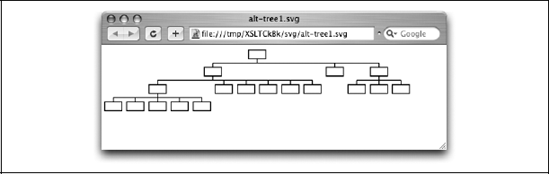
Figure: A more balanced XML document structure in SVG.
Discussion
These recipes are incomplete: they draw only the skeleton, not the content. Adding identifying text to nodes is an obvious extension, but tricky because SVG does not automatically scale text, especially if node widths depend on it. The recipe Adding extension functions with Java provides a Java extension function that can help with SVG layout.
So far, every input node maps to an SVG node. A real application would filter unimportant nodes using patterns more specific than match="node( )[*]" and match="*".
If XML’s hierarchy does not directly model the intended tree, preprocess the input to create it. This applies, for example, when attributes encode parent-child relationships through pointers and targets.
The stylesheets support two connector types. The examples use right angles. For the straight connectors shown below, override drawConnections to call drawStraightConnections.
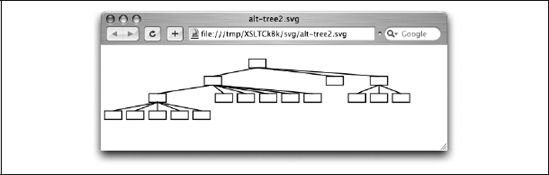
Figure: XML structure in SVG with straight connectors.
There are two portability issues. First, a Java extension accesses function Math:max. This is easy to implement in XSLT, but SVG-producing stylesheets often need other extensions anyway. Second, these stylesheets require XSLT 1.1, a discontinued version, or later to treat result tree fragments properly as node sets. Alternatively, use your processor’s node-set conversion extension.
See also
For sophisticated tree and graph drawing algorithms, read Graph Drawing: Algorithms for the Visualization of Graphs by Giuseppe Di Battista, Peter Eades, Roberto Tamassia and Ionnis G. Tollis (Prentice Hall, 1999). Expect demanding mathematics rather than a cookbook of pseudocode algorithms.
Copyright © 2006 O'Reilly Verlag GmbH & Co. KG
You may print the online version for your private use.
Otherwise, this chapter from “XSLT Kochbuch” is subject to the same conditions as the bound edition. The work, including all its parts, is protected by copyright. All rights reserved, including reproduction, translation, microfilming, and storage and processing in electronic systems.
O'Reilly Verlag GmbH & Co. KG, Balthasarstraße 81, 50670 Köln, kommentar(at)oreilly.de