

XML technologies / XSLT / XSLT Cookbook / Extending and embedding XSLT / Adding extension functions with Java: extensions
(Excerpt from “XSLT Kochbuch” by Sal Mangano)
Problem
You want to add your own extension functions written in Java.
Solution
The chapter introduction covered connecting a stylesheet to a Java implementation, so this section concentrates on examples.
In Strings you saw how to convert base-10 numbers to other bases, such as base 16, hexadecimal. A hexadecimal converter is easy to implement in Java:
package com.ora.xsltckbk.util;

public class HexConverter
{

  public static String toHex(String intString)
  {
    try
    {
       Integer temp = new Integer(intString) ;
       return new String("0x").concat(Integer.toHexString(temp.intValue( ))) ;
     }
     catch (Exception e)
    {
       return new String("0x0") ;
     }
  }
}
Formatting the return value with a leading 0x suggests that this function serves a particular code-generation application. Here is how it might be used:
<?xml version="1.0" encoding="UTF-8"?>
<xsl:stylesheet version="1.0" xmlns:xsl="http://www.w3.org/1999/XSL/Transform" xmlns:xalan="http://xml.apache.org/xslt" xmlns:hex="xalan://com.ora.xsltckbk.util.HexConverter" exclude-result-prefixes="hex xalan">
  <xsl:template match="group">
    enum <xsl:value-of select="@name"/>
    {
      <xsl:apply-templates mode="enum"/>
    } ;
  </xsl:template>
  <xsl:template match="constant" mode="enum">
    <xsl:variable name="rep">
      <xsl:call-template name="getRep"/>
    </xsl:variable>
    <xsl:value-of select="@name"/> = <xsl:value-of select="$rep"/>
    <xsl:if test="following-sibling::constant">
      <xsl:text>,</xsl:text>
    </xsl:if>
  </xsl:template>
  <xsl:template match="constant">
    <xsl:variable name="rep">
      <xsl:call-template name="getRep"/>
    </xsl:variable>
    const int <xsl:value-of select="@name"/> = <xsl:value-of select="$rep"/> ;
  </xsl:template>
  <xsl:template name="getRep">
    <xsl:choose>
      <xsl:when test="@rep = 'hex'">
        <xsl:value-of select="hex:toHex(@value)"/>
      </xsl:when>
      <xsl:otherwise>
        <xsl:value-of select="@value"/>
      </xsl:otherwise>
    </xsl:choose>
  </xsl:template>
</xsl:stylesheet>
The next example constructs Java objects and calls their methods. Transforming XML to SVG (Scalable Vector Graphics) makes text layout difficult. SVG cannot determine how wide a rendered string will be. Fortunately, Java supplies this functionality. The question is whether Java and the SVG engine agree on a string’s rendered width in a given font. Nevertheless, the idea is tempting enough to try:
package com.ora.xsltckbk.util ;
import java.awt.* ;
import java.awt.geom.* ;
import java.awt.font.* ;
import java.awt.image.*;

public class SVGFontMetrics
{
  public SVGFontMetrics(String fontName, int size)
  {
    m_font = new Font(fontName, Font.PLAIN, size) ;
    BufferedImage bi = new BufferedImage(1, 1, BufferedImage.TYPE_INT_ARGB);
    m_graphics2D = bi.createGraphics( ) ;
  }

  public SVGFontMetrics(String fontName, int size, boolean bold, boolean italic)
  {
    m_font = new Font(fontName, style(bold,italic) , size) ;
    BufferedImage bi = new BufferedImage(1, 1, BufferedImage.TYPE_INT_ARGB);
    m_graphics2D = bi.createGraphics( ) ;
  }

  public double stringWidth(String str)
  {
    FontRenderContext frc = m_graphics2D.getFontRenderContext( );
    TextLayout layout = new TextLayout(str, m_font, frc);
    Rectangle2D rect = layout.getBounds( ) ;
    return rect.getWidth( ) ;
  }

  public double stringHeight(String str)
  {
    FontRenderContext frc = m_graphics2D.getFontRenderContext( );
    TextLayout layout = new TextLayout(str, m_font, frc);
    Rectangle2D rect = layout.getBounds( ) ;
    return rect.getHeight( ) ;
  }

  static private int style(boolean bold, boolean italic)
  {
    int style = Font.PLAIN ;
    if (bold) { style |= Font.BOLD;}
    if (italic) { style |= Font.ITALIC;}
    return style ;
  }

  private Font m_font = null ;
  private Graphics2D m_graphics2D = null;
}
The Java 2 (JDK 1.3.1) classes Graphics2D and TextLayout provide the required information. Two public constructors support plain fonts and bold or italic fonts. Two public methods, stringWidth( ) and stringHeight( ), obtain dimensions for a string rendered in the constructor’s font. This is generally accurate enough for common fonts, but without definitive guarantees you will need to experiment.
This stylesheet tests the results:
<xsl:stylesheet version="1.0" xmlns:xsl="http://www.w3.org/1999/XSL/Transform" xmlns:xalan="http://xml.apache.org/xslt" xmlns:font="xalan://com.ora.xsltckbk.util.SVGFontMetrics" exclude-result-prefixes="font xalan">
  <xsl:output method="xml"/>
  <xsl:template match="/">
    <svg width="100%" height="100%">
      <xsl:apply-templates/>
    </svg>
  </xsl:template>
  <xsl:template match="text">
    <xsl:variable name="fontMetrics" select="font:new(@font, @size, boolean(@weight), boolean(@stytle))"/>
    <xsl:variable name="text" select="."/>
    <xsl:variable name="width" select="font:stringWidth($fontMetrics, $text)"/>
    <xsl:variable name="height" select="font:stringHeight($fontMetrics, $text)"/>
    <xsl:variable name="style">
      <xsl:if test="@style">
        <xsl:value-of select="concat('font-style:',@style)"/>
      </xsl:if>
    </xsl:variable>
    <xsl:variable name="weight">
      <xsl:if test="@weight">
        <xsl:value-of select="concat('font-weight:',@weight)"/>
      </xsl:if>
    </xsl:variable>
    <g style="font-family:{@font};font-size:{@size};{$style};{$weight}">
      <!-- Verwende die SVGFontMetrics-Angaben, um ein Rechteck zu rendern, das leicht größer ist als die erwartete Größe des Texts. Passe die Y-Position je nach vorheriger Textgröße an. -->
      <rect x="10" y="{sum(preceding-sibling::text/@size) * 2}pt" width="{$width + 2}" height="{$height + 2}" style="fill:none; stroke:black; stroke-width:0.5;"/>
      <!-- Platziere den Text so, dass er im Rechteck zentriert ist. -->
      <text x="11" y="{sum(preceding-sibling::text/@size) * 2 + @size div 2 + 2}pt">
        <xsl:value-of select="."/>
      </text>
    </g>
  </xsl:template>
</xsl:stylesheet>
<TextWidthTest>
<text font="Serif" size="9">Ein M ist BREIT; ein l ist SCHMAL;</text>
<text font="Serif" size="10">Der Umgang mit Text in SVG ist kein Vergnügen</text>
<text font="Helvetica" size="12">Und wenn ich ein wenig mit Java mogele...</text>
<text font="Arial" size="14" weight="bold">VERSPRECHEN SIE, MEINER MUTTER NICHTS ZU SAGEN!</text>
<text font="Century" size="16" style="italic">Und wenn Sie's tun, dann sei es drum.</text>
<text font="Courier New" size="18" weight="bold" style="italic">Nur meinem Lektor nehm ich's krumm!</text>
</TextWidthTest>As the following figure shows, the test produced quite good results for several common fonts.
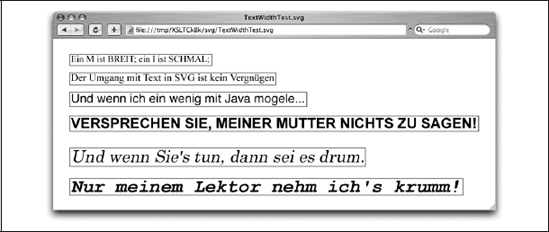
Figure: Creating correctly sized rectangles around text with the SVGFontMetrics extension.
Discussion
The examples under “Solution” work unchanged with both Xalan and Saxon, despite the namespace "xml.apache.org/xslt". This works because they use the processor’s shorthand conventions for encoding the Java class in the namespace.
Constructors are accessed with a function named new( ); the arguments let the XSLT processor determine which overloaded constructor to call. Java class member functions are called by passing an extra first argument corresponding to this. The HexConverter example shows that static members are called without the extra this parameter.
The SVGFontMetrics example does not work with older JDK versions, but similar results are possible with class java.awt.FontMetrics together with class java.awt.Graphics:
package com.ora.xsltckbk.util ;
import java.awt.* ;
import java.awt.geom.* ;
import java.lang.System ;

public class FontMetrics
{
  public FontMetrics(String fontName, int size)
  {
    // Eine beliebige konkrete Komponente reicht aus
    Label component = new Label( ) ;
    m_metrics = component.getFontMetrics(new Font(fontName, Font.PLAIN, size)) ;
    m_graphics = component.getGraphics( ) ;
  }

  public FontMetrics(String fontName, int size, boolean bold, boolean italic)
  {
    // Eine beliebige konkrete Komponente reicht aus
    Label component = new Label( ) ;
    m_metrics = component.getFontMetrics(new Font(fontName, style(bold,italic) , size)) ;
    m_graphics = component.getGraphics( ) ;
  }

  // Einfach, aber bei manchen Schriften ungenau
  public int stringWidth(String str)
  {
    return  m_metrics.stringWidth(str) ;
  }

  // Bessere Genauigkeit bei den meisten Schriften
  public double stringWidthImproved(String str)
  {
    Rectangle2D rect = m_metrics.getStringBounds(str, m_graphics) ;
    return rect.getWidth( ) ;
  }

  static private int style(boolean bold, boolean italic)
  {
    int style = Font.PLAIN ;
    if (bold) { style |= Font.BOLD;}
    if (italic) { style |= Font.ITALIC;}
    return style ;
  }
  private java.awt.FontMetrics m_metrics = null;
  private java.awt.Graphics m_graphics = null ;
}
Even if these examples do not meet your immediate needs, they demonstrate mechanisms for your own Java-based extension functions. Further possibilities, in increasing order of difficulty, include:
Using
Hashtablein Java instead ofxsl:key. This gives greater control over indexed elements and lets the index change at runtime. It also removes the restriction preventingxsl:keydefinitions from referencing variables, and permits a master index spanning multiple documents.Implementing a node-sorting function to overcome the limitations of
xsl:sort, for example when sorting according to foreign-language rules. Doug Tidwell demonstrates this with Saxon in his book XSLT (O'Reilly, 2001).Reading and writing multiple file formats in one stylesheet, such as reading non-XML text formats, CSV or proprietary binary files. XSLT 2.0 provides some support through the element
xsl:result-document(see Exploiting the potential of XSLT 2.0).Processing compressed XML directly from a Zip file with
java.util.zip.ZipFile. Studying your processor’s source code for thedocumentfunction would help here.
See also
Querying XML addressed text layout in generated SVG tree nodes. As part of a solution, you could use SVGFontMetrics.
Developers interested in Java and SVG should take a look at Batik, even though it is not directly related to XSLT extensions.
Copyright © 2006 O'Reilly Verlag GmbH & Co. KG
You may print the online version for your private use.
Otherwise, this chapter from “XSLT Kochbuch” is subject to the same conditions as the bound edition. The work, including all its parts, is protected by copyright. All rights reserved, including reproduction, translation, microfilming, and storage and processing in electronic systems.
O'Reilly Verlag GmbH & Co. KG, Balthasarstraße 81, 50670 Köln, kommentar(at)oreilly.de