

XML technologies / XSLT / XSLT Cookbook / Converting XML into SVG / Creating interactive SVG web pages
(Excerpt from “XSLT Kochbuch” by Sal Mangano)
Problem
You want to embed SVG in HTML and let the user interact with it.
Solution
This solution is based on a modified version of code in Didier Martin’s article Integration by Parts: XSLT, XLink and SVG. The stylesheet embeds an SVG graphic in an HTML page, together with information from an XML document. JavaScript is added to let the user interact with the graphic. This example is a prototype online real-estate application in which users interact with a house floor plan.
The XML input contains information about the house. Each room has an id linking its data to an element g in the SVG diagram with the same identifier:
<?xml version="1.0" encoding="UTF-8"?>
<?xml-stylesheet type="text/xsl" href="HouseLayout.xsl"?>
<House>
  <Location>
    <Address>1234 Main St. </Address>
    <City>Pleasantville </City>
    <State>NJ</State>
  </Location>
  <Layout figure="HouseLayout.svg">
    <Room id="bedroom1">
      <Name>Bedroom</Name>
      <Length>10</Length>
      <Width>10</Width>
      <Windows>2</Windows>
      <Misc>View of junk yard</Misc>
    </Room>
    <Room id="bedroom2">
      <Name>Bedroom</Name>
      <Length>10</Length>
      <Width>10</Width>
      <Windows>1</Windows>
      <Misc>Elvis slept here</Misc>
    </Room>
    <Room id="masterBedroom">
      <Name>Master Bedroom</Name>
      <Length>18</Length>
      <Width>10</Width>
      <Windows>3</Windows>
      <Misc>Walk-in Closet</Misc>
    </Room>
    <Room id="masterBath">
      <Name>Master Bath</Name>
      <Length>5</Length>
      <Width>5</Width>
      <Windows>1</Windows>
      <Misc>Full Bath w/ bidet</Misc>
    </Room>
    <Room id="kitchen">
      <Name>Kitchen</Name>
      <Length>20</Length>
      <Width>18</Width>
      <Windows>2</Windows>
      <Misc>New Cabinets</Misc>
    </Room>
    <Room id="livingRoom">
      <Name>Living Room</Name>
      <Length>18</Length>
      <Width>18</Width>
      <Windows>2</Windows>
      <Misc>View of Rose Garden</Misc>
    </Room>
    <Room id="bath1">
      <Name>Bathroom</Name>
      <Length>6</Length>
      <Width>5</Width>
      <Windows>1</Windows>
      <Misc>Heart-Shaped Tub</Misc>
    </Room>
  </Layout>
</House>
The stylesheet embeds the SVG file, converts the XML data into a table, and adds ready-made JavaScript to make the page interactive (see the figure below).
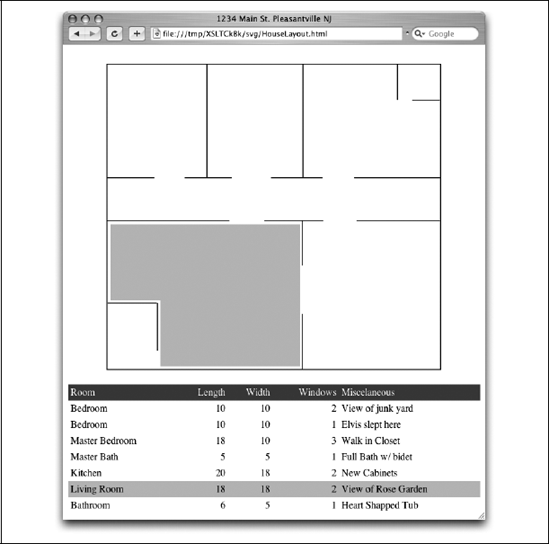
Figure: Interactive SVG generated from XML.
<xsl:stylesheet xmlns:xsl="http://www.w3.org/1999/XSL/Transform" xmlns:xlink="http://www.w3.org/1999/xlink" version="1.0">
  <xsl:output method="html" version="4"/>
  <xsl:template match="/">
    <html>
      <head>
        <title><xsl:value-of select="concat(*/*/Address,*/*/City,*/*/State)"/></title>
        <script><![CDATA[

        var item_selected = null;

        // Wenn der Mauszeiger das Ereignis "mouse over" auslöst, wird diese Funktion aufgerufen.
        // Wir benutzen sowohl SVG-DOM als auch XML-DOM, um auf die Baumknoten des Dokuments zuzugreifen.
        // Insbesondere ändert diese Funktion Elemente, die mit dem id-Attribut angegeben werden.
        // Beachten Sie, dass es zum Ändern eines Stilattributs mit SVG-DOM nicht nötig ist, vorab den Wert des Stilattributs zu kennen.
        // Anders bei XML DOM: Hier müssen Sie den ganzen Inhalt des Stilattributs kennen.
       function on_mouse_over (ID)
       {
            if (ID == item_selected)
                 return true;

            var obj_name = ID ;

            // Ändern des Stils des SVG-Elements
            // ---------------------------------
            // 1 - Hole das SVG-DOM-Dokumentelement aus dem Adobe-SVG-Viewer,
            // 2 - hole dann das Element in dem SVG-Dokument, auf das der id-Bezeichner verweist,
            // 3 - und hole schließlich das Stilattribut aus dem SVG-DOM-Elementknoten.
            // Die Funktion getStyle gehört zum SVG-DOM und gibt ein Stilobjekt zurück.
            // Wir ändern das Stilattribut 'fill' auf das zurückgegebene Stilobjekt.
            // Beachten Sie, dass wir anders als bei XML-DOM den Wert des Stilattributs nicht vorab kennen müssen, um ein CSS-Attribut zu ändern.
            var svgdoc = document.figure.getSVGDocument( );
            var svgobj = svgdoc.getElementById(obj_name);
            if (svgobj != null)
            {
                var svgStyle = svgobj.getStyle( );
                svgStyle.setProperty ('fill', 'yellow');
             }
            // Folgendes sollten wir machen, wenn der Zielbrowser XML DOM vollständig unterstützen würde:
            // --------------------------------------------------
            // Hole das Element in diesem HTML-Dokument (im body nachsehen), auf das der id-Bezeichner verweist.
            // Ändere das Stilattribut des Elements mit XML DOM.
            // Beachten Sie, dass im Gegensatz zur SVG DOM-Funktion der ganze Wert des Stilattributs geändert wird und nicht der Wert eines einzigen darin enthaltenen CSS-Attributs.
            // FUNKTIONIERT NICHT...
            var svgdesc = document.getElementById(obj_name);
            if (svgdesc != null)
                  svgdesc.setAttribute("style", "background-color:yellow; cursor:hand");

            // Folgendes machen wir beim IE 5 DHTML DOM:
            // -----------------------------------------
            var DHTMLobj = document.all.item(obj_name)
            if (DHTMLobj != null)
                  DHTMLobj.style.backgroundColor = "yellow";
            return true;
       }

       // Wenn der Mauszeiger das Ereignis "mouse out" auslöst, wird diese Funktion aufgerufen.
       // Wir benutzen sowohl SVG-DOM als auch XML DOM, um auf die Baumknoten des Dokuments zuzugreifen.
       // Insbesondere ändert diese Funktion Elemente, die mit dem id-Attribut angegeben werden.
       // Beachten Sie, dass es zum Ändern eines Stilattributs mit SVG-DOM nicht nötig ist, vorab den Wert des Stilattributs zu kennen.
       // Anders bei XML DOM: Hier müssen Sie den ganzen Inhalt des Stilattributs kennen.
       function on_mouse_out (ID)
       {
           if (ID =  = item_selected)
                 return true;

           var obj_name = ID ;

           // Den Stil des SVG-Elements ändern
           // ---------------------------------
           // 1 - Hole das SVGDOM-Dokumentelement aus dem Adobe-SVG-Viewer,
           // 2 - hole dann das Element in dem SVG-Dokument, auf das der id-Bezeichner verweist,
           // 3 - und hole schließlich das Stilattribut aus dem SVG-DOM-Elementknoten.
           // Die Funktion getStyle gehört zum SVG-DOM und gibt ein Stilobjekt zurück.
           // Wir ändern das Stilattribut 'fill' auf das zurückgegebene Stilobjekt.
           // Beachten Sie, dass wir anders als bei XML DOM den Wert des Stilattributs nicht vorab kennen müssen, um ein CSS-Attribut zu ändern.
           var svgdoc = document.figure.getSVGDocument( );
           var svgobj = svgdoc.getElementById(obj_name);
           if (svgobj != null)
           {
                var svgStyle = svgobj.getStyle( );
                svgStyle.setProperty ('fill', 'white');
                svgStyle.setProperty ('stroke', 'white');
           }

           // Folgendes sollten wir machen, wenn der Zielbrowser XML DOM vollständig unterstützen würde:
           // --------------------------------------------------
           // Hole das Element in diesem HTML-Dokument (im body nachsehen), auf das der id-Bezeichner verweist.
           // Ändere das Stilattribut des Elements mit XML DOM.
           // Beachten Sie, dass im Gegensatz zur SVG DOM-Funktion der ganze Wert des Stilattributs geändert wird und nicht der Wert eines einzigen darin enthaltenen CSS-Attributs.
           // FUNKTIONIERT NICHT...
           var svgdesc = document.getElementById(obj_name);
           if (svgdesc != null)
                 svgdesc.setAttribute("style", "background-color:white;");

           // Folgendes machen wir beim IE 5 DHTML DOM:
           // ----------------------------------------
           var DHTMLobj = document.all.item(obj_name)
           if (DHTMLobj != null)
                 DHTMLobj.style.backgroundColor = "white";

           return true;
      }

      function on_mouse_click(ID)
      {
           var obj_name = ID ;

           // setze die Farbe des zuvor gewählten Raums zurück
           if (item_selected)
           {
                var svgdoc = document.figure.getSVGDocument( );
                var svgobj = svgdoc.getElementById(obj_name);
                if (svgobj != null)
                {
                      var svgStyle = svgobj.getStyle( );
                      svgStyle.setProperty ('fill', 'white');
                }
                var DHTMLobj = document.all.item(obj_name)
                if (DHTMLobj != null)
                {
                      DHTMLobj.style.backgroundColor = "white";
                      DHTMLobj.style.fontWeight  = "normal";
                }
           }
           // wähle nun den neuen Raum
           if (item_selected != ID)
           {
               var svgdoc = document.figure.getSVGDocument( );
               var svgobj = svgdoc.getElementById(obj_name);
               if (svgobj != null)
               {
                      var svgStyle = svgobj.getStyle( );
                      svgStyle.setProperty ('fill', '#C0C0C0');
               }
               var DHTMLobj = document.all.item(obj_name)
               if (DHTMLobj != null)
               {
                     DHTMLobj.style.backgroundColor = "#C0C0C0";
                     DHTMLobj.style.fontWeight  = "bolder";
               }
               item_selected = ID;
           }
           else
               item_selected = null;


           return true;
      }
     ]]></script>
      </head>
      <body>
       <xsl:apply-templates/>
      </body>
    </html>
  </xsl:template>
  <xsl:template match="Layout">
    <div align="center">
      <embed name="figure" width="540" height="540" type="image/svg" pluginspage="http://www.adobe.com/svg/viewer/install/">
        <xsl:attribute name="src"><xsl:value-of select="@figure"/></xsl:attribute>
      </embed>
    </div>
    <table border="0" cellpadding="1" cellspacing="0" width="100%" bgcolor="black">
      <tr>
        <table border="0" cellpadding="5" cellspacing="0" width="100%" bgcolor="white">
          <tr style="background-color:#990033; color:white;">
            <td>Room</td>
            <td align="right">Length</td>
            <td align="right">Width</td>
            <td align="right">Windows</td>
            <td>Miscelaneous</td>
          </tr>
          <xsl:apply-templates/>
        </table>
      </tr>
    </table>
  </xsl:template>
  <xsl:template match="Room">
    <tr id="{@id}" style="'background-color:white;'" onmouseover="on_mouse_over('{@id}')" onmouseout="on_mouse_out('{@id}')" onclick="on_mouse_click('{@id}')">
      <td><xsl:value-of select="Name"/></td>
      <td align="right"><xsl:value-of select="Length"/></td>
      <td align="right"><xsl:value-of select="Width"/></td>
      <td align="right"><xsl:value-of select="Windows"/></td>
      <td><xsl:value-of select="Misc"/></td>
    </tr>
  </xsl:template>
  <xsl:template match="text( )"/>
</xsl:stylesheet>
Discussion
Earlier examples focused on generating SVG from XML; this one integrates SVG into a larger application using other web technologies. This recipe can only hint at the potential of such applications. SVG offers animation and dynamic content that, combined with XSLT transformations, can produce impressive results. Consider the following stylesheet, based on the chart-drawing primitives from recipe Creating reusable SVG chart utilities, but allowing the user to interact with the chart:
<?xml version="1.0" encoding="UTF-8"?>
<xsl:stylesheet version="1.0" xmlns:svg="http://www.w3.org/2000/svg" xmlns:xsl="http://www.w3.org/1999/XSL/Transform" xmlns:svgu="http://www.ora.com/XSLTCookbook/ns/svg-utils" xmlns:test="http://www.ora.com/XSLTCookbook/ns/test" exclude-result-prefixes="svgu test">
  <xsl:import href="svg-utils.xslt"/>
  <xsl:output method="html"/>
  <test:data>1.0</test:data>
  <test:data>2.0</test:data>
  <test:data>3.0</test:data>
  <test:data>4.0</test:data>
  <test:data>5.0</test:data>
  <test:data>13.0</test:data>
  <test:data>2.7</test:data>
  <test:data>13.9</test:data>
  <test:data>22.0</test:data>
  <test:data>8.5</test:data>
  <xsl:template match="/">
    <html>
      <head>
        <title>Interactive Bar Chart</title>
        <object id="AdobeSVG" classid="clsid:78156a80-c6a1-4bbf-8e6a-3cd390eeb4e2"/>
        <xsl:processing-instruction name="import">
          <xsl:text>namespace="svg" implementation="#AdobeSVG"</xsl:text>
        </xsl:processing-instruction>
        <script><![CDATA[

        function on_change (ID,VALUE)
        {
            // Hole SVG-Dokument
            var svgDocument = document.all.item('figure').getSVGDocument( );

            // Der bars-id wird der Kontextwert + _bar_ + ID vorangesetzt
            var barName = "interact_bar_" + ID ;

            var barObj = svgDocument.getElementById(barName);
            if (barObj != null)
            {
               barObj.setAttribute('y2', VALUE);
            }

            return true;
        }

    ]]></script>
      </head>
      <body>
        <div align="center">
          <svg:svg width="400" height="400" id="figure">
            <xsl:call-template name="svgu:bars">
              <xsl:with-param name="data" select="document('')/*/test:data"/>
              <xsl:with-param name="width" select=" '300' "/>
              <xsl:with-param name="height" select=" '350' "/>
              <xsl:with-param name="offsetX" select=" '50' "/>
              <xsl:with-param name="offsetY" select=" '25' "/>
              <xsl:with-param name="boundingBox" select="1"/>
              <xsl:with-param name="max" select="25"/>
              <xsl:with-param name="context" select=" 'interact' "/>
            </xsl:call-template>
          </svg:svg>
        </div>
        <table border="1" cellspacing="1" cellpadding="1">
          <tbody>
            <xsl:for-each select="document('')/*/test:data">
              <xsl:variable name="pos" select="position( )"/>
              <xsl:variable name="last" select="last( )"/>
              <tr>
                <td>Bar <xsl:value-of select="$pos"/></td>
                <td>
                  <input type="text">
                    <xsl:attribute name="value">
                      <xsl:value-of select="."/>
                    </xsl:attribute>
                    <xsl:attribute name="onchange">
                      <xsl:text>on_change(</xsl:text>
                      <!-- Vertikal ausgerichtete Balken werden gedreht, d.h., die IDs müssen umgekehrt werden. Siehe die Implementierung von svgu:bars als Erklärung. -->
                      <xsl:value-of select="$last - $pos + 1"/>
                      <xsl:text>, this.value)</xsl:text>
                    </xsl:attribute>
                  </input>
                </td>
              </tr>
            </xsl:for-each>
          </tbody>
        </table>
      </body>
    </html>
  </xsl:template>
</xsl:stylesheet>
The resulting web page lets you change the data while the bar heights adjust immediately. This stylesheet also demonstrates a technique for using inline SVG content in HTML. Unfortunately, this works only with IE 5.5 or later and requires the Adobe SVG plug-in. (That is still what much of the modern world uses. The current Firefox version, 1.5, already includes SVG support.)
See also
Didier Martin’s article Integration by Parts: XSLT, XLink and SVG (linked above) includes an even more compelling example involving interaction with a CAD drawing of a complex part.
J. David Eisenberg’s book SVG Essentials (O’Reilly, 2002) provides detailed information on SVG animation and scripting.
Developers familiar with Java who are serious about SVG should look at Apache Batik.
Back to top
Copyright © 2006 O'Reilly Verlag GmbH & Co. KG
You may print the online version for your private use.
Otherwise, this chapter from “XSLT Kochbuch” is subject to the same conditions as the bound edition. The work, including all its parts, is protected by copyright. All rights reserved, including reproduction, translation, microfilming, and storage and processing in electronic systems.
O'Reilly Verlag GmbH & Co. KG, Balthasarstraße 81, 50670 Köln, kommentar(at)oreilly.de