

XML technologies / ePUB / ePub für (In)Designer / Text / Paragraph and character styles / Nested styles, GREP styles and character styles
(Excerpt from “ePub für (In)Designer — Mit InDesign Schritt für Schritt zum E-Book” by Sascha Heck & Yves Apel)
In InDesign CS5 and CS5.5, other useful text-formatting options exist. Nested styles have existed longer and adapt dynamically, enabling rules such as “make text bold up to a colon, then use the paragraph style”.
GREP means regular-expression searches in InDesign, programming intelligent Find/Change routines. For example, a particular word can become green automatically whenever typed into a paragraph.
New CS5/CS5.5 line styles can format, for example, each paragraph’s first line differently.
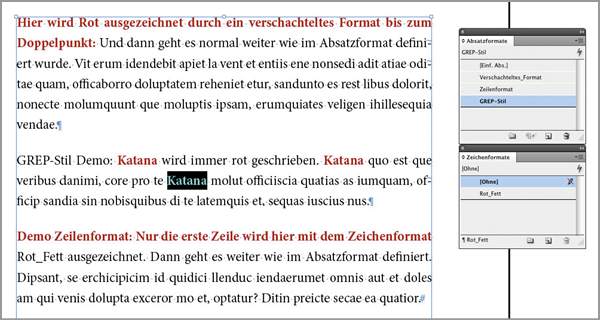
Figure: Three options—nested, GREP and line styles.
CS5.5/CS5: CS5 and CS5.5 differ here. Line styles are unsuitable for ePub because line length depends on device and settings; readers would need InDesign’s intelligence to format lines dynamically. CS5.5 exports nested and GREP styles correctly without intervention; CS5 ignores them. InDesign applies character styles internally but the panel does not show them. In the screenshot Katana is styled while the panel says [None]. The panel’s lower-left area nevertheless shows that InDesign knows the correct style is assigned internally.
For ePub export in CS5, find all nested or GREP-style text and manually reassign the character style explicitly, including drop caps. Find/Change speeds this up, since its Find/Change dialog recognizes indirectly assigned styles too. In the lower half under Find Format select a character style and replace it with itself.
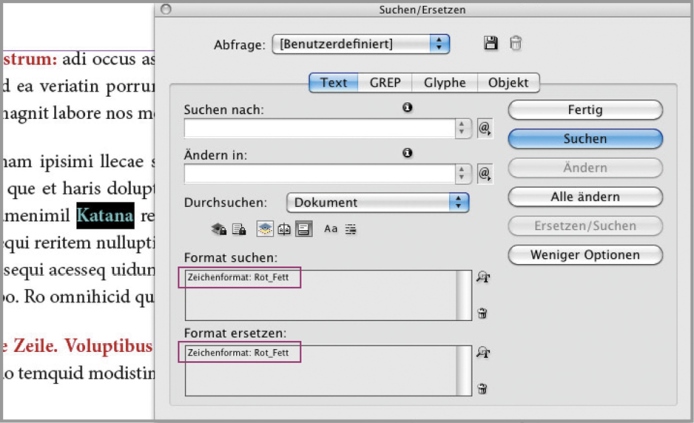
Figure: Explicit character-style assignment through Find/Change.
In-Tools also provides the free script “Apply Nested Styles” for this purpose.
Copyright © dpunkt.verlag GmbH 2012
You may print the online version for your private use.
Otherwise, this chapter from “ePub für (In)Designer” is subject to the same terms as the printed edition: the work and all its parts are protected by copyright. All rights reserved, including reproduction, translation, microfilming, and storage and processing in electronic systems.
dpunkt.verlag GmbH, Wieblinger Weg 17, 69123 Heidelberg, fon 06221-14830, fax 06221-148399, hallo(at)dpunkt.de
back to top