

XML technologies / CSS / Advanced websites with CSS / Fixed-width layouts / Zoom layouts / Creating the stylesheet
(Excerpt from “CSS − Advanced websites with Cascading Stylesheets” by Rachel Andrew & Dan Shafer)
While developing the alternative stylesheet, link it to the document so you can see changes directly. Save your existing stylesheet as zoom.css and link it to the document. Then comment out the current stylesheet to disable it, as shown below:
<head>
  <title>Footbag Freaks</title>
  <meta http-equiv="Content-Type" content="text/html; charset=iso-8859-1" />
  <!-- <link rel="stylesheet" type="text/css" href="fixedwidth.css" /> -->
  <link rel="stylesheet" type="text/css" href="zoom.css" />
</head>
Our zoom layout should not specify fixed widths for elements. Enlarging text in such elements can produce either of two outcomes: the text may become too large for a column (imagine a long word becoming wider than the column), or a column that expands with the text may become wider than the browser window, producing a horizontal scrollbar.
First edit the CSS rule for the element body. Remove the property min-width along with the background image and color. Also enlarge the base font by setting it to large:
body {
  margin: 0;
  padding: 0;
  background-color: #333;
  color: white;
  font: large Arial, Helvetica, Verdana, sans-serif;
}
Delete everything except the property padding from the rule for the element #wrapper.
Then edit the element #header, which now contains only the heading and image and becomes a white banner at the top of the page. To do so, add a CSS rule for the element #header to the stylesheet:
#header {
  background-color: white;
}
To let the element div named #content span the full page width and to change the pale background, delete the rule for #content. We can also delete #main and #content-wrapper, since these were used only for positioning.
To display the sidebar text above the page’s main content, delete the existing declarations from the rule for #extras and format this element so its content appears within a white border.
#extras {
  border: 2px solid white;
  padding: 0.2em;
}
The remaining changes concern the document’s colors and removing some previously used background images, margins and padding. The file zoom.css now contains the following rules:
body {
  margin: 0;
  padding: 0;
  background-color: #333;
  color: white;
  font:large Arial, Helvetica, Verdana, sans-serif;
}
#wrapper {
  padding: 10px;
}
#header {
  background-color: white;
}
#tagline {
  font-weight: bold;
  color: #050845;
  font-style: italic;
  margin: 0 0 0.5em 0;
  padding: 0 0 0 20px;
}
#extras {
  border: 2px solid white;
  padding: 0.2em;
}
#content .inner {
  margin: 30px;
}
#worldcuplogo {
  float: right;
  margin: 0 0 20px 40px;
  width: 111px;
}
#content h1 {
  font-size: 120%;
  color: #ccc;
}
#content h2 {
  font-size: 260%;
  font-weight: normal;
}
#content p {
  line-height: 1.6em;
  font-family: Georgia, Times, "Times New Roman", serif;
}
#dateline {
  font-size: 160%;
  font-weight: normal;
  font-family: Georgia, Times, "Times New Roman", serif;
}
.intro {
  font-weight: bold;
}
table.schedule {
  clear: right;
  width: 100%;
  line-height: 1.4em;
  border-collapse: collapse;
  border: 4px solid #ccc;
  color: white;
  background: #333;
}
table.schedule caption {
  margin: 0;
  padding: 0;
  color: white;
  line-height: 2em;
  text-align: left;
  font-weight: bold;
}
table.schedule thead tr {
  color: white;
  background: #333;
}
table.schedule thead tr th {
  padding: 0.4em 0.6em 0.4em 0.6em;
  border: 4px solid #ccc;
}
table.schedule tbody tr {
  border: 4px solid #ccc;
}
table.schedule tbody th {
  padding: 0.6em;
  border: 4px solid #ccc;
}
table.schedule tbody td {
 background: #333;
  padding-left: 0.6em;
  border-bottom: 4px solid #ccc;
}
table.schedule tbody tr.odd {
  background: #999;
}
table.schedule tbody tr.odd td {
  background: #666666;
  color: white;
}
table.schedule a:link {
  font-weight: bold;
  color: #fc0;
  text-decoration: underline;
}
table.schedule a:visited {
  font-weight: bold;
  color: #fc0;
}
table.schedule a:hover {
  font-weight: bold;
  color: #fc0;
  text-decoration: none;
}
Viewing the layout styled with zoom.css in the browser should now produce the result in the following figure.
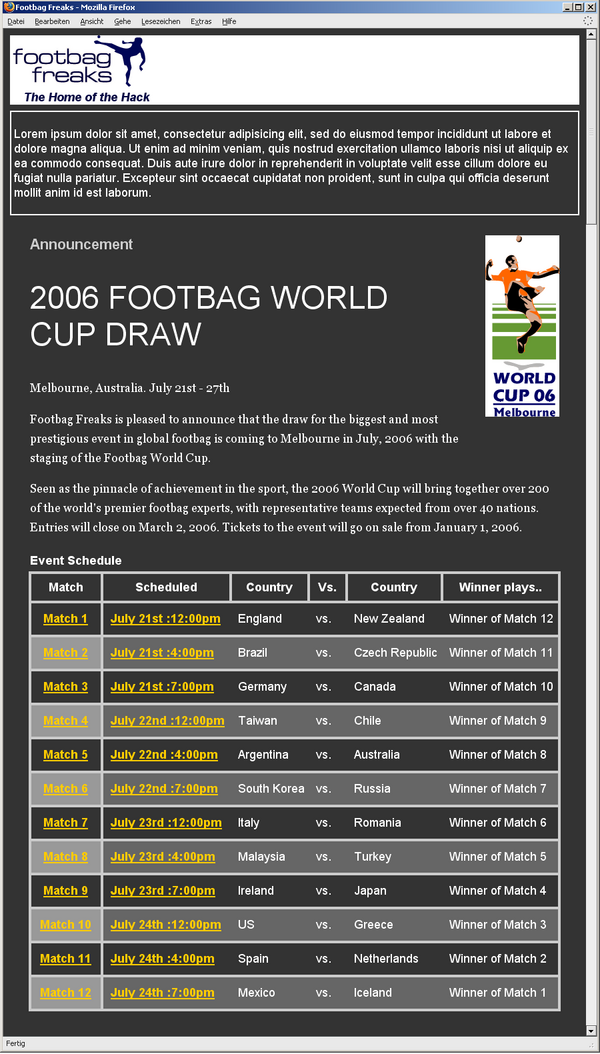
Figure: The completed zoom layout.
Copyright © 2006 of the German translation, dpunkt.verlag GmbH
You may print the online version for your private use.
Otherwise, this chapter from “CSS − Anspruchsvolle Websites mit Cascading Stylesheets” is subject to the same conditions as the bound edition: the work, including all its parts, is protected by copyright. All rights reserved, including reproduction, translation, microfilming, and storage and processing in electronic systems.
dpunkt.verlag GmbH, Ringstraße 19, 69115 Heidelberg
back to top