

XML technologies / CSS / Advanced websites with CSS / Fixed-width layouts / Zoom layouts / Including alternative stylesheets
(Excerpt from “CSS − Advanced websites with Cascading Stylesheets” by Rachel Andrew & Dan Shafer)
Many modern browsers, including Firefox and Opera, let users choose between a document’s stylesheets if they are included correctly. To offer multiple stylesheets, uncomment the main stylesheet if you commented it out in the preceding example. Then add this link’s attribute title="default layout". The link to the stylesheet zoom.css receives the attribute title="zoom layout".
<head>
  <title>Footbag Freaks</title>
  <meta http-equiv="Content-Type" content="text/html; charset=iso-8859-1" />
  <link rel="stylesheet" type="text/css" href="fixedwidth.css" title="default layout" />
  <link rel="alternate stylesheet" type="text/css" href="zoom.css" title="zoom layout" />
</head>
In Firefox, which supports alternative stylesheets, choose between the two files by clicking the menu item View > Page Style and selecting a stylesheet. The options shown correspond to the values in the attribute title, as the figure shows.
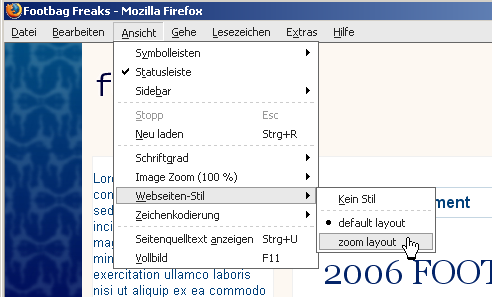
Figure: Selecting different stylesheets in Firefox.
What about visitors whose browsers do not offer this choice? Provide your own “style switcher” to offer them multiple stylesheets too. Building these switchers is beyond this book’s scope, but many implementations are possible, using JavaScript or a server-side language such as PHP or ASP. A common JavaScript stylesheet switcher is explained in the article “Alternative Style: Working With Alternate Style Sheets” by Paus Sowden on A List Apart.
Copyright © 2006 of the German translation, dpunkt.verlag GmbH
You may print the online version for your private use.
Otherwise, this chapter from “CSS − Anspruchsvolle Websites mit Cascading Stylesheets” is subject to the same conditions as the bound edition: the work, including all its parts, is protected by copyright. All rights reserved, including reproduction, translation, microfilming, and storage and processing in electronic systems.
dpunkt.verlag GmbH, Ringstraße 19, 69115 Heidelberg
back to top