

XML technologies / WordML / A truly open format?
(Montero Pineda, Manuel, Herkert, Steffen, Klevenz, Tobias, Kutscherauer, Nico: Praxistipps Word: Ein Format in aller Offenheit?, in: technische kommunikation, Heft 1, 2009).
Modern word processors increasingly approach desktop-publishing functionality. Images, tables, typography, columns and text boxes, once outside word processing, are now standard office features. Growing application complexity produces increasingly complex file formats, leading more vendors to adopt XML interfaces and XML-based formats.
Microsoft Word clearly leads the word-processing market. DOC was considered the standard for years. Since Word 2003, documents can also be saved in WordprocessingML, or “WordML”. WordML is an XML application like XHTML, Docbook or DITA. It is openly documented and can be converted to other XML formats using XSLT transformations. WordML was only an optional save format in Office 2003, with DOC the default. Word 2007 instead uses DOCX, a ZIP-compressed collection of XML data based on the open Office Open XML (OOXML) standard. OOXML was declared an ISO standard in March 2008. Publication has so far been delayed by appeals, which have now been rejected.
OOXML languages
Office Open XML includes more than Word’s markup language: it also incorporates the other Office formats at this level. Its main components are:
WordProcessingML, a slightly revised version of the XML application developed for Word 2003, covering Word’s text-processing and formatting functions.
SpreadsheetML, for embedding Excel tables.
PresentationML, covering Powerpoint’s functions.
Excel and Powerpoint extensions gain the obligatory “x”, presumably indicating XML: XLSX and PPTX.
Word also displays mathematical equations and vector drawings. For equations, the W3C-recommended Mathematical Markup Language, “MathML”, had become the standard. OOXML instead uses Microsoft’s own Office MathML (OMML). Their similarity permits partial MathML/OMML compatibility through XSL transformations. For vector graphics, OOXML uses DrawingML instead of the established W3C-standardized SVG.
OOXML structure using Word as an example
DOCX is a ZIP-compressed container. Decompressing it reveals a predefined folder structure storing all Word document information as XML and non-XML files. This structure is specified by the Open Packaging Conventions (OPC), part of OOXML standardization.
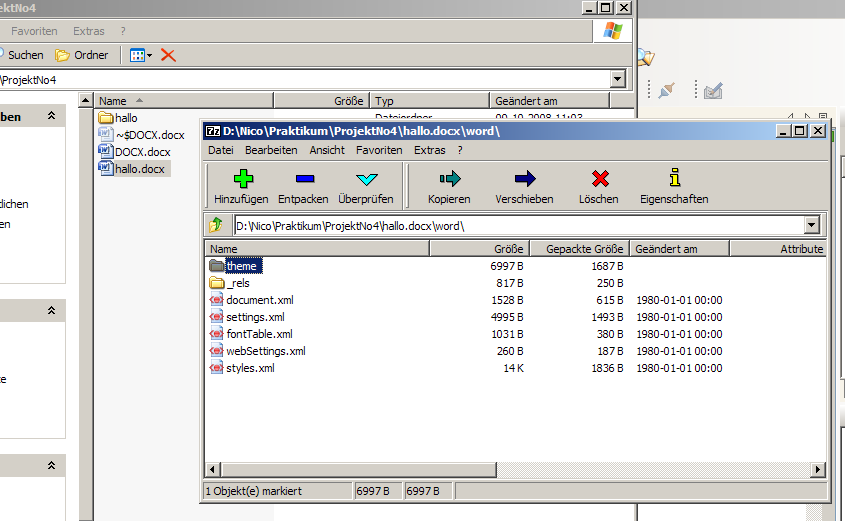
Fig.: unpacking reveals a DOCX document’s contents.
XML files in the ZIP container are divided into parts and items. Parts hold document content, while items supply metadata. Items are further divided into content-type and relationship items. Relationship items determine how parts form a document; content-type items control content presentation, such as formatting or page size. Each document has a main part, normally the file document.xml in “word”. It contains all running text. Other files in “word” store:
Automatically or explicitly generated bullets and numbering. Only their symbols, not list contents, are stored externally, for example in “numbering.xml”.
Static footer and header content goes in “footer[N].xml” and “header[N].xml”. “N” is an integer indicating the object’s document position. Headers and footers may differ between pages, so several such parts may exist.
Footnotes and endnotes inserted through their dedicated functions are collected in “footnotes.xml” and “endnotes.xml”.
Separate subfolders are created for graphics embedded in charts, SmartArt diagrams and the table of contents:
“charts/chartN.xml” holds chart data. Excel tables are embedded in “embeddings”.
“diagramms” holds SmartArt content in “data[N].xml” and the required content-type metadata in “colors[N].xml”, “layout[N ].xml” and “quickStyle[N].xml”.
The table of contents is stored as a separate subdocument in “glossary”.
Content-type items include fontTable.xml, settings.xml, styles.xml and webSettings. xml, present in every OOXML document.
settings.xml stores general document properties, fontTable.xml the font list, and styles.xml formatting instructions. webSettings.xml holds special web-display instructions. The top-level [Content_Types].xml describes the entire ZIP archive.
The docProps folder contains app. xml and core.xml for contextual document properties. app.xml holds application information such as author, page, word and character counts, and application version. core.xml records creation and last-save dates.
ODF: the competitor
Before OOXML’s ISO nomination, an office-document standard already existed: OASIS Open Document Format for Office Applications, “OpenDocument” or “ODF”, became an ISO standard in 2006. Unlike OOXML, tailored to Microsoft Word, ODF is based on the file format of the free application OpenOffice. This head start brings support not only from open-source advocates but also companies such as IBM, Oracle, Sun Microsystems and Google, as well as public authorities.
Criticism of OOXML
Main criticisms are the roughly 6,000-page specification and incompatibility with established standards such as MathML and SVG. Its size prevents competing products from fully supporting OOXML. Even MS Office is expected to support the standard fully only in its next version; Office 2007 merely uses it as a basis.
Office MathML instead of MathML and DrawingML instead of SVG also hinder support by other applications. Full conversion to standards such as ODF or MathML requires new converters, contradicting the idea of universal standardization built on existing standards. Moreover, the new WordML version does not solve its structural problems.
OOXML must also compete internally. Every software change brings a lengthy migration process to support older versions. Old Office versions need extensions to read DOCX, creating compatibility problems and requiring a new converter. DOCX must therefore first establish itself against the widespread DOC format.
Compared with Microsoft’s past policy, this is a breakthrough. Yet the company still cannot, or will not, shake off the impression of monopolization.
Copyright © 2009 tcwolrd GmbH
You may print the online version for private use.
Otherwise, this article from "technische kommunikation" (issue 1, 2009) is subject to the same terms as the printed edition: the work and all its parts are protected by copyright. All rights reserved, including reproduction, translation, microfilming, and storage and processing in electronic systems.
tcworld GmbH, Rotebühlstraße 64, 70178 Stuttgart, info@tekom.de, www.tekom.de