

XML technologies / PresentationML / Introduction to PresentationML / The PPTX container
1.1 The PPTX container
As noted, PPTX is a file compressed as a ZIP container. Decompressing a PPTX file with ZIP-capable software yields a predefined folder structure containing all information for the PowerPoint document as a collection of XML and non-XML files. The ZIP container structure is standardized in OOXML as the Open Packaging Conventions (OPC).
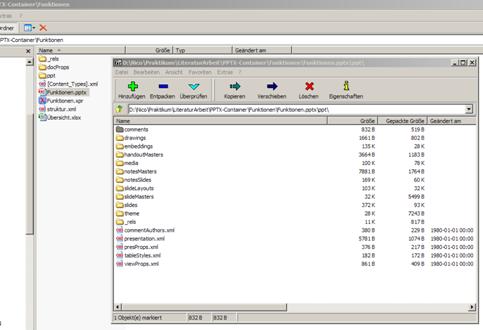
Fig. 1: the PPTX container after decompression
Each file in the ZIP container is a part. Its name combines its internal path and filename. Each part has a predefined content type describing its content structure and may have a “Grow Hint” indicating possible space requirements. This permits reserving space to avoid fragmentation of the part.
Every document has a main part, normally presentation.xml in the PPTX ZIP container’s ppt folder. Its name is therefore “ppt/presenation.xml”. This file lists all slides, references the master-slide set and contains further settings. Separate parts in ppt hold, among other things:
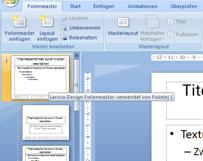
Fig. 2: slide master in PowerPoint
For each slide in the presentation, the ppt/slides directory contains a file named Slide[N].xml12. Here and in the part collections below, [N] is an integer indicating the object’s position in the document.
The first slide’s part name is therefore always “ppt/slides/slide1.xml”. Each slide’s content is stored in its corresponding part.
Each slide master has a slideMaster[N].xml12 file in ppt/slideMasters. This slide-master part does not contain the individual slide layouts defined by that master.
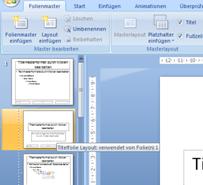
Fig. 3: slide layouts in PowerPoint
Each layout defined in the slide master has a ppt/slideLayouts/slideLayout[N].xml file containing all layout properties of the master slide.
Static header and footer content is stored in notesMasters[N].xml in ppt/notesMasters. Each comment has a part named ppt/comments/comments[N].xml.
Special handout headers and footers inserted through the corresponding function are stored in notesSlides[N].xml in ppt/notesSlides.
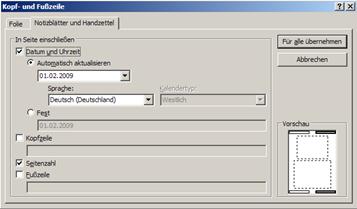
Fig. 4: inserting handout headers and footers
Separate subfolders are created for charts, “SmartArt” diagrams, embedded images and the table of contents:
Chart data is stored in ppt/charts/chart[N].xml12. When referencing an Excel table, the corresponding Excel file is embedded in the embeddings subfolder of ppt.
The slide parts reference embedded images. The images themselves are copies of the original files in ppt/media. Their file type varies, but their names are standardized as “image[N]” 12 with the corresponding extension (e.g. “.jpg”).
Alongside regular parts, relationship parts link parts together. Each belongs to another part, except .rels in the top-level _rels folder, which identifies the main part. All other relationship parts follow the same pattern: the folder holding the associated part contains an _rels subfolder holding its relationship file. The filename is the associated part’s filename plus “.rels”. Thus ppt/presentation.xml has ppt/_rels/presentation.xml.rels, and ppt/slides/slide1.xml has ppt/slides/_rels/slide1.xml.rels. Despite their “.rels” extension, these files are well-formed XML documents.
Relationship parts describe outgoing relationships from their associated part to embedded files and other parts. If content from another part is embedded in that part, its relationship is recorded in the relationship Item. If that part is embedded in a different part, this is not recorded in its own relationship part. Some parts are only embedded elsewhere and embed no parts themselves, so they have no associated relationship part.