

XML technologies / SpreadsheetML / The XLSX format
XLSX is a container format combining multiple files using ZIP compression. An XLSX file is a ZIP archive with the extension .xlsx and an internal directory structure. Decompressing it with a ZIP-capable program produces a defined folder structure containing all information needed to describe the Excel document as a collection of mostly XML files. The container structure, Open Packaging Conventions (OPC), forms part of OOXML standardisation. This chapter is based on that part of the standard.
Fig. 1: the decompressed OPC container
Saving a new Excel file Mappe1.xlsx without changes produces the container directory structure shown in Figure 2.
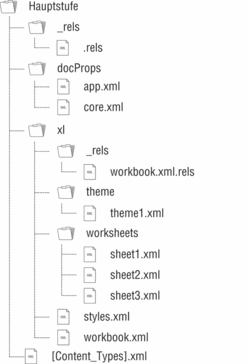
Fig. 2: OPC container contents
Each file is a part with a unique name and a predefined content type describing its structure. Parts contain document content, represent container relationships or store metadata and layout information.
Part name
A part’s full name is its file path within the container. The file sheet1.xml from Mappe1.xlsx therefore has the part name /xl/worksheets/sheet1.xml. This name also serves for addressing a part. Relative addressing is also possible: a reference from the file workbook.xml.rels to sheet1.xml can use ../worksheets/sheet1.xml. The notation .. in a path moves the context one directory upwards, as in XPath or the DOS command line.
The following descriptions sometimes use short names omitting the container path and file extension. The short name of the part /xl/workbook.xml is therefore workbook part.
Content type
The part /[Content_Types].xml lists every part’s content type. Parts may contain different XML languages, container relationships, layout descriptions or binary data. A unique string identifies each content type, matching a media type from the W3C HTTP/1.1 standard.
The following example shows the structure of the part /[Content_Types].xml:
<ct:Types>
  <ct:Default Extension="xml" ContentType="application/xml"/>
  <ct:Default Extension="rels" ContentType="application/vnd.openxmlformats-package.relationships+xml"/>
  <ct:Override PartName="/xl/workbook.xml" ContentType="application/vnd.openxmlformats-officedocument.spreadsheetml.sheet.main+xml"/>
  [...]
</ct:Types>
Content types are determined by file extension or part name. The <ct:Default> element assigns every part with the extension specified in the Extension attribute the content type specified in the ContentType attribute. The <ct:Override> element overrides this for individual parts, whose full name is supplied in the PartName attribute.
Content parts
Every document has a main part, usually in the container folder xl as the file workbook.xml. Its full name is therefore: /xl/workbook.xml. It lists all sheets, including worksheets and chartsheets. Other parts in the directory xl store, among other things, the following:
Each worksheet has, in the directory /xl/worksheets a file sheet[i].xml. The [i] here and in other container collections is an index indicating item order. The first worksheet’s part name is therefore /xl/worksheets/sheet1.xml. Its content is represented using SpreadsheetML. For details of sheet parts, see SpreadsheetML.
A chart creates a part /xl/charts/chart[i].xml. It contains all chart information in DrawingML. DrawingML structure is described under DrawingML.
Chart position and size are stored separately in a frame part called a drawing part. Embedded images and SmartArt graphics also use these frames. Drawing parts are named /xl/drawings/drawing[i].xml.
A drawing part for an image references a copy of the original file stored under /xl/media/. The image filename is standardised as image[i] with the original extension, such as .jpeg. Thus /xl/media/image[i].[Format] can be used as the generic name.
SmartArt uses several XML files under the directory /xl/diagrams/. SmartArt graphics are represented by color[i].xml, data[i].xml, drawing[i].xml, layout[i].xml and quickStyle[i].xml.
Relationship parts
References between OPC parts are always indirect. A part’s relationships are collected in an associated relationship part. Instead of directly referencing target paths, the base part references relationships, which in turn identify all target parts.
Fig. 3: indirect relationship between two parts through a relationship part
Each relationship part belongs to exactly one base part, except the file .rels in the /_rels folder at the container’s top level, which identifies the main part. Except for .rels, relationship parts follow one rule: the base part’s folder has a subfolder named _rels. It contains the relationship document, named like the base part with an extra extension .rels. For the base part /xl/workbook.xml, the relationship part is therefore /xl/_rels/workbook.xml.rels. Despite their extension .rels, they are well-formed XML documents.
They describe outgoing relationships from base to target parts, recorded only in the base’s relationship part, not the target’s. Parts referenced by others but having no outgoing references have no relationship part.
Structure
The namespace for relationship elements has the URI schemas.openxmlformats.org/package/2006/relationships. There are only two elements: root <rp:Relationships> and its <rp:Relationship> children. Each <rp:Relationship> creates a base-to-target relationship. The example shows the relationship part /xl/worksheets/_rels/sheet1.xml.rels:
<rp:Relationships>
     <rp:Relationship Id="rId1" Target="../drawings/drawing1.xml" Type="http://schemas.openxmlformats.org/officeDocument/2006/relationships/drawing"/>
     [...]
</rp:Relationships>
The Id attribute defines the relationship’s ID, used in the base part to reference it. The base thus references the target indirectly through its relationship entry.
The Target attribute specifies the target part. Relative paths start from the base part, not the relationship part. Since the base here is /xl/worksheets/sheet1.xml, the target is /xl/drawings/drawing1.xml.
The Type attribute supplies a URI identifying the relationship type, describing the target’s role within the base. It depends on the target’s content type. Table 1 lists common types.
Target part | Relationship type |
|---|---|
drawing | schemas.openxmlformats.org/officeDocument/2006/relationships/drawing |
chart | schemas.openxmlformats.org/officeDocument/2006/relationships/chart |
image | schemas.openxmlformats.org/officeDocument/2006/relationships/image |
sheet | schemas.openxmlformats.org/officeDocument/2006/relationships/worksheet |
styles | schemas.openxmlformats.org/officeDocument/2006/relationships/styles |
Table 1: relationship types for different target parts
Metadata and layout information
In addition to content and relationship parts, others store metadata or layout information. The part /[Content_Type].xml was described above. There are also the parts /docProps/app.xml and /docProps/core.xml, containing metadata such as the Excel version in the app part, or creation date and author in the part core.
Individual-cell layout information is stored in the part /xl/styles.xml, the theme in /xl/theme/theme[i].xml. Calculated cells have a reference in the part /xl/calcChain.xml.
|